

Apparently a self-destructing SSD wasn't enough protection for RunCore as they have just announced the global availability of their new Xapear solid state drive. The new Xapear features some even more innovative features to protect a user's data than just self-destructing. It provides both remote data deletion and RFID protection.
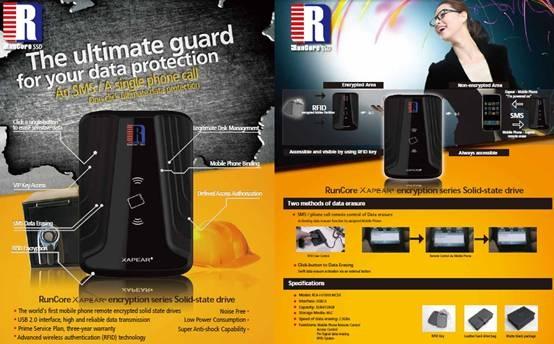
The SSD uses a USB 2.0 interface for data transfer. The drive features two partitions: one freely accessible and one that is only accessible after applying a special RFID key. Xapear comes with two RFID keys that are initialized by the user. After initialization, users have two partitions which can be resized to user preference. One swipe of the RFID key and the hidden partition becomes visible and usable. Another swipe and it is gone.
The drive also features a GSM connection:
GSM communication is provided for by an integrated SIM card. User then can link this SIM card one specified and self-defined mobile phone. Only this pre-defined mobile phone will be able to detect drive access. Furthermore, the mobile phone can remotely send a data deletion command to the drive, telling it to overwrite all data, rendering it impossible to recover previous data.
These new data protection features come at a time when more and more sensitive data is being carried with a user. The number one cause of data compromise is physical loss of a device through theft or carelessness. As such, the hidden drive and the ability to remotely wipe a drive are two unique features which will protect a user from the damages of physical loss.


 Unreal Engine 5.4 brings significant updates to ray tracing and rendering for 60 FPS gaming
 SK hynix plans $14.6 billion on new chip fab in South Korea to meet 'soaring demand' of HBM
 You can pick up AMD's flagship RDNA 3 GPU, the Radeon RX 7900 XTX, for $850
 Tesla unveils new Model 3 Performance: 0-60 mph in 2.9 seconds, 163 mph top speed
 GIGABYTE confirms AMD Ryzen 9000 Series processors are coming soon
 ACEMAGIC AD08 "Core i9 11900H" Mini PC Review
 Lenovo ThinkPad X1 Carbon Gen 12 Review
 ASUS ROG Swift Pro PG248QP Gaming Monitor Review - Frames, frames, and more frames
 FlexiSpot C7B-Mesh Ergonomic Office Chair Review
 Samsung G8 34-inch QD-OLED Gaming Monitor Review - 175Hz for $900
 ASRock NUCBOX-155H Mini PC Review
 NuPhy Air96 V2 Wireless Mechanical Keyboard Review
 TEAM T-FORCE Siren DUO360 RGB Liquid CPU Cooler Review
 AVerMedia Live Streamer ULTRA HD Review
 AVerMedia Live Gamer 4K 2.1 Review
 Everything you need to know about the latest ASUS NUC Mini PCs - NUC 14 Pro and ROG NUC
 How to Overclock Your GPU and Boost Your PC Gaming with ASUS GPU Tweak III
 ASUS's AMD Radeon RX 7000 Series GPU lineup has something for every gamer
 ASUS OLED Premium Care defends the ROG Swift OLED PG32UCDM gaming monitor from burn-in
 Patriot Viper Xtreme 5 Engineering Prototype 48GB Dual-Channel Memory Kit Preview