


Obviously, living on the edge requires using this type of early-build software. Engadget have a bunch of observations that you can have a read through and see if Honeycomb is any good as it stands right now. Obviously it's not a final build so I wouldn't be making any judgements of it just yet.
Here's what Engadget had to say:
Like Android SDK emulators before it, Honeycomb's is extremely slow -- nearly to the point of uselessness in this case. We'll give them a mulligan since this is a preview build, but seriously, we wouldn't recommend installing this unless you enjoy pulling your hair out.
There appears to be some sort of orientation bug that prevents us from going landscape, which is what we really wanted. Sorry about that! We've shot the video sideways and rotated all of our images; if we're able to figure it out or a newer build is released with orientation properly working, we'll update.
The browser looks great -- specifically the UI, which is going to make desktop browser users feel right at home perhaps more than any other tablet browsing experience to date. As with the rest of the emulator, it was too slow to really use -- and it kept crashing on us -- but we're digging the look.
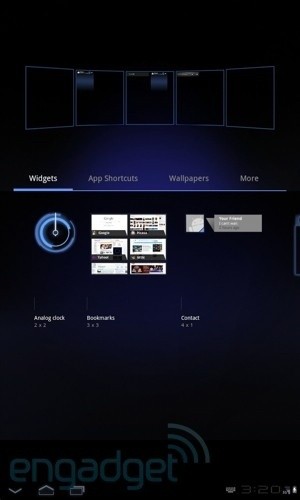
The system for adding and managing widgets is a joy to use -- it makes your entire desktop accessible from a single screen, and we like the amount of detail you can preview for each widget before deciding whether to use it and where to place it.
In general, the window animations and screen transitions seem cool, but none were smooth or fast enough in the emulator to know for sure. Jury's still out until this gets faster or we're using Honeycomb on actual tablets.
We're not in love with the dim, squashed segmented display that Google is using for the time in the lower right; we're hoping there are plenty of alternative fonts available.


 Blizzard praises Microsoft's 'let it be' hands-off approach to management
 Target confirms plans to reduce physical media, but games are unaffected
 Fallout 4 conquers PlayStation Plus charts amid TV show success
 Meet Microsoft's VASA-1: AI can now take a photo and turn it into a 'talking head' video clip
 Microsoft has brought its OneNote app to the Apple Vision Pro, get it now
 FlexiSpot C7B-Mesh Ergonomic Office Chair Review
 Samsung G8 34-inch QD-OLED Gaming Monitor Review - 175Hz for $900
 ASRock NUCBOX-155H Mini PC Review
 NuPhy Air96 V2 Wireless Mechanical Keyboard Review
 TEAM T-FORCE Siren DUO360 RGB Liquid CPU Cooler Review
 AVerMedia Live Streamer ULTRA HD Review
 AVerMedia Live Gamer 4K 2.1 Review
 XPG Invader X Mid-Tower Chassis Review
 Intel Core i9-14900KS CPU Review
 Arbiter Polar 65 Magnetic Gaming Keyboard Review
 Everything you need to know about the latest ASUS NUC Mini PCs - NUC 14 Pro and ROG NUC
 How to Overclock Your GPU and Boost Your PC Gaming with ASUS GPU Tweak III
 ASUS's AMD Radeon RX 7000 Series GPU lineup has something for every gamer
 ASUS OLED Premium Care defends the ROG Swift OLED PG32UCDM gaming monitor from burn-in
 Patriot Viper Xtreme 5 Engineering Prototype 48GB Dual-Channel Memory Kit Preview