Morrowind Tweak Guide - Introduction
Introduction
Morrowind is a game ahead of its time in many respects. The freedom you have to choose your path through the game is mind-boggling. The graphics are astounding in their detail and atmosphere, especially for an RPG. The sheer size of the game world is incredible. The storyline - if you choose to involve yourself in it - is immersive and complex.
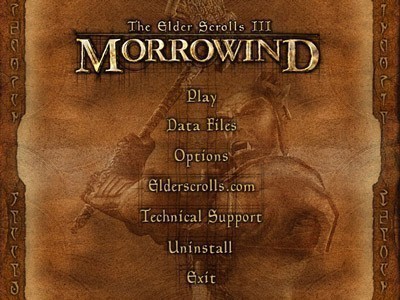
While Morrowind is a blessing for most RPG gamers, sadly there have been many who are unable to make this game run at anything but a chug on their machines...and that's if they're lucky enough to get the game to run with any stability at all. The word now on gamer's lips is that Morrowind is also ahead of its time in terms of system requirements...
That's not entirely true, and I'm here to show otherwise. You may know me as PersianImmortal from various gaming and hardware forums. This is my first guide for TweakTown, and it's been a little while in the making, having gone through a few early iterations on the official Morrowind forums.
This guide has been written to help gamers get more out of Morrowind, smooth out and speed up framerates and loading times, and reduce and (hopefully) eliminate crashes to desktop (CTDs), lockups and error messages.
The guide is broken into three sections.
1. Basic Morrowind Optimisation
2. Advanced Morrowind Tweaks/Troubleshooting
3. Windows-specific Tweaks/Optimisation
Read through and follow all three parts for maximum benefit.

Note: This guide has been updated up to the latest version of Morrowind (Version 1.6.1820) which is the version with the latest Morrowind Bloodmoon Expansion Pack Patch. If you do not have Bloodmoon, the next latest full version of Morrowind is 1.4.1313 with the Tribunal Expansion and Patch, or if you just have Morrowind without any expansions, the latest version is the 1.2.0722 patch.
Morrowind Tweak Guide - BASIC MORROWIND OPTIMISATION
PART 1 - BASIC MORROWIND OPTIMISATION
1. Installation/Uninstallation of Morrowind:
Install Morrowind in the straightforward way described in the manual. I highly recommend choosing to install the TES Construction Kit as well, as this will be needed later to fix an error with the plugins. I would also recommend installing Morrowind in the directory suggested by the program. Usually this is C:\Program Files\Bethesda Softworks\Morrowind.
If you don't have WindowsXP, you will need to install at least DirectX8.1 as well (if not DirectX9.0b). A copy of DirectX8.1 is on the Morrowind CD. I recommend installing DirectX9.0b (more information in my System Optimization Guide). You can download the latest DirectX from Microsoft DirectX Homepage.
If for any reason you wish to uninstall and cleanly reinstall Morrowind - for example for troubleshooting purposes - the best way to do so is:
1. If you want to keep your saved games, copy the contents of the SAVES folder under the \Morrowind directory, as well as the Journal.htm file in the Morrowind directory itself to somewhere safe.
2. Go to Control Panel>Add/Remove, select "Morrowind" from the list and choose "Change/Remove" to uninstall.
3. Go into Windows Explorer, to the directory where you installed Morrowind, and manually delete the entire directory, including the Bethesda Softworks entry.
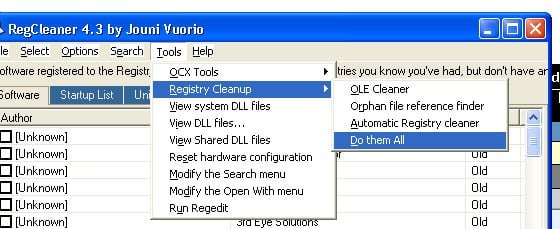
4. Download a program called RegCleaner and install it. Under the Software tab, look for entries by Bethesda Softworks and place ticks next to them, and choose "Remove Selected" at the bottom. Next, still in RegCleaner, go to the Tools menu and choose Registry Cleanup>Do Them All to clean out your registry of redundant entries in general.
5. Once all this is done, reboot your system and you should be ready for a reinstall of Morrowind. Just make sure after you've reinstalled and re-patched, that you copy back the Journal.htm file and the SAVES folder to the same places if you want to recover your saved games.
2. Morrowind Patches
All Morrowind patches are available for download from the Official Morrowind Website
Morrowind V1.6.1820
The latest version of Morrowind is V1.6.1820 which is Morrowind with the Bloodmoon expansion installed and the Bloodmoon Patch. If you've installed Morrowind and then Bloodmoon, then you need to install this patch to fix several bugs in Morrowind, Tribunal and Bloodmoon which are caused by installing the Bloodmoon expansion.
Morrowind V1.4.1313
If you don't have the Bloodmoon expansion, and you've installed the Tribunal Expansion pack, there is a patch available for Morrowind + Tribunal which will bring your version up to V1.4.1313. Download the patch here. Remember the patch is only for Morrowind with the Tribunal Expansion pack installed. If you have Bloodmoon installed you don't need it, and if you don't have any of the expansion packs you can't use it.
Morrowind V1.2.0722
If you don't have either of the official expansion packs installed, to bring your original Morrowind to the latest version, install this patch if you're using the North American, Australian or European Collectors Edition. If you're using the standard European edition, install this patch. If you're using the localised French version of Morrowind, install this patch.
So basically Bloodmoon users need to install only one patch. Tribunal users need to install one patch, and base Morrowind users need to install one patch. Each patch/version contains all the fixes from the previous versions, so you don't need to install earlier patches. Make sure that you get the correct version based on whether you have the US or the European edition of Morrowind. For Australian copies get the US patch. Run the patch file, and it should automatically update your Morrowind. The patch fixes a number of bugs and adds several useful features so it is a must. If you have problems running the patch successfully, try doing a clean install of Morrowind suggested in 1 above.
2(a). Morrowind Tribunal Expansion Pack
This expansion pack is an add-on to Morrowind, and hence you must have the retail version of Morrowind to install and play Tribunal. Aside from a new storyline and new areas to explore, the expansion pack also provides a nice update to Morrowind, bringing it up to version 1.3.1029. This update contains an improved journal system which now keeps track of each quest, a range of bug fixes for Morrowind and some slight performance improvements as well. These improvements apply to Morrowind in general and not just the new expansion, hence the pack is worth getting just for the updates.
Installation of the pack can be tricky if you're currently using a No-CD patch for Morrowind. See the No-CD Patch section below for general details of No-CD installation, but here are the Tribunal-specific instructions for installation and No-CD patching:
1. If you use a No-CD patch, make sure you delete the No-CD Morrowind.exe file, and replace it with your original Morrowind.exe (which you should have backed up before). This is essential for proper installation of Tribunal.
2. Install Tribunal by running Setup.exe, and ensure that the installation path is your default Morrowind directory. Installation of Tribunal will add the gameplay elements of the expansion, but as mentioned, it will also patch your entire Morrowind install up to the new version 1.3.1029. If you have a fresh install of Morrowind, you needn't install any of the earlier patches first - Tribunal will bring it up to the latest version.
3. Download and install the latest Morrowind Tribunal patch, which brings Morrowind up to version 1.4.1313 (see above for link). Note that the patch is only for those with the Tribunal Expansion Pack installed already.
4. Once Tribunal is installed, you can download the 1.4.1313 No-CD patch from the sites listed in the No-CD Patch section of this guide, or directly from here.
5. Before installing any patch, make sure you make a copy of your original Morrowind.exe, rename it (e.g. Morrowind.REALexe), and keep it as a backup.
6. If the new No-CD patch comes as a modified Morrowind.exe, put the new Morrowind.exe in your \Morrowind directory over the existing one (remember to backup first). If the No-CD patch is an actual "patch", it will need to be copied into your \Morrowind directory and executed to modify your Morrowind.exe. Once done you will no longer need the Morrowind CD in the drive to run the game.
Note that some No-CD patches will not play the startup movies from Morrowind. Also note that the first time you start Morrowind with Tribunal installed, you may get some errors about plugins being out of date. See the Plugins section for how to fix this. One final note: because of the new journal quest tracking system, the first time you load a saved game in Morrowind with Tribunal installed, it will have to parse (sort) all the quests and this can take several minutes to complete. Once done, make sure you re-save your game so you don't have to parse the quests again.
In terms of performance tweaks, setting descriptions, console commands, etc. in the rest of this guide, what applied to Morrowind will apply to Tribunal.
2(b) Morrowind Bloodmoon Expansion Pack
Just like Tribunal, this expansion pack is an add-on to Morrowind which will provide new areas to explore, a new storyline and some new gameplay elements (such as the ability to play as a werewolf). Installation instructions are similar to Tribunal, but you should note some important things:
1. Installing Bloodmoon will bring whatever version of Morrowind you have to version 1.5.1629. You don't need to install any of the older patches, Bloodmoon automatically contains all the previous fixes and updates. This also includes the new Journal sorting/tracking system, even if you haven't installed Tribunal.
2. Once you've installed Bloodmoon, you need to install the 1.6.1820 patch from here to bring Morrowind up to the latest version. This will fix a number of bugs which Bloodmoon introduced into Morrowind, Tribunal, and Bloodmoon quests.
3. You don't need to install Tribunal for Bloodmoon to work. However if you do have Tribunal and wish to install it along with Bloodmoon, make sure you install Tribunal first. Alternatively if you've already installed Bloodmoon, and you then install Tribunal, you will need to reinstall Bloodmoon to bring Morrowind back to the latest version.
4. You will need the correct 1.6.1820 No-CD version to run Bloodmoon without a CD in the drive. Check the No-CD patch section of this guide for download sites and instructions.
3. Morrowind Official Plugins
All the official Morrowind Plugins can be downloaded here at the official site. You can get non-official Plugins from places such as Morrowindfiles. Once you have downloaded them, to install each plugin, follow this procedure:
1. If the plugin comes as an .exe file, simply run the file. That's all you need to do.
2. If the plugin comes as a .zip file, unzip the contents of the plugin to an empty directory.
3. Copy the main plugin file - the .esp file - into the \Morrowind\Data files\ directory, right next to the Morrowind.esm and Morrowind.bsa files.
4. Copy the remaining files into their relevant directories. For example, with the Lefemm armour plugin, copy the contents of the \Meshes\A directory to the \Morrowind\Data Files\Meshes\A directory. If such a directory doesn't exist, then create it first, and then copy the contents to it. Just remember that all the plugin files will have to site beneath the \Morrowind\Data Files\ directories somewhere otherwise Morrowind won't be able to detect them properly.
5. Once all the plugin files have been copied into the appropriate place in the correct Morrowind directory, double click on the Morrowind icon, and in the Morrowind launcher menu, choose Data Files. You should see a list of existing plugins and the Morrowind.esm file with a cross in the box next to it. Go to the new plugin name and double click on it so that it too has a cross next to it.
Now, sometimes when running Morrowind, especially with the new patch, you will get an error as the game is loading saying something along the lines that the plugin date is newer than Morrowind.esm and hence there may be problems. This is not a serious issue at all as all the official plugins work perfectly well with the latest patched version of Morrowind. However, to get rid of the annoying error messages, you will have to do the following:
1. Open the TES Construction Set Editor.
2. Go to the File menu, and choose Data Files.
3. Click a plugin name (only one can be fixed at a time) and click Set As Active File so that a cross appears next to it, and click OK. This will open the data file, and may take some time so be patient.
4. Once the file is open, don't change anything, just go to the File menu and choose Save. Once that's done, this will update the date of the plugin and you won't see the error message again on loadup. Do this for every plugin.
Morrowind Tweak Guide - Morrowind "No CD" Patch
4. Morrowind "No CD" Patch
As of the 1st Official Morrowind Patch, it seems Bethesda have removed the Macrovision Safedisc protection system from Morrowind, hence providing some performance improvement without needing any No CD patches. However they've retained the simple CD check, which checks to make sure you have the Morrowind CD in the drive while playing. Now I'm against piracy and I urge you to buy Morrowind and not play using a pirated copy. (Ed note. TweakTown does not endorse pirated or cracked software - Go out and buy the game.) However the CD check is annoying and I much prefer to put my original Morrowind CD safely away and play without it in the drive.
If you have previously used a No CD patch or hack of any kind for Morrowind, before patching, make sure you have replaced the original Morrowind.exe and/or Morrowind Launcher.exe files in your Morrowind directory, and the cracked versions are removed. If necessary, you may have to reinstall Morrowind (follow procedures in 1 above for uninstalling/reinstall Morrowind) if you don't have the original .exe files anymore. The patch won't work properly on the cracked versions, and even if it does, you may run into problems later on.
If you have a fresh install of Morrowind, or you're sure that all the original Morrowind files are there, and you've installed the latest official Morrowind Patch, then:
1. Go to either the Morrowind, Tribunal or Bloodmoon sections of Megagames, or the GameFix Morrowind section. Note the patch may be in a compressed .ace or .rar file, in which case go to WinAce or WinRAR and download the latest version of these free utilities to extract it.
2. Once extracted, you'll typically find a Morrowind.exe file which has been modified to remove the CD check from Morrowind. Go to the \Morrowind directory and rename the original Morrowind.exe file to something like Morrowind.RealExe, and copy the new "No-CD" Morrowind.exe file into the same directory.
3. Next, copy the VIDEO directory and its entire contents from your Morrowind CD to under your \Morrowind directory. This is necessary otherwise you may get errors on startup.
Once this is done you can now run Morrowind exactly as if you had the CD in the drive, but without the annoyance.
Alternatively, if you can't find a No-CD EXE file for your version of Morrowind from one of the sites above, you can try this general method which should work for all versions:
1. Download this Generic Morrowind No-CD Patcher and extract the contents to an empty directory.
2. Copy your Morrowind.exe from the \Morrowind directory into the same directory where you extracted the No-CD patch. Leave the original Morrowind.exe in the \Morrowind directory, but rename it (e.g. Morrowind.REALExe) and keep it as a backup.
3. Run the Runme.bat file and it will patch the copy of Morrowind.exe you've placed in the same directory. It will now be called mw.exe. Rename it back to Morrowind.exe, and place it in the \Morrowind directory.
4. Make sure you copy the VIDEO directory and its entire contents from your Morrowind CD to under your \Morrowind directory. This is necessary otherwise you may get errors on startup. Alternatively you can use the VIDEO directory which comes with the No-CD patch, and which contains the relevant files to avoid errors (but no movies).
You should now be able to run Morrowind without the CD, and the above method should work for all versions of Morrowind.

If you want to play a game then pay for it, or go without, but there's no excuse for pirating a game as great as Morrowind.
Morrowind Tweak Guide - Optimising Morrowind Settings
5. Optimising Morrowind Settings
- Resolution
The resolution in Morrowind doesn't play a major part in performance. I compared the three resolutions from 1024x768 to 1600x1200 and performance was almost identical in my case. In particular, any resolution from 1024x768 upwards shows almost no difference in framerates, so choose a higher resolution (if your monitor supports it) to achieve a smoother picture - instead of running Anti-aliasing (FSAA) for example, which will show a small performance hit. NVNews recently did a "Benchmark" of Morrowind at different resolutions and came up with the same conclusion.
- Real Time Shadows
Real Time Shadows are only cast by people and creatures. Turn off Real Time Shadows completely (slide to full left) for a noticeable performance improvement. Most of the time they're cast badly and sometimes you can see shadows of people or creatures a level above you through the floor, which can be a bit of a "cheat". In any case, turn them off and you'll still have all the lighting effects such as torchlight on people, light shining on your blade and armour, etc.
- View Distance
The View Distance determines how far you can see. The lower the setting, the more "fog" you walk around in on a sunny day. Keep the View Distance at a reasonable length. However, you will get a noticeable decrease in fps if you set it above 80%, and any lower than around 50% and you're wandering around in fog all the time. I have mine at 80% and I would recommend it as a good balance of realistic viewing and performance.

View Distance 0%

View Distance 50%

View Distance 100%
- Gamma Correction
Keep the Gamma Correction low to avoid that washed out look. Halfway or just a bit below is best. Also, set your monitor's Contrast to 100% and reduce your monitor's brightness (on mine around 70) for crisper pictures without blasting your eyes. The right brightness and contrast really brings out the colours in Morrowind.
For nVidia based graphics card owners who have the newer Nvidia Detonators installed, go to Control Panel>Display>Settings>Advanced>Color Correction and set Digital Vibrance to Low or Medium to dramatically improve in-game and desktop colours. Then tick Automatically Apply These Settings At Startup.
- AI Distance
Set the AI distance lower for better fps, without any impact on image quality. Mine is set at 50%, but you can lower this if you need the extra fps. Try to keep it above 25% for some realism.
- Pixel Shaders (GeForce3 and above, but not GeForce4 MX)
If you have a GeForce3 or above, turn Pixel Shaders on for spectacular water effects. This is done by double clicking the Morrowind icon, and in the initial launcher menu, selecting Options. If the option for Pixel Shading is grayed out then your graphics card doesn't support this feature, as it's a hardware-based feature, there's no "software hack" to enable it.
Morrowind Tweak Guide - ADVANCED MORROWIND TWEAKS/TROUBLESHOOTING
PART 2 - ADVANCED MORROWIND TWEAKS/TROUBLESHOOTING
1. Morrowind.ini Tweaking
Many of Morrowind's "hidden" settings are in the Morrowind.ini file found in the \Morrowind directory. This file can be opened and edited with the simple windows text editing utility Notepad. However, before doing any editing of this file, make a copy and call it something like Morrowind.RealINI.
Here are some Morrowind.ini settings I have experimented with. I would recommend making the changes one at a time, saving, and checking the results in Morrowind. I personally only ended up keeping the altered Cellbuffer and MaxFPS settings and haven't implemented the rest of these changes permanently:
Max FPS=100 this setting determines the maximum frames per second you can see in Morrowind. On first impression you'd think this setting would be best at its default 240 or even higher, so that there's no cap on your framerate. However ideally you should set max fps lower (e.g. at your monitor's maximum refresh rate, or a moderate figure like 60) to maintain smoother graphics. The higher the max fps, the more "jerkiness" and "stuttering" you may experience as your framerate fluctuates a lot more.
ShowFPS=1 will show your frames per second in the lower right hand corner during the game
Screen Shot Enable=1 will allow you to take in-game screenshots by pressing the Print Screen key. The screenshot will be placed in the Morrowind directory.
Screen Shot Base Name=ScreenShot changing this name will change the name of the screenshot file
Screen Shot Index=0 this is the number of screenshots you've already taken, and the number that'll be added to the name of the next screenshot.
DontThreadLoad=1 will get rid of some of the smaller loading delays in the game. You'll get longer loading delays, but they'll happen less often.
Interior Cell Buffer=64
Exterior Cell Buffer=128
With 512MB of RAM I raised these buffer values from their original settings of 10 and 32 respectively. I've also tried higher values, but it seems with my memory these settings work best in smoothing out fps. If you have less memory, try lower values of around 32 and 64 respectively.
UseLinear=0 will switch off Linear, and in place of it you can:
UseQuadratic=1 to switch the light method. This may improve fps, however the change in lighting may not be to your taste.
Number of Shadows=6 change this number (only works if you have Real Time Shadows on)
Maximum Shadows Per Object=1 can also be altered to taste
SurfaceFPS=25 this value (if Pixel Shaders are ON) can be altered to get a balance between visual quality/performance
There are many other settings which can be played around with, and you can experiment if you like, however there are no "magic" settings which will suddenly increase your fps or smooth the game out dramatically. Read 3 below to understand why Morrowind runs slowly on most machines.
2. Morrowind Console Commands
You can bring up the Morrowind Console - and close it again - by pressing the ~ key (top left corner below ESC). I don't know much about the Morrowind console commands, but apparently a full list of them is available in the TES Construction Set Help file.

The main commands though of most use in fixing common problems in the game are:
Fixme - Use this command when your character gets stuck in scenery. It should put you somewhere safe nearby where you'll be free to move again.
TCL - This toggles clipping off/on. With clipping off you can walk through walls etc. using this. It can be dangerous to use, as NPCs may fall through floors etc. However if you have tried everything and there's something blocking a closed door and it won't open or something similar, give it a shot. Just make a save before you do it though in case weird things happen afterwards. And of course make sure you type in TCL again to turn it back on straight away once you're done.
RA - Resets Actors (NPCs) to their original positions. This can help with NPCs who end up standing in doorways or who've fallen off/through buildings etc.
As a side-note, if you do have a non-vital character or animal (such as a rat) behind a door and it won't open, and you've tried the RA command above without success, then try shooting arrows or using spells to kill it, as these sometimes go "through" the door.
Morrowind Tweak Guide - Morrowind Game Engine
3. Morrowind Game Engine - One Reason Behind Low Frames Per Second (FPS)
In layman's terms, the graphics "engine" - the core programming code which provides all the graphical effects for the 3D Morrowind world - is such that it currently requires a great deal of processing power (both CPU and GPU) to run.
Now there are ways in which it could perhaps do more with less, however the fact of the matter is that it is not fully optimised at the moment, and there is probably a great deal of work involved in "fixing" it to run faster. So everyone will experience slower framerates than we are used to with other games. The sad fact is that when a graphics engine is less than optimal in performance, the best we can do is use the tweaks in guides like this one to get the most out of our system and wait for a possible fix. It can only be fixed by the developers. People have complained a great deal about this situation and nothing's been done so far, so more complaining won't achieve much. The Morrowind developers are aware of the situation.
I personally have Morrowind running quite smoothly on my modest machine (P4 1.7@1.85/GF3@240/540), so I'm sure if you tweak your system like I have, you'll get it running much more smoothly. However if you're running an older or weaker or unoptimised system, don't expect miracles, and don't blame everything on the engine. After all, a GeForce2MX card is not going to have enough power to render the beautiful Morrowind graphics at high fps no matter how good the engine or your CPU. The better the graphics in a game the more powerful the hardware you'll require. If it looks fantastic you can bet it needs a lot of power


4. Crashes to Desktop (CTDs), Lockups, Stuttering and Game Bugs
This is the area of biggest concern for most Morrowind players. The main solutions to these problems will be found in Part 3 of this guide below. Almost all CTDs, lockups, etc. are due to problems with your system configuration, Windows settings, and hardware. Morrowind itself may have poor memory management leading to some CTDs and slowdowns, but lockups and stuttering are entirely due to hardware being pushed too far (and the associated heat) or poor system configuration. Even then, I've personally managed to have zero crashes or problems, so if I can do it, you can try too. Or at least reduce the frequency of such problems.
However, there are some known issues, and these can be found at the top of the Morrowind Forums, and in the readme.txt file found in the \Morrowind directory.
On the topic of game bugs, there were several that were resolved by the Official Morrowind Patch. A "Fanfix" patch is also available, but I would strongly recommend against installing it because it's a workaround and not a fix, and it's not fully tested. I've noticed on the Morrowind forums that a lot of people wrongly think that certain game features or reactions or situations are "bugs". For example, choosing Dispose of Corpse will put all of the corpse's contents into your inventory. This may seem a little annoying, but it's a feature described in the manual and hence not a bug. Other apparent bugs are actually the result of memory corruption or bad installs of the game, or even fan plugins which conflict with the patch.
The bottom line is do a search on the official forums first, read the manual again, make sure you've installed the game as suggest above with all the tweaks/optimisations listed here. Ideally, if you're not too far progressed, start a new game if your character was created before the new patch was released (as I did) to ensure there are no conflicts between the versions. If all of this fails then you may have actually encountered a bug, but in my experience, as a level 50 character I have encountered perhaps two actual bugs in the game - and I've completed all the Mages Guild, Fighters Guild and Redoran quests not to mention a whole bunch more. Don't be so quick to jump on the bug bandwagon - do a little reading and some more searching around beforehand.
Morrowind Tweak Guide - WINDOWS-SPECIFIC TWEAKS/OPTIMISATIONS
PART 3 - WINDOWS-SPECIFIC TWEAKS/OPTIMISATIONS
What follows are some optimisations/tweaks for Windows which should improve your computer's performance in all areas, not just for Morrowind. If your system is not optimised, doesn't have the correct drivers or the right settings then you can expect problems. A game like Morrowind will highlight these weaknesses because it pushes your hardware and software hard, and if your system is less than optimal or stable, you'll get lockups, crashes, errors and bugs. It's in your best interests to learn how to tune up and maintain your PC properly to get the most out of it, and to reduce frustrating crashes and problems.
Note that the following is specifically for WindowsXP (Home and Pro), but should also broadly apply to Win9X/ME/2K.
Note: The following system optimization information and links are well out of date. For the latest version of this information see my System Optimization Guide which is always kept up to date.
1. The Latest Drivers/Firmware
It is absolutely important that you have the latest drivers for your graphics card, sound card and motherboard chipset, as well as the latest BIOS for your motherboard. Even your monitor, CD/DVD ROM, and hard drive have drivers or firmware you should find and install.
I will list the links for some common pieces of hardware, but basically all you need to do is go to a search engine like Google and type in the precise name and model of your hardware to find the drivers.
Nvidia Graphics Cards - The latest drivers for Nvidia cards can be found at The Official Nvidia Website. Currently the latest and greatest version is 40.72 and they're well worth installing, providing up to 25% performance increase over older detonators. Older and newer Detonators (including betas) can be found at Gurud3D.com and Abitboy's Website. Ideally however, you should at least install the latest 40.72 detonators for bug fixes and stability sake alone.
VIA Motherboards - The latest 4-in-1 drivers for VIA-based motherboards can be found at The Official Via Website - VIA Arena. The latest version is the 4.43 4-in-1s and they should be fine for most systems - especially newer Via chipsets like the KT400. I recommend the 4.40 4-in-1s for greatest stability on all via chipsets. For more information on how to install drivers for VIA motherboards, which to install, how to check version numbers, and all download links, check my Via Driver Guide here at the Tweaktown VIA forums.
Intel Motherboards - Check the Intel Tech Support website, and enter your motherboard model.
SoundBlaster Sound Cards - A commonly used brand of sound card, you can download the latest drivers for these from The Official Creative Website. Note in particular if you have a newer SB Audigy sound card, you must install the AudigyXP drivers because XP doesn't have native Audigy support. If your sound card doesn't support DirectX8.1 (e.g. older sound cards) then this will not meet Morrowind specs and hence you may have problems.
BIOS - Go to your motherboard manufacturer's website. If you're not sure which motherboard/chipset you have, download SiSoft Sandra 2002 which is an excellent and commonly-used benchmarking/system information utility. Run the "Mainboard Information" module, and check the manufacturer and chipset.

You should carefully follow the instructions given at the manufacturer's website on how to flash your BIOS as this can be dangerous if done improperly. It's very important to have the latest BIOS for your motherboard, as this can affect system stability and compatibility greatly.
CD/DVD ROM and CDRW - While not really related to Morrowind (unless you don't have the No CD patch and run off the CD), you can download all the latest firmware for your optical storage devices from this site, just to make sure everything's up to date.
Hard Drives - While the hard drive "driver" is actually the motherboard software for the IDE controllers, if you have an IBM drive you can (and should) update the firmware to prevent them from eventually becoming unusable. The failure rate on 75GXPs for example is quite high. You can download new firmware for these IBM drives here
For any devices or manufacturers not listed here, search around and make completely sure you have the latest drivers for your device. That may not solve the problem, but it does make sure that your device is completely up to date (and it's the first thing tech support will ask you to do anyway).
Finally, it's important that if you're installing non Windows-certified (WHQL) drivers, that you change the Digital Signing option in Windows so you can install them without problems. If your settings block the installation of drivers which aren't digitally signed (basically most of the new ones such as beta detonators and some 4-in-1s aren't because of the ridiculously high cost Microsoft impose on charging - $10,000 US per version of driver) then they won't install on your system even if it looks like the driver install ran fine.
To view and adjust this setting, go into Control Panel>System>Hardware>Driver Signing and I would recommend you select Warn - Prompt me each time to choose an action.
That way the system will warn you whether the drivers are signed or not, and in each case you can choose to continue or stop the install. In 99% of cases, installing a digitally unsigned driver is perfectly fine. If you're really paranoid, make a System Restore point before installing so you can wind back if you encounter problems.
Morrowind Tweak Guide - Hard Drive Optimisation
2. Hard Drive Optimisation
One of the most important but overlooked areas of system performance is your hard drive. If this is not running properly, it will be a bottleneck in your system regardless of how fast your CPU and graphics card is. You need to make sure your hard drive is running as fast and as smoothly as possible to improve performance. Here are the most important tips:
- UDMA
Go to Control Panel>System>Hardware>Device Manager>IDE ATA/ATAPI
Controllers>Primary IDE Channel (and the same for Secondary IDE Channel)>Advanced Settings and make sure that for every device that's actually connected it says "DMA If Available", and that the DMA mode is the highest your device can run. For example, for ATA100 hard drives on an ATA100 compatible motherboard, the highest mode is UDMA 5. For IDE CD/DVD ROM and CDRW, the highest mode possible is UDMA 2.

- Write Caching
Go to Control Panel>System>Hardware>Device Manager>Disk Drives>[Hard drive name]>Policies and make sure there's a tick in the Enable Write Caching On The Disk box, and that of the two options available (and probably grayed out), you can see Optimize for Performance selected.
- Disk Cache Size
To get the most benefit out of DMA and Write Caching, you'll need to have an optimal Disk Cache size, and minimal use of the swapfile. These settings can be changed quite easily by downloading Cacheman, a utility which helps you set the various cache sizes on your machine. You only need to run it once, then under the Show Wizard menu, select All and follow the instructions to set the right cache sizes. Next, go to the Options button and make sure the Load Cacheman at Windows Startup box is unticked. We don't want it to load every time at startup - it only needs to be run once and the settings saved on exit. Reboot to activate the new cache settings.
- Swapfile/Pagefile/Virtual Memory Size
Now, you'll need the optimal swapfile size. The swapfile (or pagefile or virtual memory) is often misunderstood and confused with the disk cache (see above). The swapfile is an area of the hard drive where windows will swap information from the physical memory (RAM) into the virtual memory (pagefile) and back - in effect giving you more actual memory than you have physically installed. To optimise the size and use of the pagefile, go to Control Panel>System>Advanced>Performance>Settings>Advanced>Virtual Memory>Change and select Custom Size. Now the more memory you have, the less virtual memory you'll need. And if you make the minimum and maximum the same size, Windows will use fewer resources to continually calculate and resize the thing, and more importantly you will reduce CTDs. On my system with 512MB, I found that Morrowind needs around 768MB min/max pagefile to work without any crashes or problems. With less RAM you should set more virtual memory. Ideally make sure your RAM + Virtual Memory = around 1.1GB. If you have 1GB of RAM for example, set Virtual Memory to 100MB (but don't set it to 0 as some games need virtual memory to be present). Once done, click on Set.
- Defragmenting Correctly
Defragmenting your drive. Another misunderstood area of disk behavior, when information is written to your hard drive, over time individual files will be "fragmented" all over various areas of the actual drive, and this can slow the computer down in reading the entire files. By running the defrag utility you defragment the files. The best method of doing this is to first follow the steps in the item above, however this time select No Paging File and click Set. This deletes the swapfile for now. Next make sure all the main programs you want to use on your computer, including Morrowind are installed and all the large files you want on your hard drive are all there. Next, run the Defrag utility. Then once everything is defragmented, go through steps above again and reset your swapfile size to the size you chose. This will make sure that the swapfile is not itself fragmented (because defrag can't defragment the swapfile and will show it as "unmovable files" - so we have to use this method). It's best to run defragmenter straight after you copy/delete/create large files on your drive, and once a week to keep things running smoothly.
Having done all of the above, you can test your hard drive speed using a utility like George Breese's HD Speed Utility. As a benchmark, my ATA100 7200rpm 40gb drive with all the optimisations above does around 89MBs/39MBs on HDSpeed.
Morrowind Tweak Guide - Graphics Card Optimisation
3. Graphics Card Optimisation
The following is a guide to optimising an Nvidia graphics card (especially GeForce cards). Sadly I don't know the best settings for other cards.
Go to Control Panel>Display>Settings>Advanced>[Name of Card]>Additional Properties screens. There are 5 main screens by default:
3D Anti Aliasing
OpenGL
Direct3D
Overlay Controls
Desktop Utilities
If you've enabled the "coolbits" tweak in your registry, then you'll also see the Clock Frequencies tab. If you haven't enabled coolbits, then follow our Beginners Guide to Overclocking nVidia Video Cards to see how and why you should do it. It's not a "hack", it's just hidden functionality on your GeForce card which Nvidia doesn't usually show because it doesn't want kids messing around with it accidentally. You can also use RivaTuner to change the clock speeds and other settings far beyond those mentioned here.
- Clock Frequencies
I won't cover the Clock Frequencies tab because it's covered in the above "coolbits" guide. Just remember with Morrowind the higher you overclock your card the better your framerates, but you will also experience more stuttering, lockups and crashes to desktop. See 6 below for more on overclocking problems.
- Overlay Controls (won't be covered as they're fairly self-explanatory).
- Desktop Utilities (won't be covered except to say untick both boxes - neither are necessary).
- 3D Anti Aliasing
Full Screen Anti Aliasing (FSAA) is a way in which the drivers attempt to "smooth" the jagged edges of the 3D items rendered on your screen, especially at lower resolutions. Graphics looks better but at the cost of lower performance. Set this to "Allow applications to control the Anti-aliasing mode". If you want to be 100% certain Anti Aliasing is not running in any games (for maximum performance) select the second option and set it to off.
- OpenGL
Of no relevance to Morrowind whatsoever (as Morrowind runs only under Direct3D), I'll include the optimal settings for this API here just for reference. These settings should be optimal for most people, and I won't go into lengthy explanations here.
Performance and Compatibility Options Of the five boxes, only have the first two ticked.
Default color depth should be set at "Use Desktop color Depth" initially. Best if color depth of desktop matches that in game.
Buffer Flipping Mode Auto Select
Vertical Sync (Definition covered below) Off by default or Always off for best performance...depends on taste and monitor.
Anisotropic filtering disabled for best performance, successively higher settings will increase image quality and reduce performance by varying amounts based on graphics card and detonator version.
Amount of Memory in PCI mode leave at default. Has no impact unless you have a PCI graphics card. Most people have AGP cards nowadays.
- Direct3D
This is the graphics mode in which Morrowind runs, and you'll get noticeable differences in Morrowind when changing these settings:
Enable Fog Table Emulation: Definitely tick this box.
Display Logo when Running 3D Apps Untick this box - Totally unnecessary.
Mipmapping The settings range from Best Image to Best Performance, and do exactly what they say. Best Image - the top selection in the box - is the ideal setting. Any lower and graphics quality falls, but fps rises. The choice is yours but I prefer Best Image.
PCI Texture Memory Size leave at default. Has no impact unless you have a PCI card. Most people have AGP cards nowadays.
More Direct3D button under this button are several choices (especially if you've installed the coolbits entry):
- Texel Alignment leave this at default (3)
- Vertical Sync (VSync) is basically where your graphics card waits for your monitor before it refreshes the screen. That means your frames per second (how fast the screen refreshes) will be capped at how fast your monitor can refresh at the chosen resolution. For example, some monitors can refresh 85 times per second at 1280x1024. This is shown as 85Hz @ 1280x1024 in your monitor specs. That means with VSync on, your fps will be limited to 85 at most. Now, turning VSync off will allow your fps to increase over this limit
(e.g. indoors in Morrowind, I'll get 120fps at times, but my monitor can only refresh 75 times per second at 1600x1200) but the downside is - depending on the monitor - you may see the image "tear" in parts as you look around quickly. This won't damage your monitor, but it can be annoying to some. Turning VSync off also has the advantage that it actually allows your overall fps to increase a little bit, even if they're not in excess of the monitor's refresh rate. So in Balmora you may go from 18 to 21fps. Try turning it to "Always Off" and see what you think.
- Render Ahead Leave at default 3, unless you have real problems with mouse/joystick lag in which case lower it. Remember though that Morrowind already has mouse lag normally due to the slow cursor, especially at high resolutions, and in places where your fps is low, and this setting doesn't change that.
If you can't see the Vertical Sync or Render Ahead option, you need to enable coolbits (see above) or use a tweaking utility like RivaTuner.
- GeForce FAQ
If you want to troubleshoot problems with a GeForce graphics card, you can't go past this definitive GeForce FAQ. It will answer all your GeForce-related questions in an easy-to-find way.
- Refresh Rate Fix
Under Win2K/XP, there's a problem in which the refresh rate (see VSync above) is stuck at 60Hz (60fps) at all resolutions, despite the fact that most monitors can exceed this, particularly at resolutions of 1280x1024 and below. This can cause eyestrain not to mention it's simply annoying if you have good hardware capable of much more. The solution can be found in a variety of fixes, but the most reliable one I've found, which works with all the latest detonator versions on Nvidia cards is RivaTuner. Download and install this utility, and once run, select the Customise button under the Driver Settings area on the Main screen. Then simply click the 60Hz button which appears, and then click the first tick mark at the bottom (for all resolutions), click the multicolour button with the lock (for all colour depths), select the double forward arrow button to choose the maximum refresh rate supported by your monitor for all these resolutions and colour depths. Select Install to run the fix and reboot as requested.
A universal fix which works with all graphics cards and detonators can be also found here.

- Colour Depth
Since Morrowind runs at 32bit colour depth automatically, I would strongly recommend that you set your desktop colour depth to 32bit as well by going to Control Panel>Display>Settings and making sure under Quality, it's on Highest (32 bit). In the past many games, such as Unreal Tournament, Return to Castle Wolfenstein etc. have had known issues when the desktop colour depth differs from the game colour depth. Setting it to 32bit on desktop may well reduce or eliminate crashes to desktop (CTD).
Morrowind Tweak Guide - Optimal BIOS Settings
4. Optimal BIOS Settings
To get into your BIOS, you usually press the DEL or F1 key immediately as the PC is booting up. Look at the bottom left corner of the screen just after your monitor has switched on and you'll see which key.
Now there are several different BIOS types, many settings and various names for the same settings, so I won't go into much detail here. The best way to check your BIOS settings and optimise them is to follow the Definitive BIOS Optimisation Guide which is excellent. Each BIOS setting is indexed alphabetically and explained quite well. If you really want to get the most out of your system, and improve stability and performance you'll have to correctly set up your BIOS. There's no way around it. I'll comment on the settings most relevant to Morrowind:
- AGP Aperature Size
The common myth is that this should be ½ your RAM size. This is not true. Read the BIOS Guide above to find out why, but for people with 256MB of RAM or above I would recommend choosing a 128MB aperature size. Don't allow your aperature size to be below 64MB as this turns off AGP Texturing. And don't set it to anything above 256MB.
- AGP 4x/2x
If you're running AGP4x on your system and it's not a new system, try AGP2x. AGP4x was known to be quite unstable on most systems up until very recently when both the graphics cards and motherboards have had better implementation of AGP4x which is very stable. The speed difference between AGP4x and AGP2x is almost non-existent.
- Sidebanding
Turn off sidebanding if you have it on. It's another cause of instability, and the speed difference is effectively nil.
- Fast Writes
Fast Writes is another cause of instability with a minute speed difference with it on. Turn it off to ensure greater stability.
Note that setting AGP4x, Sidebanding or Fast Writes in the bios does not guarantee these settings will run at 4x or be enabled in Windows. You should use RivaTuner or similar tweaking utilities to check and alter these settings to ensure they are on or off as required.
I would highly recommend that if you're having problems you stick with AGP2x, Fast writes off, Sidebanding off for maximum stability.
- RAM Timing Settings
These are many and varied, but for safety and stability, initially set these to 'Auto' or 'By Spd' to ensure they're not too fast for your RAM. Also, if you have two or more different brands/speeds of RAM in your system then run the RAM at the setting supported by the slowest RAM stick. Even then, this can still be a source of problems, so attempt to have all your DIMMS the same speed and brand for optimal stability.
5. Windows Tweak Guides
Absolutely essential to getting the most out of your machine is tweaking Windows. I've written two comprehensive WinXP Tweak Guides which bring together all the major performance settings and tweaks. I recommend you read and follow them from start to finish:
WinXP Tweaking: From Reformat to Relax
WinXP Tweaking: From Relax to Righteous
The following tweak guides are also excellent and I highly recommend you read and follow them too:
Our WinXP Tweak Guide - Part 1
Our WinXP Tweak Guide - Part 2
WinXP Services Tweak Guide
Morrowind Tweak Guide - Overclocking and Conclusion
6. Overclocking
I've already mentioned how to enable the tools for overclocking your graphics card above. However, the concept and necessary details on how to safely overclock your PC are lengthy and would fill several guides. So I'm simply going to address overclocking from a troubleshooting point of view here.
Basically if your system is overclocked, you are running your machine beyond specifications. This can create several problems. First of all, individual components such as the CPU and graphics card (and even the hard drive) will build up additional heat for which their stock cooling may not be adequate. It can sometimes take quite a while for heat to build up in your case, and even with the case sides off, heat may still be building up and not dissipating fast enough from the immediate area around these components. This results most commonly in system crashes, lockups and even data corruption.
In fact, almost every lockup is due to heat or hardware failure of some sort. If you're experiencing any lockups then first of all try taking the case sides off, then try putting a normal desk fan facing into the case and see if that reduces the lockups or increase the length of time before you get one. If so then heat is the culprit. The only option you have is to buy better cooling for your PC, and in most cases, to also reduce the overclock.
Crashes to desktop are similarly often caused by overclocked components (particularly RAM and CPU) simply not coping with the overclock. Even if cooled properly, there's a limit to which a component can be overclocked and still remain stable. So wind back the overclock and see if it helps.
Finally, I personally value stability over speed. I mean there's not much point to having a fast system if you keep crashing every 30-60 minutes. You might impress people with your 3DMark2001 score, but generally gaming is frustrating on such machines. Most importantly, even if you crash in one game or app, or under rare circumstances, then you still have an unstable system.
In the case of Morrowind in particular, it really stresses system components. Even if all your other games run fine on your overclocked machine, Morrowind will probably crash it 9 times out of 10 simply because it's so demanding, whether through unoptimised code or whatever. Reduce your overclock dramatically and if you get a reduction in crashes then you know where the fault lies.
And on the topic of 3DMark2001, you can download it from here. It's a graphical benchmark which will give you a numerical result. The best way to use it is not so much to impress the opposite sex, but to see if the tweaks you're doing will increase your graphics performance (the 3DMark result increases) or decrease it. It's also a good stability test, because you can leave it to loop continuously for several hours as a simulation of intense graphical gaming and if you get a crash then your system is not stable enough.


Conclusion
Well that's it. I hope this guide's been of some use to you. If you have any additional tweaks or tips for Morrowind, or feedback (both positive and negative welcomed), please head over to the Gaming section of our forums!
Our Latest TweakTown Guides
- Here's the four Windows 11 components I only add when a job calls for them
- I stopped reaching behind my monitors after PowerToys added this brightness control
- I stopped trusting the Startup apps tab after I opened this utility on my PC
- I audited every credential Windows had stored for me and deleted three-quarters of them
- The Complete Windows 11 Tweaking Guide for 2026: What to Change and What to Avoid