










Introduction
Windows Vista is the new operating system from Microsoft that everyone has been talking about for quite a few years now, even as far back as 2001, when plans were first started for the then named "Longhorn" project. Since then, it has come a long way, and it comes with the promises of offering users an experience with many improvements over the aging XP operating system (OS). Such as vastly improved visuals through the Windows Aero GUI and making life easier and less complicated when you're working on your computer.
It comes with a stack of new features and changes, more than we can talk about today - on the surface it feels like a completely new OS from the positive installation changes through to the first time you load Vista. Although, deep down, it would seem like Microsoft have created an OS which is powered by the XP engine with a bunch of pretty funky cosmetic changes on the top but also some quite utterly annoying security warnings, as well. Of course, it's more than just cosmetic changes as we see totally revamped features such as networking, DX10 graphics support, searching and performance features like ReadyBoost but visuals is a big part of the difference between Vista and XP from what we have seen so far from the latest release from Microsoft, RC2 build 5744.
Because of these major cosmetic changes, Vista will not be for everyone. If you want to run the fancy Aero interface, which comes with certain editions of the OS (such as Vista Ultimate edition, which we are looking at today from RC2), you will need a DX9 capable graphics card with Hardware Pixel Shader v2.0 and at least 128MB of memory onboard. You'll also need a CPU with at least a 1GHz clock speed and 1GB of memory. If you have anything less, you aren't ready for the "Vista Premium" experience and if you aren't ready for that, you probably shouldn't consider upgrading to Vista. In some ways, Vista will force a lot of people to upgrade or buy new computers, which is good for the industry, but not good for the end-user since they need to spend more money. You may be able to run Vista "Premium" editions on your old computer but it will more than likely be sluggish and unenjoyable. If you run the cheap and less impressive versions of Vista, it's very debatable if you should even upgrade.
Eventually PC users, in particular gamers (and us benchmark testers), will be forced to upgrade to Vista because it comes with DX10 and if you want to play the latest games with all the latest visually impressive graphics features, Vista is a requirement. Of course, people will just upgrade because it's the latest thing on the streets and you gotta keep up with your pal down the street, right?
Today we'll take a close look at the latest released build from Microsoft (RC2 build 5744) and give you our thoughts on the OS, from the down right impressive to the down right dog ugly. We look at installation to tweaking the OS, driver support, discussing what XP supported programs and games worked in Vista and then run some benchmarks to compare the performance from XP to Vista in its current state and with the latest drivers available to us at the moment.
Vista is looking pretty good so far but definitely some changes are required by Microsoft before the official release next month. Let's go and take a closer look!
Installation of Vista RC2
Installing Vista RC2 - Improvement!
Several days ago Microsoft started hosting Vista RC2 on their Vista website but for some reason it was suddenly pulled without any explanation. If you want to try RC2 for yourself, you can download it via a torrent file at Torrent Spy. It comes with a serial key but since it is just to try and for beta testers, you'll only be able to use the OS for a maximum of 30 days without actually buying Vista and obtaining your own serial key.
After we finished downloading the 2.5GB torrent and burning it to DVD (yes, the installation comes on a DVD, so you will need to buy a DVD drive if you don't already have one) we rebooted the system, place the DVD in the drive and booted from it like normal. At first, it seemed as if the installation files were corrupt - it took at least 10 minutes each to load the first couple of setup screens. After noticing there was network activity, I unplugged the network cable and tried again and everything loaded much quicker. Also if you do try RC2, don't be alarmed when the installation says you're installing RC1 - it's obviously just a small bug, it is actually RC2.

One of the most annoying and frustrating parts of the Windows XP install was the fact that if you wanted to install onto a RAID array drive connected to your RAID controller, you needed a floppy drive installed in your systems and a floppy disk (what are those again?) to install the driver so the Windows install could detect the drive - it drives me mad! Thank
Besides that, there is nothing else overly exciting about the installation phase of Vista but that's a good thing because we have nothing negative to report for the latest build from Microsoft. Apparently in previous builds of Vista released to the pubic, it took a long time to install but it seems with each release Microsoft has cleaned up unnecessary files and what now and now it only takes marginally longer than XP to install.
After a few reboots and all the files were copies, Vista is ready for use and installed without any dramas at all. Good start so far but let's get into the OS now and take a closer look!
First impressions of Vista - The Good
Our first impressions of Vista - The Good
Now that Vista is installed, we're in Vista for the first time after setting up the initial regional settings, date and time, users and so forth.
By default, each time you load Vista you are greeted with the "Welcome" screen which displays basic information about your computer along with getting started tips for Vista. For advanced users, the screen is pretty much useless although a good addition for new users. The good news is that it can be disabled from starting every time you load Vista. If you're an advanced user or an enthusiast you will likely find yourself wanting to disable a lot of things from loading.
The very first impressions of Vista are a little over-whelming, actually. The RC2 build comes with the fancy Aero interface and things are quite different and a lot of things are in different places to XP (especially when it comes to the start menu) but overall the GUI looks great and is quite a refreshing change to the now seemingly boring and old looking XP GUI. It did take a little while to adjust to the style changes in Vista, such as the transparent color windows, which add a nice touch but does aid in the time it will take one to adjust. Once you've spent only a short time with the new OS, you should feel comfortable with it and if you're a geek like us, you'll probably be quite impressed with the visuals but then wonder where all the various OS settings are hiding. Out of the box, Vista is going to be a great OS for new users who don't want to mess around with settings and so forth and just want things to work but enthusiasts will quickly be looking for the Control Panel to start personalizing to their tastes - and that's likely going to mean disabling a lot of stuff.

One of the really big changes is the ability to flip between applications and that's a big part of the Aero interface. After clicking an icon in the taskbar near the Vista logo (like the "start" button in XP) on the left, you can use the scroll button on your mouse to switch between open windows in a really cool 3D view. I appreciate this feature has been in Vista for a while now but for a first time user of Vista, it's a really neat looking feature and actually very useful, too.

One of the other good features which have been synonymous in Vista builds for a long time is the Windows Sidebar. As the name suggests, this is a bar which can be positioned on either the left or right side of the screen and includes handy little widgets (or gadgets, as Microsoft call them). Included in Vista are a bunch of useful gadgets, the ones I found most useful were the CPU and Memory usage indicator, up-time indicator, weather, RSS feeds and currency converter. All of these gadgets update by themselves and besides looking attractive, work quite well - a lot of them are even desired by us enthusiasts and it's good to see Microsoft adding them. While there are many types of these top and side bars already out for Windows XP and other operating systems, this one is the best I have used. There is even already a program out already which allows you to run a Vista like Windows Sidebar in XP but is nowhere near as good as the latest version in RC2.

Another new feature included in Vista is the section where you can rate and improve the performance of your computer, as Microsoft call it. It is a completely new feature which runs a quick test on different parts of your PC and gives you a rating of your CPU, Memory, Graphics, Gaming Graphics and HDD. You are given a base score which is the lowest ranking out of each individual component - you can then use this score to determine if your computer is able to run certain games or applications. Microsoft has the attention of selling software on their websites or partner websites with information about the required base score to run it. This is not a bad idea for newbies as it will give them a fairly accurate idea of whether or not certain software will work on their PC but when it comes to enthusiasts, they won't give a damn about the score.
First impressions of Vista - The Good Continued
Our first impressions of Vista - The Good Continued

After a bit of digging, you can find a lot of useful little tools and applications hidden in Vista but they aren't always easy to find. Next up we have the Reliability and Performance Monitor which is like an extended version of the performance monitoring in XP Task Manager. While it doesn't go into extreme detail, it does go into fair detail regarding usage of CPU, Memory, HDD and LAN. The network section is quite particular as you can tell exactly what program is downloading data from the Internet (or LAN) and from what IP address.

While we won't go into detail about the performance improvements Microsoft has said to put into Vista such as SuperFetch and ReadyDrive, one which interested us the most was the Windows ReadyBoost feature. This performance feature is designed to use flash memory (USB drive, flash card or whatever) to boost system performance by using it to store the pagefile / virtual memory or whatever you like to call it. Since flash memory is solid state and always on, it can be accessed quicker than the HDD and will especially come in handy when coming out of hibernation or standby. While it's hard to determine the performance increases from ReadyBoost, we gave it a try with a Crucial USB 2.0 drive and it worked without a problem. This feature will be more useful with people with older systems and not much RAM. Microsoft know Vista is intensive for older systems and it's good to see that they are doing all they can to provide relief for users with aging systems.
As we have already mentioned several times, the higher-end editions of Vista come with the Aero GUI which offers some quite impressive visuals. Included in Vista Ultimate Edition (cannot say about other editions as we haven't tried those) are some nice GUI changes which help to make the whole Vista experience. Besides the transparent windows and menus much of the interface has changed. Instead of boring old mouse cursors you have special cursors which are animated and add to the overall effect.

If you scroll over a closed window in the taskbar, a small window pops up giving you a preview of what is being displayed - yet another funky little visual feature, but will we actually gain much benefit from it? When you try and copy a file to a directory which already has the same file in it, you are prompted by a brand new screen which asks if you want to copy and replace, don't copy or rename the file you are copying to a different name, e.g. Quake4 (2).exe. When you are copying files again we have a new screen which tells us the file copy status including the amount of files, the size and the time remaining but it seems Microsoft still hasn't fixed the time issue as like just about every other version of Windows, the remaining time is not accurate and all over the place. You have a similar type My Computer structure with your folders on the left but it seems more streamlined and yet again Microsoft have done all they could to make it look sexy and they did a fairly good job at it here as well.
There has been a lot of talk about Vista being a resource hog and making computers run slow. While the part about the resource part is partly true - it does use more CPU cycles and memory to spin its wheels but that comes in return of impressive visuals and other new features. Using a high-end system which we tested RC2 on, we had no problems at all - everything was responsive and worked without any issues. Even though it not the final release yet, it was very stable and we had no issues at all - and that's using ALL of the drivers which come in the Vista install. Press in the past has reported Vista as sluggish, they may have been using crappy systems or maybe Microsoft has got their act together in RC2 and improved things.
Now we're finished with the good first impressions, we'll move onto some of the bad first impressions of Vista RC2.
First impressions of Vista - The Bad
Our first impressions of Vista - The Bad
While our good first impressions of Vista stretched over two pages, there are quite a number of negative areas focused around security warnings that we found in RC2 of Vista, which are just down right dog ugly and suck.
UAC or User Account Control would have to be one of the most annoying features and possibly one of the most useless in any Windows OS yet. Whenever you want to make a change in Vista, start an application (Microsoft or not) or run a program or file from unknown publisher, you need to accept the security warning and then continue.

Let's consider the following scenario: You load up IE7, go to your website and download the file - already Vista has asked you once if you are sure the file is safe and you want to download it. Now you try and open that file and it will ask you again if you are sure you want to execute the file - that's the second warning. Now you install the program and you may or may not be asked if you are sure again - let's call that the third warning. Now you are ready to open the program but Vista doesn't recognize it, so you'll need to accept yet another security warning to open the program - from download to execute, that's a total of four security warnings and that's just ridiculous, especially considering it's the same application from the start of the process!

Microsoft has done such a bad job of the UAC security "technology" that it will effectively become useless in very short time. Users constantly have to click their approval for files and applications and soon enough they will just start ignoring it and not pay any attention - they will know if they want something to work, just click the magic button and they're off and racing. We actually thought there was something wrong during testing - like we were in a restricted mode of Vista or something, even though we had logged in as "Administrator".
We'll, we were right - there was something wrong! Even though we are in fact logged in as the administrator, we don't have proper administrator rights as you would expect like in Windows XP - far from it, in fact. For some crazy reason, you still are treated as a regular user and just about every change or addition requires approval. Sure, you won't need to enter a password because you're logged in as the administrator but you still need to accept every little move by accepting the security dialog. It's shocking and highly annoying and Microsoft needs to tweak UAC damn quickly before the final release.
Fortunately after enough digging around, you can effectively disable UAC. Although, you shouldn't need to do any of this and it should work much better than this straight out of the box, as it is a good idea which is well overdue but just horribly executed. The UAC garbage has been present in Vista builds for sometime now and it's unknown whether or not Microsoft intends on doing something about it. Soon we will publish a dedicated guide into disabling UAC and sending it to the grave for good as that's pretty much all it's good for in its current state.
Vista is now a fairly polished OS from what we can see and it's looking pretty good and the features are good and work well but something must be done about UAC - it needs to be totally scrapped or completely re-worked but Microsoft probably doesn't have enough time for that now with the final release due to come out soon.
XP Software Compatibility in Vista
Talking about XP Software Compatibility in Vista
During our testing, one of the most interesting areas of Vista was if our Windows XP compatible games and applications would just work in the new OS, without having to go to great efforts to get them working.
We are happy to report that most XP based applications and games we threw at Vista worked with very little to zero problems. We tried a short list of about 20 XP based software (Firefox 1.5 and Firefox 2 PR, 3DMark05 and 3DMark06, Winrar, utorrent, Spybot Search and Destroy, Cinebench 9.5 and CPU-Z) and game titles (such as Doom 3, Quake 4, PREY and Half Life 2) that we most commonly use and out of those 20, only 3 didn't work - out of those three, two installed without a problem but wouldn't execute. One which wouldn't execute was HDTach (a HDD benchmark program) - when trying to execute, we got a dialog box saying that either Windows 2000 or XP was required and we had no way in. This should be a pretty easy fix as it seems like most XP software will be able to work in Vista but I'm not a software developer, so I can't say for sure.

Another was AVG Free anti-virus which installed without a problem but wouldn't execute as Vista believed its driver was not fully compatible with Vista. It might be a simple case that AVG is not certified to work with Vista yet or the program doesn't work in Vista yet or maybe we just did something wrong.
We believe most companies have been working on Vista support for many months now for their software and come the release of the OS by Microsoft, you will see a multitude of software companies release updated versions with Vista support or special versions just for Vista - just for example, companies such as ATI and nVidia have now long had Vista graphics card drivers on their website, so don't think companies are sitting idle, they are working hard on making everything work well in Vista.
Drivers - everything just works?
On the subject of drivers, we were amazed with the latest build of Vista. After loading Vista for the first time, we expected the need of having to install a bunch of drivers to make everything work - and possibly certain devices not working properly or not at all. To our surprise, we didn't have to install ANY drivers at all - everything just worked!
It was a big shock to hear the Vista welcome sound on the very first load of Vista on the new install and see our RAID 0 array drive detected - definitely a vast contrast from Windows XP. The resolution and refresh rate of the monitor were set at the optimal settings - in my case 1920 x 1200 (Dell LCD). While it didn't detect the monitor, it did come with nVidia GeForce drivers for the 7900GS included. For the best performance during our benchmarking, we upgrade the drivers to the latest on the nVidia website, which were ForceWare 96.33 BETA from September 1st 2006. While it's not as refined as the latest XP driver, it works fine as you will see in our benchmark testing later.
As far as updating drivers went, the only driver we updated was the graphics card. As we mentioned, everything else just worked including HD Audio out of the box. Once Vista is fully released, all hardware companies will come out with new Vista specific drivers which will be tweaked for better performance, stability and features for Microsoft's latest OS.
If you're running a current modern system with standard components, you have no need to worry about driver support. Although, if you are running an older system with non-regular hardware components such as TV Tuners or other unusual or old devices, you probably should wait for the hardware vendor to come out with an actual Vista driver for optimal performance and stability. We're unsure just how many devices will be supported in Vista itself but time will soon tell once it has been released.
Included driver support in Vista impressed us with our particular test system and that's a great sign as Vista's launch is not too far away. Now we're ready to move onto the benchmarks and work out if there are any tangible performance differences between Windows XP and Vista.
Benchmarks - Test System Setup and 3DMark05
Test System Setup
Processor(s): Intel Core 2 Duo E6700 @ 3150MHz (7 x 450MHz FSB)
Motherboard(s): Gigabyte P965-DQ6 (Supplied by Gigabyte)
Memory(s): 2 x 1GB Kingston HyperX PC8000 DDR-2 (DDR-900 1:1)
Graphics Card(s): XFX GeForce 7900GS Extreme (Supplied by XFX)
Hard Disk(s): Seagate 7200.10 SATA2
Operating System(s): Windows XP Professional SP2 and Windows Vista RC2 build 5744
Drivers Used: nVidia ForceWare 92.91 / DX9c / Intel INF 8.1.1.1001 for XP and nVidia ForceWare 96.33 BETA / DX10 for Vista
The aim of our benchmarking here today is to work out if there are any tangible performance differences between Windows XP and Vista.
Sure, the Vista build which we are using here today is not the final release and Microsoft may well improve performance and newer drivers might be bundled in Vista from the various hardware companies but on the same token, Vista is almost ready for release and this should give us some idea of the performance differences between each OS in some situations.
We had no issues running any of the benchmark applications you see here today - each performed as they should and we experienced no crashing or unusual behavior whatsoever. As for 3DMark06, that required us to download a single DX9 driver file and place it into the Windows/system folder and then everything worked perfectly - 3DMark05 didn't ask for any drivers, it just used the DX10 drivers which come part of Vista.
We'll mostly be focusing on gaming performance as that is what interests us most. So, how does the latest Vista RC2 build 5744 shape up against the mature, tried and tested Windows XP SP2?
Let's check it out in the several benchmarks we performed to give you an idea!
3DMark05
Version and / or Patch Used: Build 120
Developer Homepage: http://www.futuremark.com
Product Homepage: http://www.futuremark.com/products/3dmark05/
Buy It Here
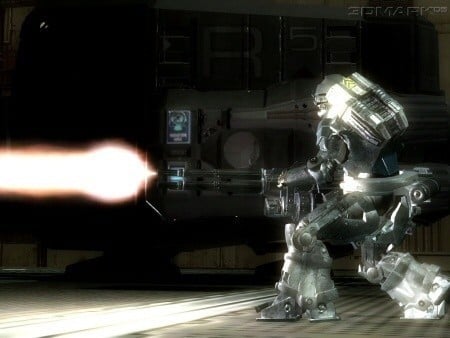
3DMark05 is now the second latest version in the popular 3DMark "Gamers Benchmark" series. It includes a complete set of DX9 benchmarks which tests Shader Model 2.0 and above.
For more information on the 3DMark05 benchmark, we recommend you read our preview here.
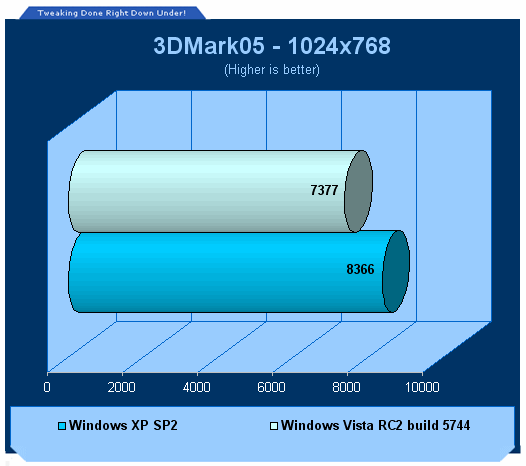
In our first benchmark we can see that Windows XP has almost a 14% lead over Vista RC2. This is as to be expected as XP is the mature OS with equally mature and tweaked drivers.
Benchmarks - 3DMark06
3DMark06
Version and / or Patch Used: Build 102
Developer Homepage: http://www.futuremark.com
Product Homepage: http://www.futuremark.com/products/3dmark06/
Buy It Here

3DMark06 is the very latest version of the "Gamers Benchmark" from FutureMark. The newest version of 3DMark expands on the tests in 3DMark05 by adding graphical effects using Shader Model 3.0 and HDR (High Dynamic Range lighting) which will push even the best DX9 graphics cards to the extremes.
3DMark06 also focuses on not just the GPU but the CPU using the AGEIA PhysX software physics library to effectively test single and Dual Core processors.
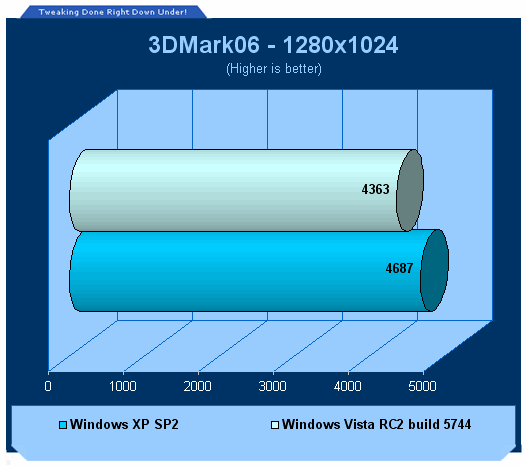
In our second benchmark and the latest version of 3DMark which relies on more than just the graphics card to obtain a score, we see that XP is just a little over 7% faster than Vista.
This is a great sign for Vista as it's still not finally released yet it only a little behind our Windows XP SP2 system with more mature drivers.
Benchmarks - Cinebench 9.5
Cinebench 9.5
Version and / or Patch Used: 9.5
Developer Homepage: http://www.cinebench.com
Product Homepage: http://www.cinebench.com
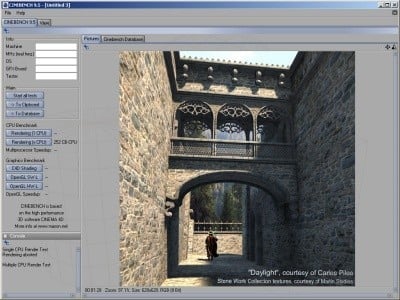
CINEBENCH is the free benchmarking tool for Windows and Mac OS based on the powerful 3D software CINEMA 4D. Consequently, the results of tests conducted using CINEBENCH 9.5 carry significant weight when analyzing a computer's performance in everyday use. Especially a system's CPU and the OpenGL capabilities of its graphics card are put through their paces (even multiprocessor systems with up to 16 dedicated CPUs or processor cores).
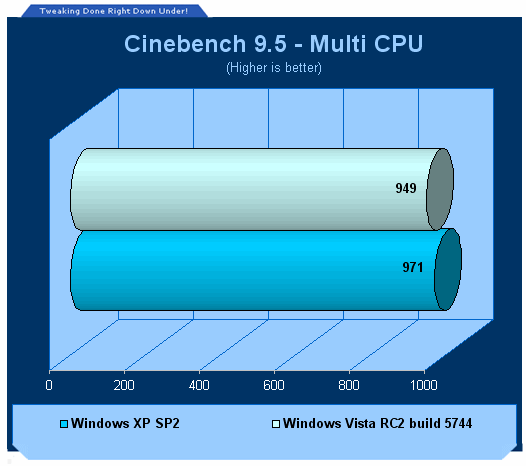
Under Cinebench 9.5 where CPU is a big influence, we run the "x CPU" option which uses two or more cores and measures the rendering performance. In this benchmark, Windows XP is only just in front of Vista.
Benchmarks - Quake 4 with SMP
Quake 4 with SMP
Version and / or Patch Used: 1.2 (with SMP support)
Timedemo or Level Used: HardwareOC Timedemo
Developer Homepage: http://www.idsoftware.com
Product Homepage: http://www.quake4game.com
Buy It Here
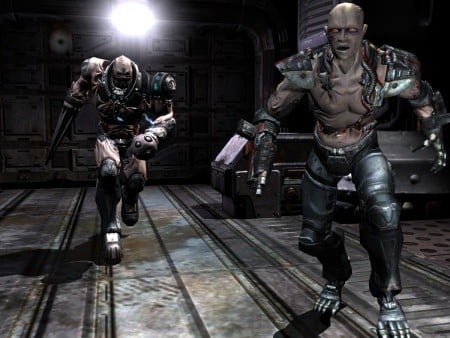
Quake 4 is one of the latest new games to be added to our benchmark suite. It is based off the popular Doom 3 engine and as a result uses many of the features seen in Doom. However, Quake 4 graphics are more intensive than Doom 3 and should put more strain on different parts of the system.
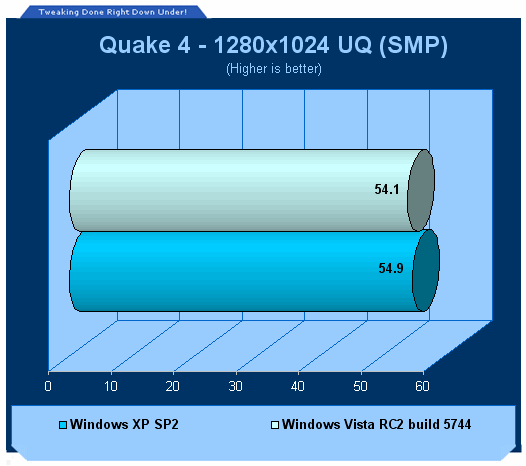
When using the latest 1.2 patch with Quake 4, SMP (dual core) support is enabled and we are able to see what Vista does when this is enabled.
As we can see from the graph, there is barely any difference in performance between XP and Vista which is a good sign for gamers of Q4.
Benchmarks - PREY
PREY
Version and / or Patch Used: 1.1
Timedemo or Level Used: HWzone Timedemo (HardwareOC)
Developer Homepage: http://www.humanhead.com
Product Homepage: http://www.prey.com
Buy It Here

PREY is one of the newest games to be added to our benchmark line-up. It is based off the Doom 3 engine and offers stunning graphics passing what we've seen in Quake 4 and does put quite a lot of strain on our test systems.
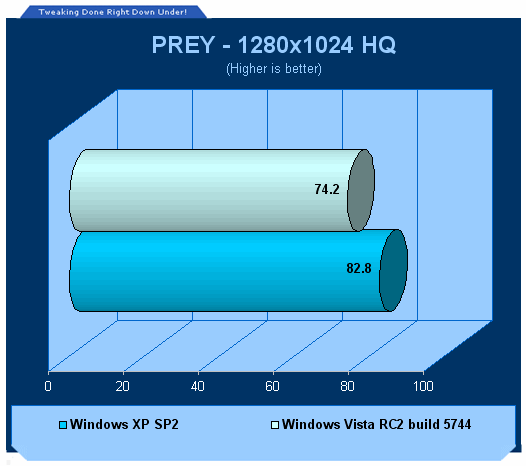
In our final benchmark we see that there is quite a difference in performance between XP and Vista.
Final Thoughts
Windows Vista RC2 build 5744 will more than likely end up being the final testing build of the new OS released to the public by the folks at Redmond before Vista hits shop shelves sometime very soon. Microsoft right now would be actively finishes up the final touches - fixing whatever bugs beta testers and engineers discovered, tweaking performance, trying to reduce the HDD space required and a multitude of other requirements I don't even want to have to begin to try and think about.

From the word go, we were impressed with the latest build of Windows Vista. Installation has been vastly improved over XP with the ability to install RAID controller drivers by means other than just a floppy disk drive. The Windows Aero interface is really quite spectacular for the first time and everything in Vista looks pretty damn fine. The most amazing feature for us was the 3D flipping technique which is going to amaze most people at first but there are many other subtle yet impressive GUI improvements which add to the whole overall revamp of the OS. Besides the visual changes, there are a bunch of new features to play around with and a bunch of performance and security enhanced hidden under the hood.
The fact that we didn't need to install any drivers whatsoever was a really bright note for us. This is a good sign that if you're running a fairly modern system, you shouldn't have any issues with drivers as long as you're running standard components.
Of course though, not everything can be perfect and Microsoft ought to dig their faces in the dirt when it comes to UAC - the idea is good and about time but the execution is truly horrid. As mentioned, we'll have a guide up online soon which explains how to avoid the endless bombardment of the security dialog warnings.
As far as performance goes, it's pretty much what we expected. Windows XP SP2 is consistently faster than the latest build of Vista although we would have expected Vista to lag behind a little further. This is for the reason that while Vista seems like just a revamp of XP, it is a new OS and there are separate drivers for it and they are only new and nowhere near as matured as XP drivers, which have been around for years. When and after Vista is finally released, hardware companies will come out with Vista drivers and it's almost a dead-set conclusion that those drivers will offer performance improvements and stability updates for Vista and take performance up to the level of XP and possibly higher.
We're left with quite a sweet taste in our mouths from Vista. Sure, UAC sucks big time but once that's taken care and out of the way of our eyes, it's really quite a nice OS. It works well and looks good but just make sure your system is up to the task of the hardware requirements of the various versions of Windows Vista.
Our Latest Benchmarks Article Coverage


 Ethereum Mining Guide - Part 1: The Basics & Set Up
 Unigine Superposition Benchmark: The New GPU Crusher
 3DMark Time Spy - DX12 Benchmarking for the Masses
 AMD Radeon Software Crimson Edition (RSCE) 16.4.2 Overview
 AMD makes game development easier with its new GPUOpen initiative
 Zelda Ocarina of Time remake confirmed for 2026 launch on Switch 2
 ID Cooling shows off wooden PC cases and matching AIO coolers at Computex 2026
 Formula V Line's Ice Nova Pro 3 air cooler could be perfect for brass-themed PC builds
 SAMA's Computex 2026 lineup includes a curved-glass case and AIO coolers with swappable screens
 Master Chief crashes the Covenant's vacation in new Halo remake prequel missions
 Highlights from MSI's impressive 40th Anniversary Exhibition in Taipei
 Halo: Campaign Evolved PC requirements revealed, RTX 4080 and 32GB of RAM required for 4K 'Ultra' settings
 HP's new limited edition Ferrari laptop is made from carbon fiber and glass
 GeForce RTX 50 SUPER Series is now rumored to be coming in early 2027
 COLORFUL's new slim RTX 5070-powered iGame M15 and M16 Origo laptops automatically lock when you're away
 Navman MiVue Smart True 4K Surround Dashcam Review - Seeing In All Directions At Once
 IQUNIX Magi96 Pro Aluminum Low Profile Mechanical Keyboard Review - Premium Build, Satisfying Sound
 Asetek Forte S-Series Racing Simulator Bundle Review
 Razer Pro Type Ergo Wireless Split Ergonomic Keyboard Review - Built for Comfort and Support
 ASUS ROG Strix Morph 96 Wireless Gaming Keyboard Review - Great Performance, More Affordable
 SAPPHIRE Radeon RX 9070 GRE PULSE OC Review - A New 1440p Challenger Has Arrived
 NZXT H6 RGB+ Compact Dual-Chamber Chassis Review
 ASRock Radeon RX 9070 GRE Steel Legend Review - The RDNA 4 Mid-Range Reshuffle
 ASRock Z890 Taichi Aqua Motherboard Review - Flagship features without the flagship price
 GIGABYTE Z890I AORUS Ultra Motherboard Review - Mini-ITX with surprisingly good thermals
 The PowerToys utilities I keep enabled on every Windows 11 PC, and the ones I turned off within a week
 TweakTown's Best of Computex 2026 Awards - The Best Hardware, Gaming Gear, and AI
 Phison E37T SSD Controller Exclusive Preview - The Fastest DRAMless SSD Platform Yet
 USB Ports Not Working in Windows 11? Try These Fixes
 ASUS WiFi Routers and Networking Solutions Deliver Long-term Security and Reliability with No Additional Cost
 Second Monitor Not Detected in Windows 11? Try These Fixes
 Turn Your Old Smartphone Into a Dedicated Webcam for Your Windows PC
 The Send To menu is the right-click feature on Windows 11 that nobody bothers to customize
 Windows 11 will not let you pin a folder to the taskbar, but a 30-second workaround does
 ASUS ProArt Displays Unlock Creativity with Professional Monitors for Everyone