


Introduction and Specifications

 4
4I still remember the first Tomb Raider on the original Sony PlayStation, my neighbor at the time was around 10 years older than me (I was 12-13 at the time) and obviously had a job. High school me thought it was mind-blowing for someone to own this powerful console, and to be running Tomb Raider.
The graphics were incredible, and it was such an amazing game to play at the time. Between then and now, we've seen a bunch of Tomb Raider games, some movies starring Angelina Jolie and everything in between. Crystal Dynamics have now rebooted Tomb Raider, and it has AMD behind them.
Tomb Raider falls under AMD's "Gaming Evolved" banner, with the company working closely with Crystal Dynamics. The game features better performance on Radeon GPUs, better textures and TressFX Hair - the world's first real-time hair physics in a game.
I've played the game for all of 15 or so minutes, and didn't think much of it, but it does have a built-in benchmark that we've run in both 1080p and 5760x1080p. This is going to be the first of many games we're going to try out in various resolutions, so continue checking back for some more GPU goodness!
 4
4For your information, I'm running:
- Intel Core i7 3770K @ 4.8GHz
- Corsair H100 Hydro Cooler
- Corsair Force Series GT 240GB SSD
- ASRock Z77 Extreme 9 motherboard
- Sapphire AMD Radeon HD 7970 Dual-X OC Edition (x2)
- Lian Li PC-T60 Pitstop
- Corsair Dominator Platinum - 16GB kit of 2133MHz DDR3 RAM
- Windows 7 Ultimate Edition x64
- AMD Catalyst 13.2 beta 4 drivers
I'd like to extend a big thank you to Sapphire, Corsair and ASRock for supplying the parts for this machine, I couldn't write this article or any future articles without this hardware!
It's a seriously nice machine, and really powers through what I do each day. I've got the CPU clocked up to remove any potential CPU-based bottlenecks, the RAM is at stock as it doesn't really help gaming performance all that much and everything else is at out-of-the-box settings.
Benchmarks - Single Screen and EyeFinity
Now onto the ever so important benchmarks; Tomb Raider has so many different graphical options, but we've chosen to run the two highest settings, Ultra and Ultimate.
Ultimate turns on the TressFX hair physics, which strains the system much more. At the moment I personally don't have any NVIDIA GPUs to play with, but this should hopefully change in the coming weeks. For now I've used our Sapphire Radeon HD 7970 video cards, in both single and multi-GPU configurations, with both single and multi-monitor resolutions.
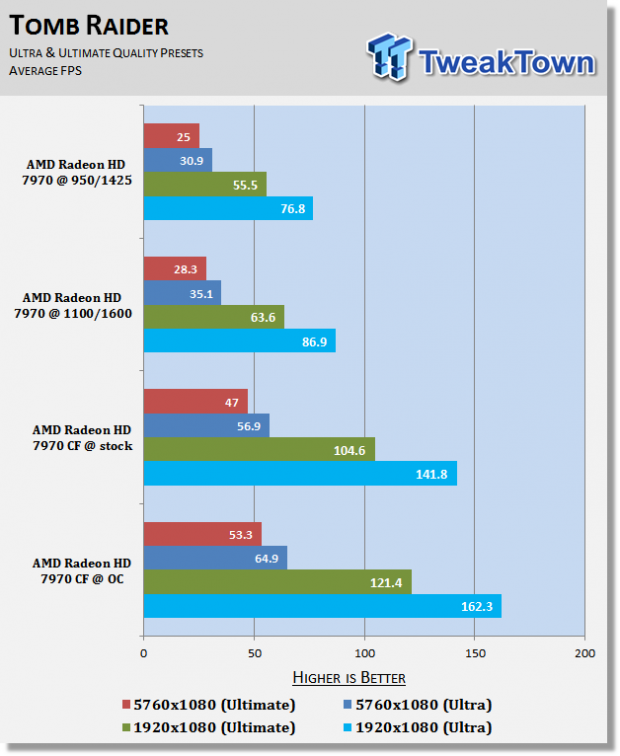
I've run both the Ultra and Ultimate tests at 1920x1080 and 5760x1080 with both a single GPU and CrossFire enabled. I've also re-run the tests on each configuration at stock, and overclocked settings. This gives us a great look at how Tomb Raider can stretch your GPU legs.
 4
4As you can see, overclocking really helps with Tomb Raider's performance. Running the single Sapphire HD 7970, we went from 55.5 FPS to 63.6 FPS at 1080p with an easy overclock. The same improvement can be seen in the CrossFire results - 104.6 FPS to 121.4 FPS.
EyeFinity is impressive with Tomb Raider, working right out of the box with no setting adjustments required - and performance is equally as impressive. With a single HD 7970, we still see 30.9 FPS.
Doubling the GPU performance provides us with close to double the frame rate, from 30 FPS to 56.9 FPS in Ultra settings.
TressFX brings the GPU down by 10-20% depending on the resolution and overclock. In EyeFinity, we see the overclocked HD 7970 video cards drop from 64.9 FPS under Ultra settings to 53.3 FPS with Ultimate settings.
Final Thoughts
 4
4Tomb Raider is a great way to bench your system and it seems to spread performance across multi-GPU solutions quite well, which is a nice change to games like Battlefield 3 where multi-GPU use can be sporadic.
EyeFinity performance is also great, where going CrossFire close to doubles your frame rate, which is really needed when tripling your resolution.
I didn't expect much from Tomb Raider, but the inclusion of a benchmark within the game is a sign that Crystal Dynamics actually give a damn about PC gamers. Built-in benchmarks should really be included in all major releases, and I think we'll see more of that going into next-gen games from next-gen consoles.
Games being built around actual x86-based architecture and DX11-capable, AMD-based GPUs is going to be a huge gain for PC gamers and enthusiasts.
 United
States: Find other tech and computer products like this
over at
United
States: Find other tech and computer products like this
over at  United
Kingdom: Find other tech and computer products like this
over at
United
Kingdom: Find other tech and computer products like this
over at  Australia:
Find other tech and computer products like this over at
Australia:
Find other tech and computer products like this over at  Canada:
Find other tech and computer products like this over at
Canada:
Find other tech and computer products like this over at  Deutschland:
Finde andere Technik- und Computerprodukte wie dieses auf
Deutschland:
Finde andere Technik- und Computerprodukte wie dieses auf 


 Dragon's Dogma 2 patch delivers some important fixes - but not the one everyone wants
 AMD's top Strix Point Halo APU could have 16 Zen 5 cores in 2 x CCDs, mirroring Ryzen 9000 CPUs
 FBI confirms Chinese hackers have infested US water and energy systems
 Microsoft's new Windows 11 'AI Explorer' feature set to anger AMD and Intel
 High-end PC maker gives advice that could fix Intel Core i9 CPUs crashing in games
 ASUS ROG Swift Pro PG248QP Gaming Monitor Review - Frames, frames, and more frames
 FlexiSpot C7B-Mesh Ergonomic Office Chair Review
 Samsung G8 34-inch QD-OLED Gaming Monitor Review - 175Hz for $900
 ASRock NUCBOX-155H Mini PC Review
 NuPhy Air96 V2 Wireless Mechanical Keyboard Review
 TEAM T-FORCE Siren DUO360 RGB Liquid CPU Cooler Review
 AVerMedia Live Streamer ULTRA HD Review
 AVerMedia Live Gamer 4K 2.1 Review
 XPG Invader X Mid-Tower Chassis Review
 Intel Core i9-14900KS CPU Review
 Everything you need to know about the latest ASUS NUC Mini PCs - NUC 14 Pro and ROG NUC
 How to Overclock Your GPU and Boost Your PC Gaming with ASUS GPU Tweak III
 ASUS's AMD Radeon RX 7000 Series GPU lineup has something for every gamer
 ASUS OLED Premium Care defends the ROG Swift OLED PG32UCDM gaming monitor from burn-in
 Patriot Viper Xtreme 5 Engineering Prototype 48GB Dual-Channel Memory Kit Preview