


Introduction
 18
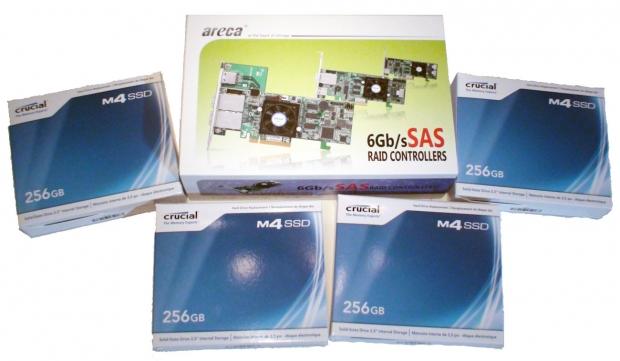
18Just over 12 months ago we checked out the Crucial C300 256GB SSDs in RAID 0 and found ourselves very impressed with the performance that Crucial was offering with the new SATA drives. The C300 drives from Crucial were one of the first SATA III drives to come out and in RAID 0 we saw some awesome performance out of the 1TB setup via the four 256GB drives.
Today we jump forward and find ourselves looking at the brand new m4 drives from Crucial to see what's going on with performance. We'll also be taking the same approach as we did last year with the four drives on hand which will again be running in RAID 0.
Outside of the new m4 drives, though, we've got ourselves a brand new Areca RAID card to make sure we're able to get the most amount of performance out of our drives. We'll take a closer look at that in just a moment, along with a closer look at the drives themselves.
Since there's no real formula to what we're doing today, we'll start off by taking a closer look at the hardware we're using; once that's done we'll check out the testbed and then we'll just get stuck straight into the performance side of things to see just what the new m4 setup is offering us when compared to the older C300 setup that's been working hard for the past 12 months.
So with that all said and done, let's get into it and take a closer look at the m4 drives and our Areca RAID card we have on hand.
The Hardware
 18
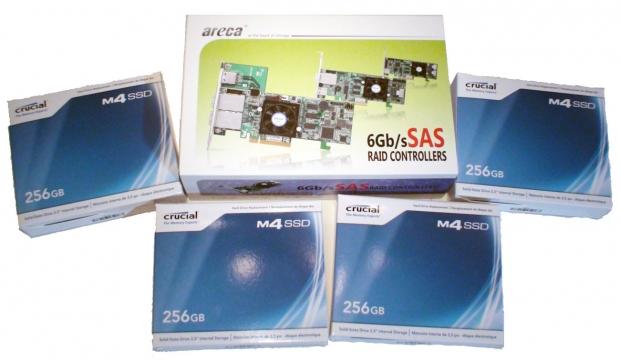
18We'll only get into the detail of the two main pieces of hardware we're using today - the rest of our machine will be covered in the testbed in the following pages. Today, though, we've got two main pieces to the puzzle with the first being the 256GB Crucial m4 drives.
 18
18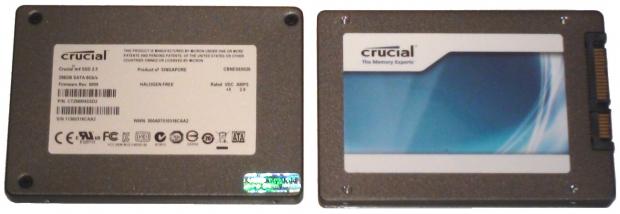 18
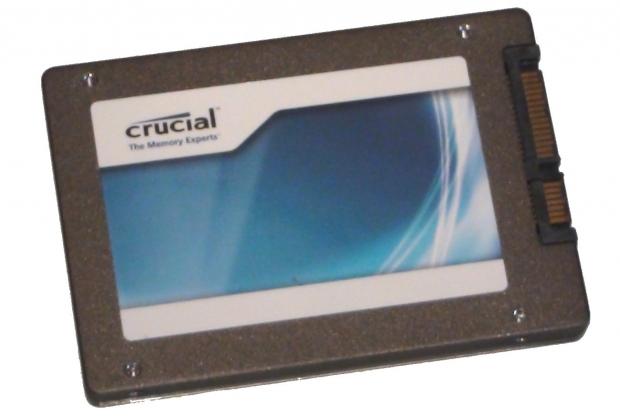
18We've got a total of four here and we've looked at both the 128GB and 512GB version of the drives and found ourselves already very impressed with what's on offer.
 18
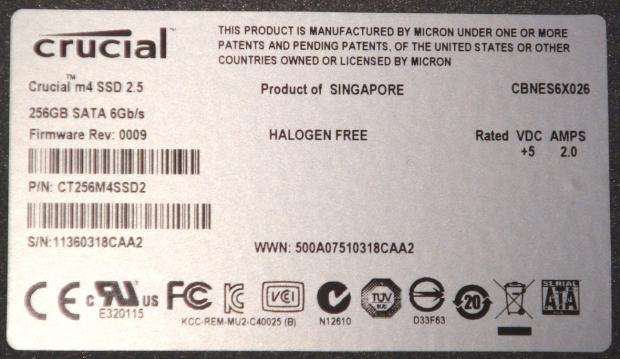
18Looking over the drive, there's nothing too out of the ordinary when it comes to the information on hand; we've got the main Crucial sticker on one side, while turning over we've got our information sticker that tells us the firmware, part number, model etc. We can also see they're 256GB SATA 6GB/s drives, or SATA III as we know them as these days.
 18
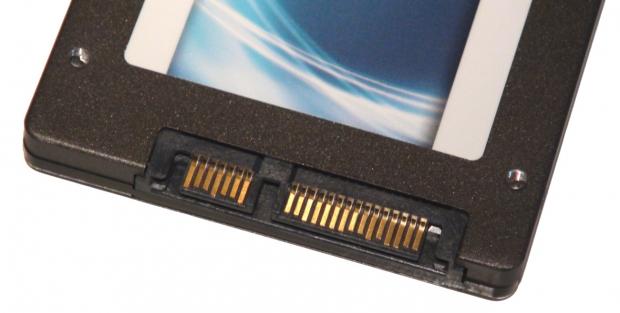
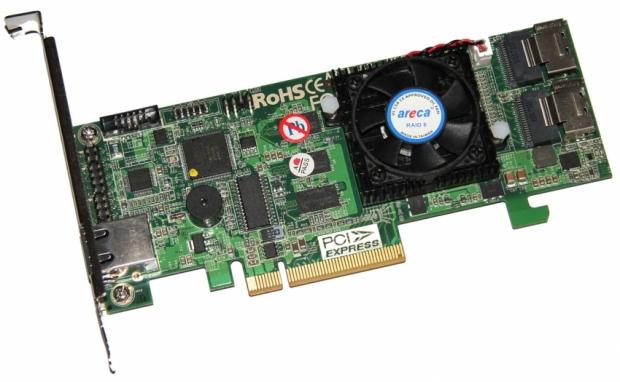
18Towards the back, we've of course got our standard power and SATA connector present; no real surprises at all. Moving away from that, we can take a closer look at our Areca RAID card that's present today. It's actually the same card we used in our Areca ARC-1882i and Corsair Force GT 7 Drive SATA III RAID 0 Setup we checked out a few months ago.
 18
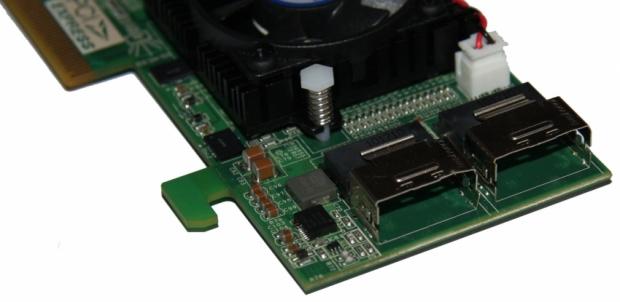
18The Areca 1882i is a second generation SATA III RAID card and offers us support for up to eight drives via the two SAS 2.0 ports on the back of the card with the help of two SAS to four SATA port cables that need to be purchased.
 18
18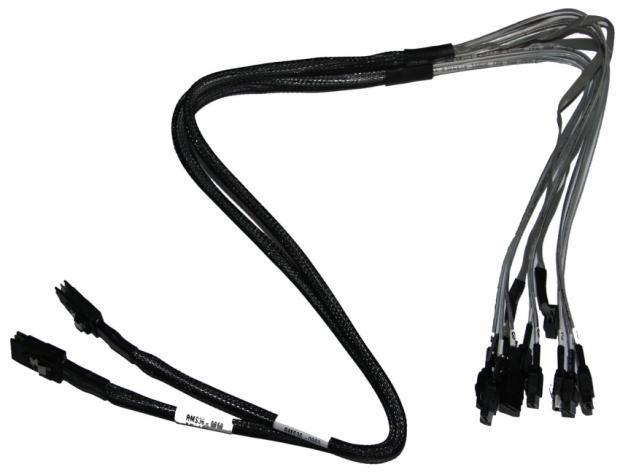 18
18Along with SAS 2.0 support, we've got a dual core RAID-on-Chip 800MHz I/O processor and 1GB On-Board Cache via DDR3 1333MHz DDR memory. We've been using Areca RAID cards for these articles for a while now and the ARC-1882i did a fantastic job with our Corsair Force GT 7 Drive setup. We should continue to see strong performance out of it today with our Crucial drives of old and new.
Test System Setup and CrystalDiskMark
 18
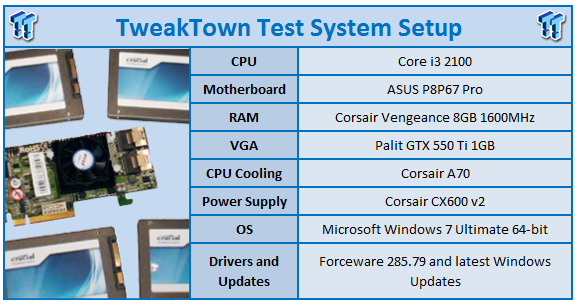
18We would like to thank the following companies for supplying and supporting us with our test system hardware and equipment: Intel, ASUS, Palit, Crucial and Corsair.
There isn't much need to go into too much detail on what's going on today with our testbed as everything above is fairly self-explanatory. We will be using one of our lower end testbeds, though, which as you can see uses the Intel Core i3 2100 and ASUS P867 Pro.
 18
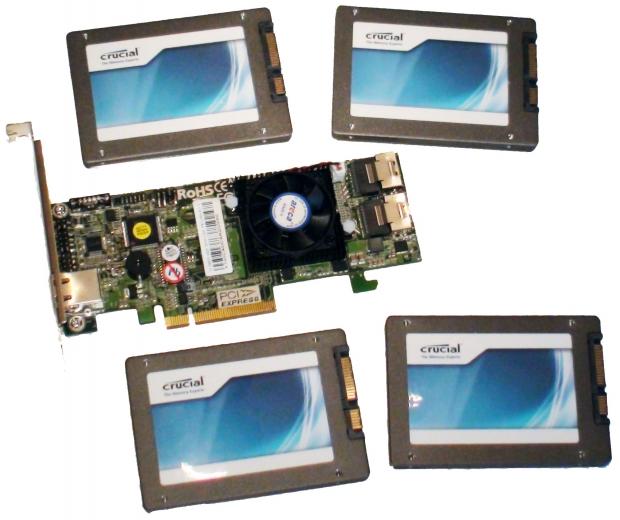
18The main stars of the testbed today are of course the four 256GB Crucial m4 drives and Areca ARC-1882i RAID card. Alongside them, we've also mentioned that we've got our older SATA III 256GB C300 drives from Crucial. These drives have been retested today on our new testbed and the new Areca ARC-1882i card. We haven't included the original tests because they can't be compared as the platform and RAID card are completely different.
As for the benchmark line-up today, we'll be checking out the performance of the two setups under CrystalDiskMark, AS SSD, HD Tune Pro and AIDA64 to get read and write speeds along with other important pieces of information like access times.
It's also worth noting that the C300 drives are of course 12 months old now, so that's something that has to be considered as we know that sometimes SSD performance can drop over time. Ultimately we want to be able to show you if you're running a setup that's older, what kind of performance can you expect to see with these new drives.
Let's get started!
CrystalDiskMark
 18
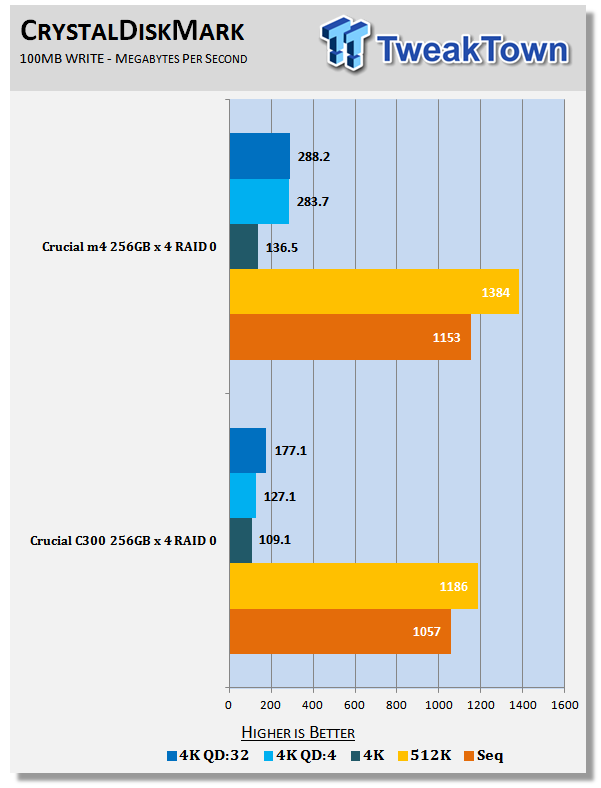
18Getting into CrystalDiskMark and looking at the 100MB Write performance of the two setups, we can see across the board we've got improvements on our new m4 drives. This doesn't come as any real surprise as they're of course updated drives; you can see a nice improvement in all areas of writing, though.
 18
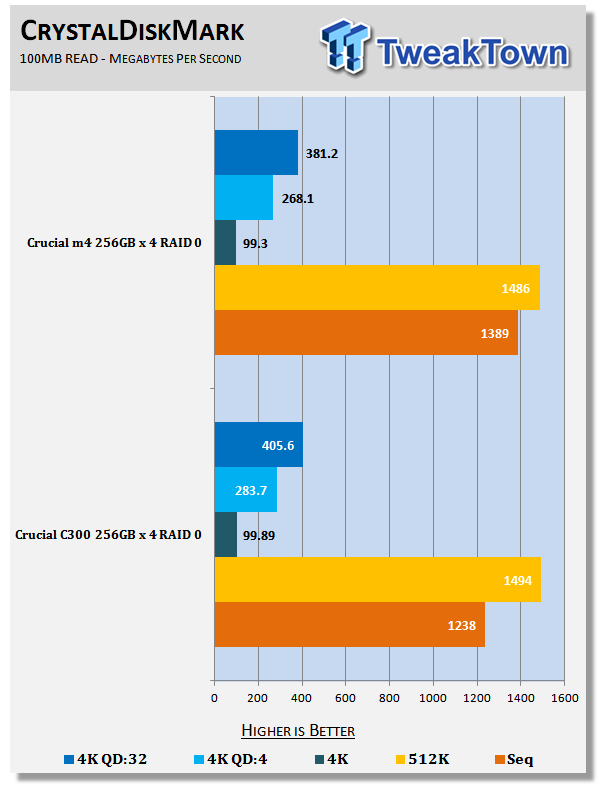
18Looking at read performance, we don't see the same kind of changes. In some areas we see that the m4 drives come in a little lower; this is evident in the 4K QD:32 and 4K QD:4 tests. 4K and 512K tests on the other hand see performance very similar while the sequential testing sees a nice performance boost when comparing the two setups.
AS SSD
 18
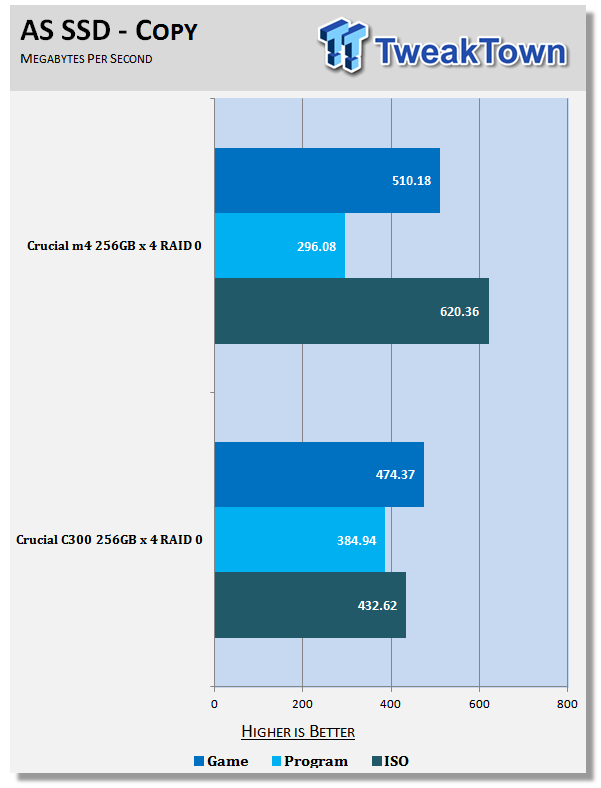
18Checking out the Copy performance under AS SSD, we can see that the Game and ISO testing is very strong on the m4 setup. On the other hand, we can see that the Program performance sits behind a bit. Talking to Crucial, we were told that because of the page size difference on the NAND media (4kb for C300 and 8KB for m4), under certain loads we can have a little more command overhead to pass the same amount of data.
Page 5 [HD Tune Pro]
HD Tune Pro
 18
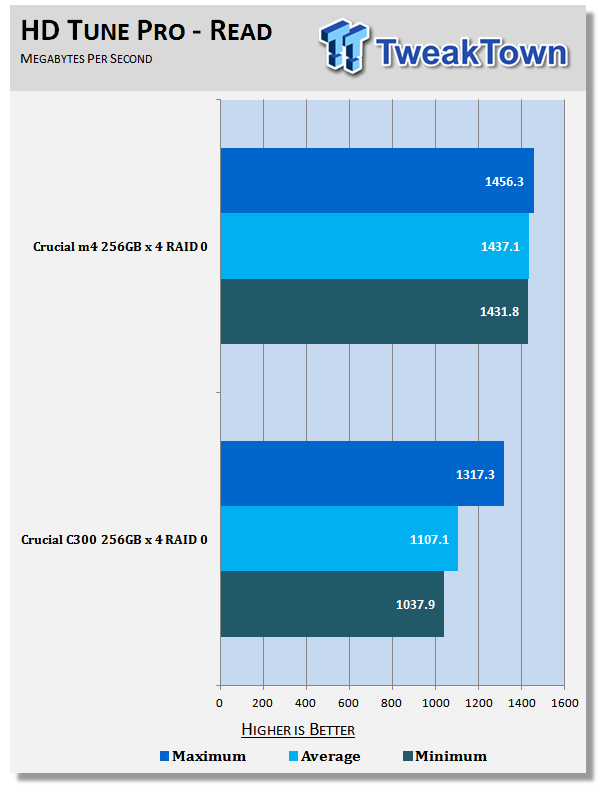
18Something that Crucial mentioned to us was the stronger sustained performance on the new m4 drives when under RAID and that's extremely evident here as we can see only 25MB/s separates the minimum and the maximum. Overall this also results in a strong performance gain over the older setup with the minimum seeing a 40% boost in performance.
 18
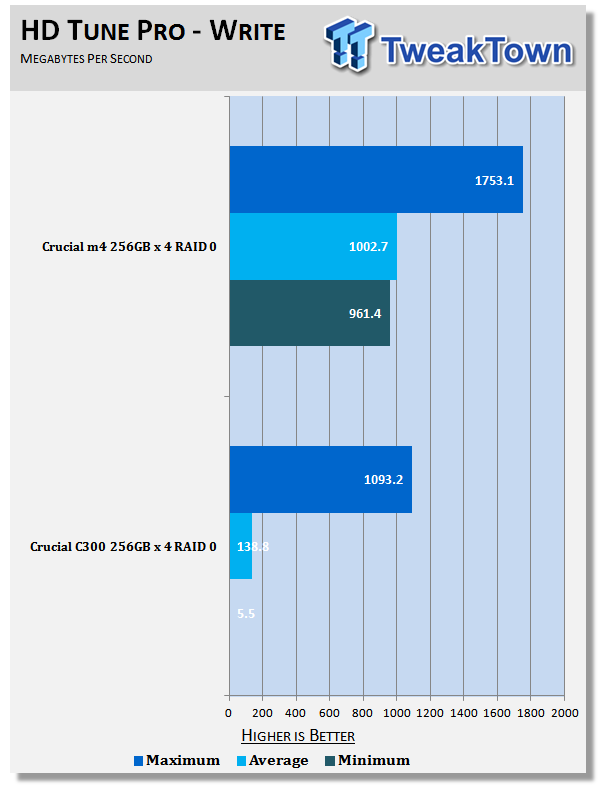
18Something went wrong when testing Write performance on the C300 and it seems evident that it has something to do with the Garbage Collection. Ignoring the minimum and average for just a second, though, if we jump over to our original Crucial C300 256GB SSDs in RAID 0 article, it's really interesting to see the Maximum write performance for the setup on our older RAID card was 966MB/s.
I say interesting because over time we'd expect the performance to drop back slightly, instead we're seeing that performance is a bit stronger here. While we no doubt expect that to have a lot do with the new RAID card, we'd still expect the performance to have dropped back below our original results. There's either no or minimal performance drop, or the older ARC-1880i was holding our C300 setup back a fair bit.
Saying all that, performance on the newer drives is massive with a maximum read speed exceeding 1700MB/s.
AIDA64
 18
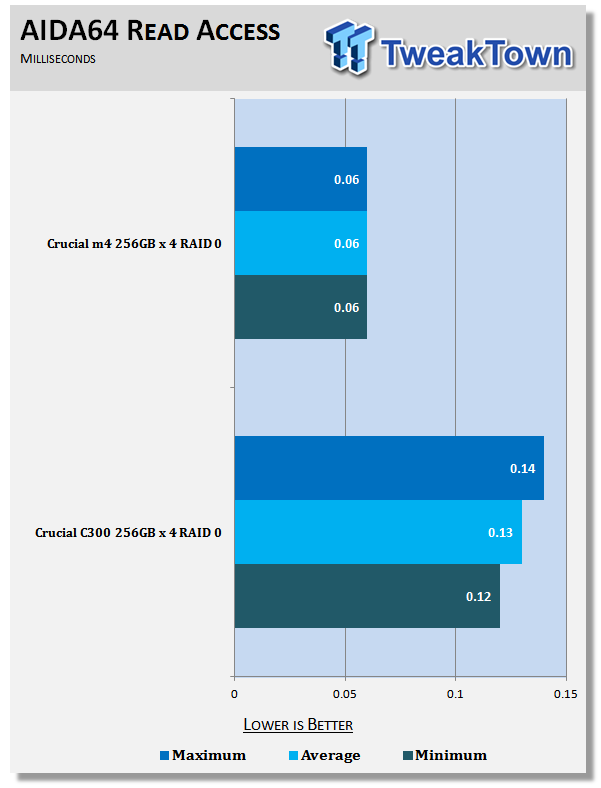
18Moving into AIDA64, we can see that read access times on the new m4 setup is half that of the C300 setup. Of course, it's not the end of the world when you're talking .06 milliseconds verse .14 milliseconds. It doesn't change the fact that it's half, though.
 18
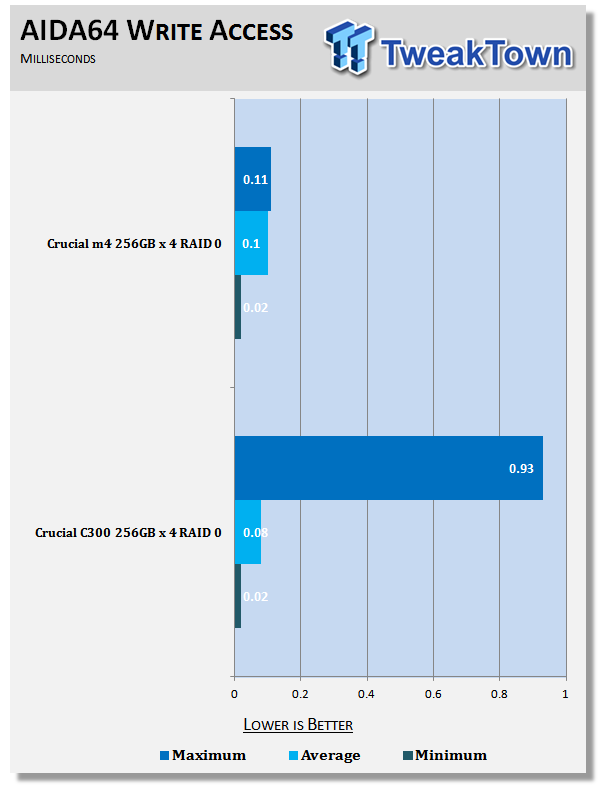
18Write Access times on the other hand see the minimum and average very close to each other; it's only the maximum write time that we see blow out. It must only be for the smallest amount of time, though, as overall the average time comes in ever so slightly quicker than the m4 setup, interestingly enough. It's safe to say you probably wouldn't notice a difference.
Final Thoughts
Looking through the benchmarks, at times our setups do become a bit wobbly, especially the older C300 one. For the most part, though, we can see performance is extremely strong on the new m4 setup with some of the best gains being shown under HD Tune Pro where we can see that Read performance minimum numbers and maximum numbers are separated by only 25MB/s.
Talking to Crucial, it seems that this was an area that they chose to concentrate on. These are some massive upgrades from the C300 drives; they're more tweaked and that becomes evident when we're looking at some of the numbers.
The cost of the larger improvements in some areas, though, has seen a small drop in other areas. While we would've preferred to see gains across the board completely, it seems clear that a sacrifice in some smaller areas has been taken to create better gains in more important ones.
No matter what way you look at it, this continues to be a very expensive setup in the end with the ARC-1882i RAID card carrying a $650 US price tag and each 256GB m4 drive coming in at $379 US, resulting in a total price tag of $2,166 US.
That price will get you a Terabyte of storage at blistering speeds. If you're already running an older SATA III 256GB RAID 0 setup, we probably wouldn't recommend you run out and upgrade. While the gains in some areas are nice, the cost of moving over probably doesn't make it worth it. On the other hand, if you're ready to blow $2k on a dream storage setup, this makes for a mean setup.
 United
States: Find other tech and computer products like this
over at
United
States: Find other tech and computer products like this
over at  United
Kingdom: Find other tech and computer products like this
over at
United
Kingdom: Find other tech and computer products like this
over at  Australia:
Find other tech and computer products like this over at
Australia:
Find other tech and computer products like this over at  Canada:
Find other tech and computer products like this over at
Canada:
Find other tech and computer products like this over at  Deutschland:
Finde andere Technik- und Computerprodukte wie dieses auf
Deutschland:
Finde andere Technik- und Computerprodukte wie dieses auf 


 Unreal Engine 5.4 brings significant updates to ray tracing and rendering for 60 FPS gaming
 SK hynix plans $14.6 billion on new chip fab in South Korea to meet 'soaring demand' of HBM
 You can pick up AMD's flagship RDNA 3 GPU, the Radeon RX 7900 XTX, for $850
 Tesla unveils new Model 3 Performance: 0-60 mph in 2.9 seconds, 163 mph top speed
 GIGABYTE confirms AMD Ryzen 9000 Series processors are coming soon
 ACEMAGIC AD08 "Core i9 11900H" Mini PC Review
 Lenovo ThinkPad X1 Carbon Gen 12 Review
 ASUS ROG Swift Pro PG248QP Gaming Monitor Review - Frames, frames, and more frames
 FlexiSpot C7B-Mesh Ergonomic Office Chair Review
 Samsung G8 34-inch QD-OLED Gaming Monitor Review - 175Hz for $900
 ASRock NUCBOX-155H Mini PC Review
 NuPhy Air96 V2 Wireless Mechanical Keyboard Review
 TEAM T-FORCE Siren DUO360 RGB Liquid CPU Cooler Review
 AVerMedia Live Streamer ULTRA HD Review
 AVerMedia Live Gamer 4K 2.1 Review
 Everything you need to know about the latest ASUS NUC Mini PCs - NUC 14 Pro and ROG NUC
 How to Overclock Your GPU and Boost Your PC Gaming with ASUS GPU Tweak III
 ASUS's AMD Radeon RX 7000 Series GPU lineup has something for every gamer
 ASUS OLED Premium Care defends the ROG Swift OLED PG32UCDM gaming monitor from burn-in
 Patriot Viper Xtreme 5 Engineering Prototype 48GB Dual-Channel Memory Kit Preview