

Introduction and Package
Introduction
 15
15We love SSDs here at TweakTown; not just as a site, but all of our writers love what SSD technology brings to the table. Most of us here actually run SSD setups including the boss who late last year moved to a 4x 256GB SATA III Crucial setup.. One of the biggest requirements for myself when upgrading my testbeds recently was the introduction of larger SSD drives. The 128GB Kingston drives I'd been using for a while now had served me very well, but as we expand our game testing and games themselves become so much bigger, we needed to make the move to the next size up.
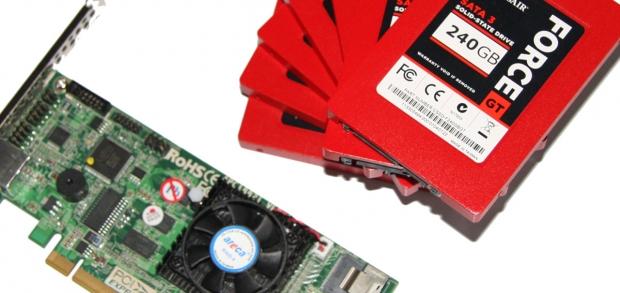
Since the move to the next size up was happening, it made sense to make use of the latest SATA III technology. The 120GB Force GT from Corsair has already lit up our test system, but today I thought we'd take the 240GB version which are being used in my new testbeds for a spin. Of course, this isn't a hard drive review or anything like that, Instead, because a total of seven drives arrived for my new testbed line-up and a smart cookie on our facebook page commented we should throw them into RAID 0 for a bit of fun, we figured why the hell not!
So, with the help of Corsair and the good folks over at Areca, we'll today be checking out our seven Corsair Force GT 240GB drives in RAID 0 before they have to be separated and lead separate lives with other testbeds.
There's no real formula to the whole process today, so what we'll do is quickly just have a look at the parts and talk about the costs associated with each of them on the next page before we just look at our testbed and get stuck into the benchmark side of things.
To be honest, I've got a feeling most people haven't gotten this far into the introduction, so I may as well wrap it all up now and just get into the hardware side of things to see what's going on.
The Hardware
While there are indeed many parts to our testbed here today, we won't be getting into all the specifics here. Instead we'll just quickly cover them in the next page as we look at the testbed on a whole. Here we'll just look at the two main parts that make this setup possible.
 15
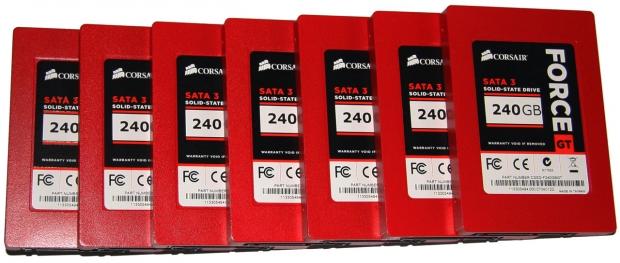
15The first is my new beloved Corsair Force GT 240GB SATA III drives. I've been actually using them for the last couple of weeks while we organized a RAID card to arrive and they really just are an excellent running drive. When you install Windows on machines as often as I do, you do really appreciate the speed that's on offer here.
The Force GT line from Corsair is of course the flagship line and like any flagship product, there's of course quite a price tag associated with it. The drives we're using today will set you back a cool $479.99 US each. That brings the seven SSDs in at a nasty sounding $3,359.93 US. Ouch!
The drives sport the SandForce SF-2200 controller with 4KB Random Write up to 85,000 IOPS, Max Sequential Read up to 555MB/s and Max Sequential Write up to 525MB/s. These are some good numbers, but let's see what happens when we add more and more drives into the mix.
If that wasn't enough to make the Force GT from Corsair sound fast, the fact that it's red means it goes even faster, as it's a proven fact that red makes things go faster and that's not limited to SSD drives.
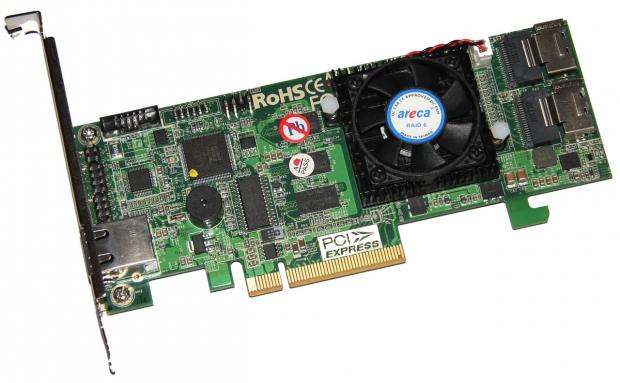
The other part to this SSD puzzle is of course the RAID card and the bad boy that will be making our seven Corsair Force GT drives run in RAID 0 harmony comes from Areca. The brand new ARC-1882i which isn't even listed on its own website yet is what we'll be using today.
 15
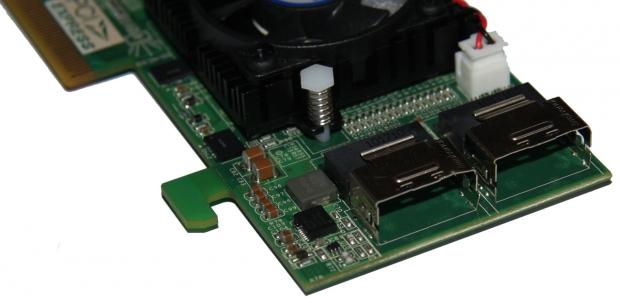
15This is the next generation Dual Core card from Areca and sports a Dual Core RAID-on-Chip 800MHz I/O Processor, has two SAS connectors, supports SATA III and SATA II drives, comes with 1GB of on-board DDR3 1333MHz DDR memory and uses a PCIe 2.0 8x interface.
 15
15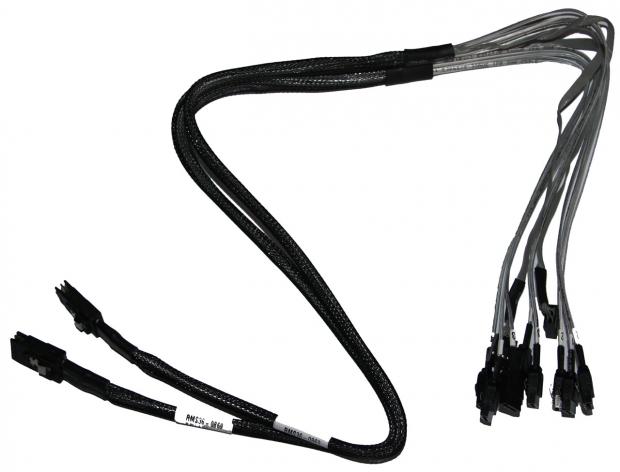 15
15Being so new, we don't have a price on this bad boy yet. We do know that the ARC-1880i comes in at $579.99 US. It's fairly safe to assume that with a pair of SAS to SATA cables as well, the ARC-1882i combined with our seven Corsair Force GT 240GB drives here today will set you back somewhere in the vicinity of $4,000 US.
Test System Setup and ATTO Baseline
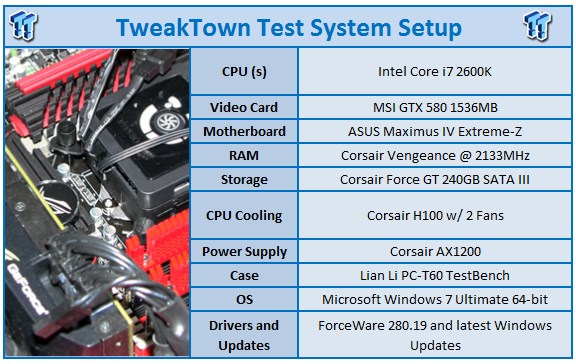 15
15We would like to thank the following companies for supplying and supporting us with our test system hardware and equipment: Intel, ASUS, MSI, Western Digital and Corsair.
On the testbed side of things there isn't anything out of the ordinary when compared to other recent reviews you'd have seen me do. On the motherboard side of things we've got our trusty ASUS Maximus IV Extreme-Z which sports the Intel i7 2600k.
We've got a MSI GTX 580 installed today, but that won't really be getting much of a work out. Windows will also just be running off our Kingston 128GB SATA II drive that we've been using for a while. Of course, the products that really stand out today are the SSD and RAID card which we covered on the previous page.
Let's get started!
ATTO Baseline Performance
Version and / or Patch Used: 2.34
ATTO is used by many disk manufacturers to determine the read and write speeds that will be presented to customers.
 15
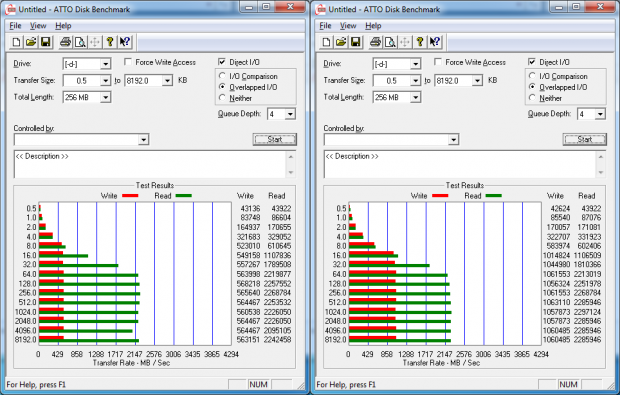
15Left: 1x Corsair 240GB Force GT SATA III - Right:2x Corsair 240GB Force GT SATA III in RAID 0
 15
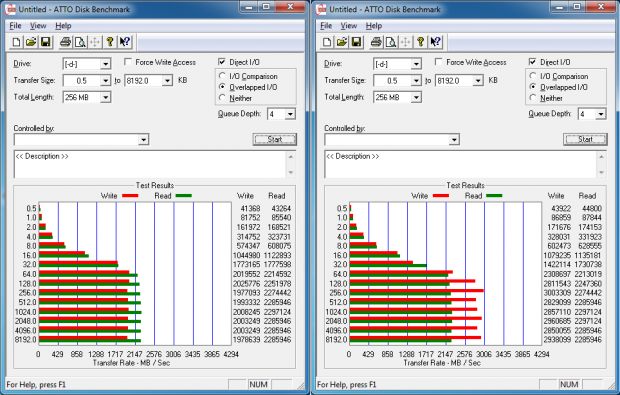
15Left: 4x Corsair 240GB Force GT SATA III in RAID 0
Right: 7x Corsair 240GB Force GT SATA III in RAID 0
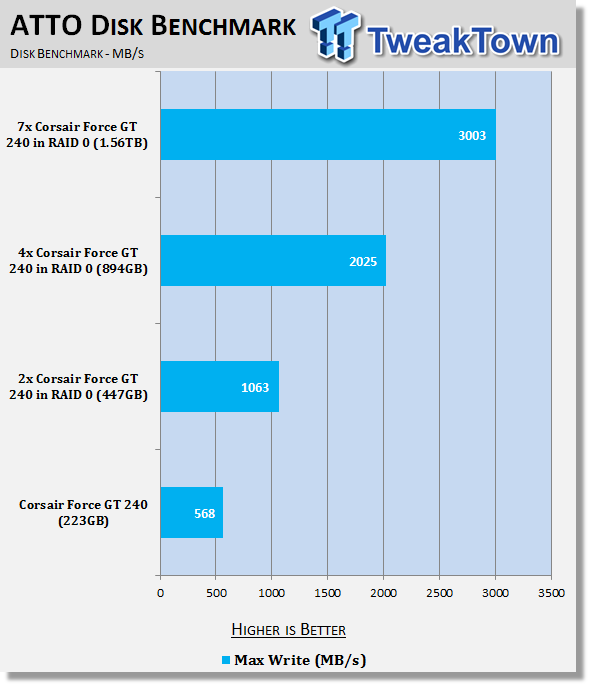
In the first two screen shots you can see the kind of performance we get under the ATTO Baseline test. It can be a little hard to read, so if we just throw the highest numbers into the graph we get a better idea of what's going on.
 15
15Checking out the write numbers, we get an excellent idea of what's going on with performance and what happens as we add more and more drives into our RAID 0 mix. From a single drive to a two drive RAID 0 setup we go from 568 MB/s to 1063MB/s.
Moving to a four drive setup, we see that doubles again to 2025MB/s. Moving to seven drives doesn't quite see the same linear jumps in performance, but we do see a massive 3003MB/s maximum write speed.
AIDA64
Version and / or Patch Used: 1.70.1400
Developer Homepage: http://www.aida64.com
Product Homepage: http://www.AIDA64.com
Replacing Everest in our labs is AIDA64. This new testing suite is from the core development team from Lavalys and continues that tradition. The guys have thrown in better support for multithreaded CPUs as well as full 64 bit support. We use this to test memory and HDDs for now, but may find ourselves opening this up to other areas of the motherboard.
 15
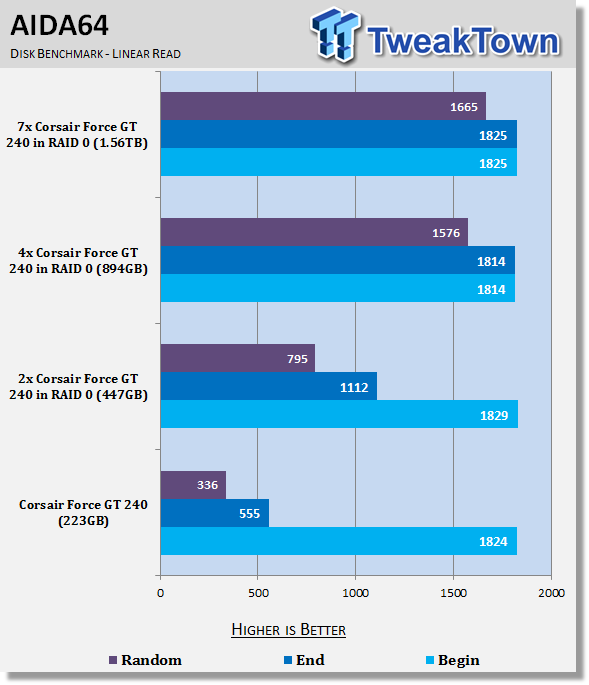
15Across the board we found the beginning of the test didn't change; you can see we get a much better picture of how everything works, though, when we look at the End and Random results.
HD Tune Pro
Version and / or Patch Used: 4.61
Developer Homepage: http://www.hdtune.com
Product Homepage: http://www.hdtune.com
HD Tune Pro gives us accurate read, write and access time results and for the last couple of years has been gaining popularity amongst reviewers. It is now considered a must have application for storage device testing.
 15
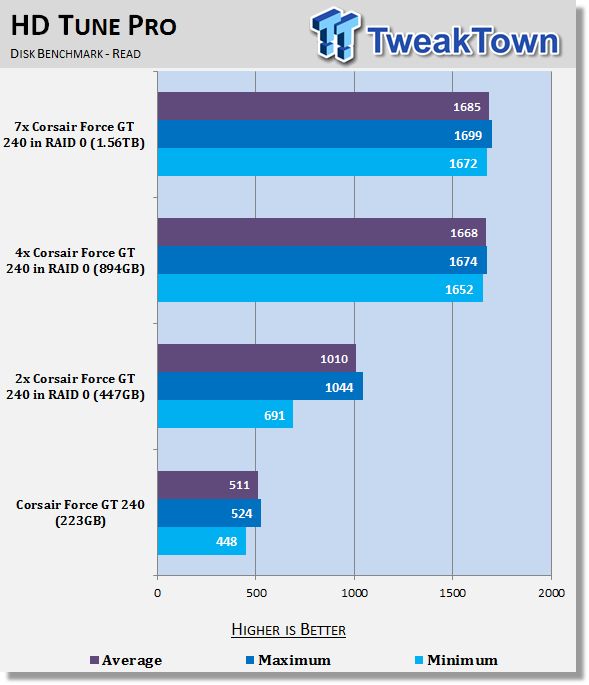
15Having a look at HD Tune Pro, you can see that once we went past that four drive setup we didn't really see a difference in overall performance. You can see moving from one to two and two to four, though, it brings with it some really nice performance gains as we move up further and further.
 15
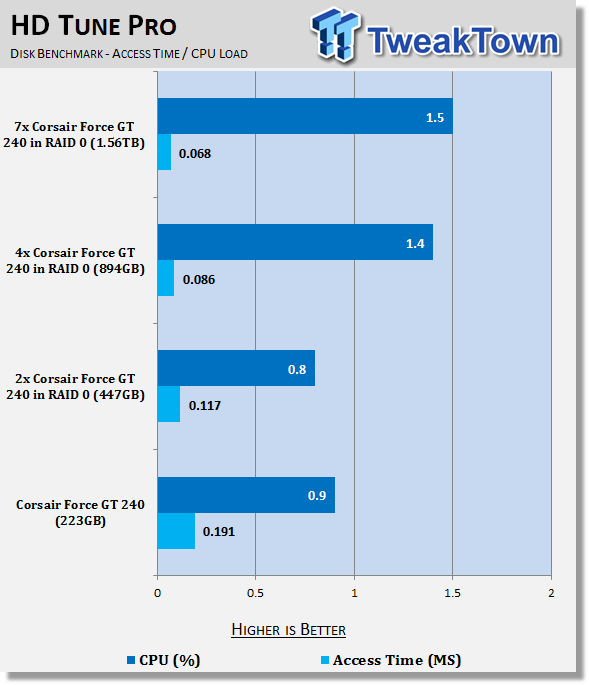
15We can see that Access Time drops ever so slightly as we move up, while CPU load jumps a little. There's such a small difference between the numbers, though, that it doesn't really matter and the important numbers are ultimately seen in the transfer rates.
CrystalDiskMark
Version and / or Patch Used: 3.0 Technical Preview
Developer Homepage: http://crystalmark.info
Product Homepage: http://crystalmark.info/software/CrystalDiskMark/index-e.html
Download here: http://crystaldew.info/category/software/crystaldiskmark
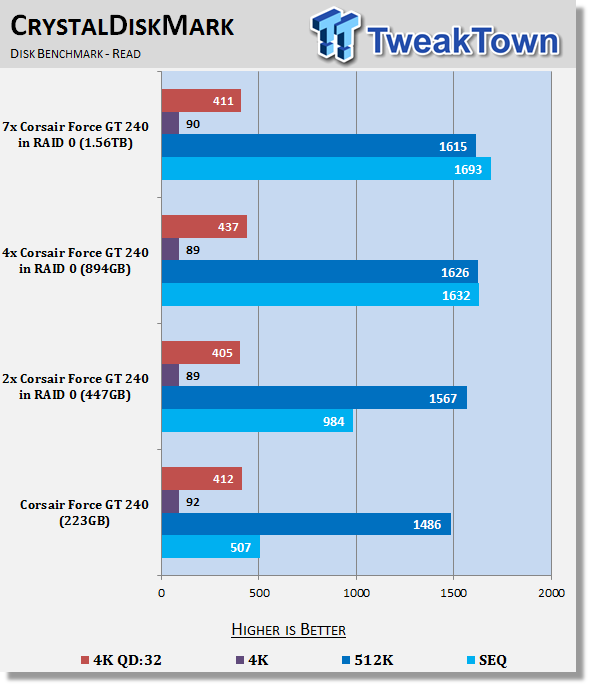
CrystalDiskMark is disk benchmark software that allows us to benchmark 4K and 4K queue depths with accuracy.
 15
15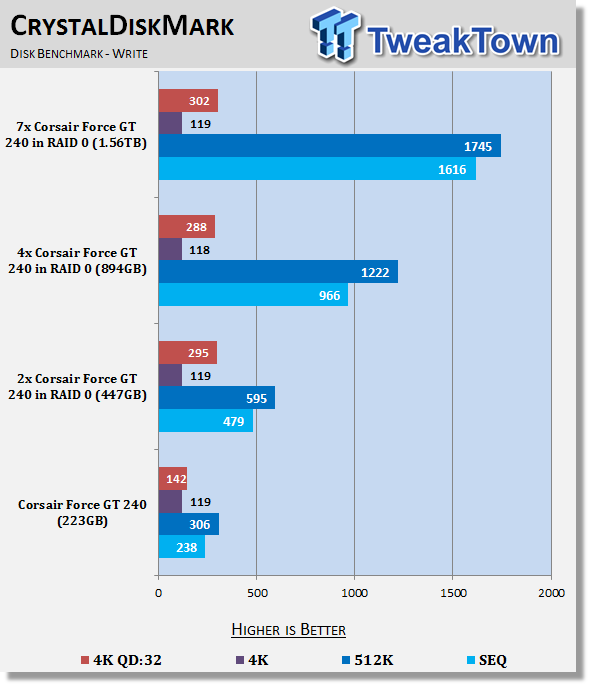 15
15Firing up CrystalDiskMark, we continue to see across the board what those different RAID setups bring to the table.
AS SSD
Version and / or Patch Used: 1.6.4237.30508
Developer Homepage: http://www.alex-is.de/PHP/fusion/news.php
Product Homepage: http://www.alex-is.de/PHP/fusion/news.php
Download here: http://www.alex-is.de/PHP/fusion/downloads.php
AS determines the performance of Solid State Drives (SSD). The tool contains four synthetic as well as three practice tests. The synthetic tests are to determine the sequential and random read and write performance of the SSD. These tests are carried out without the use of the operating system caches.
In all synthetic tests the test file size is 1GB. AS can also determine the access time of the SSD, the access of which the drive is determined to read through the entire capacity of the SSD (Full Stroke). The write access test is only to be met with a 1 GB big test file. At the end of the tests three values for the read and write as well as the overall performance will be issued. In addition to the calculated values which are shown in MB/s, they are also represented in IO per seconds (IOPS).
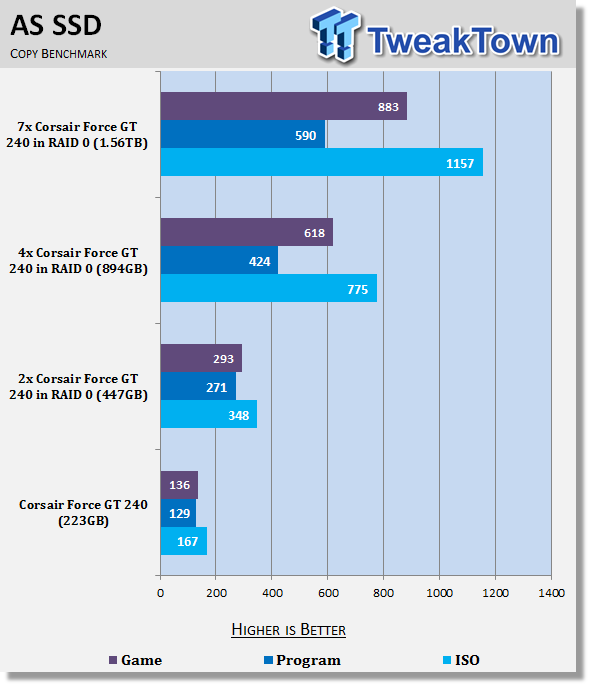
Note: AS SSD is a great benchmark for many tests, but since Crystal Disk Mark covers a broader range of 4K tests and HD Tune Pro covering sequential speeds, we will only use the Copy Benchmark from AS SSD.
 15
15Finally, we finish up our benchmarking with AS SSD and you can again see that as we climb the table in SSDs, we continue to see a good boost in performance with some exceptional scaling being seen.
Final Thoughts
We're not delusional and we understand that the SSD market isn't the largest in the world yet. We also know that when you start talking about RAID SSD setups, that market shrinks considerably. When you start to talk about $4,000 US RAID setups...well...that's a pretty small part of the market indeed.
Not only was the article a bit of fun, though, it also helps give us a really good idea on the scaling of RAID 0 as we add more and more drives into the mix. Most will argue that the need for RAID 0 is very limited, but as an SSD 2-drive RAID 0 user myself, I think that it still has its place.
I think as we start to expand past two drive setups the price does become a bit too scary for most people to consider and honestly, we can see why. But if you're up for a serious SSD setup and you don't want to limit yourself to a single PCIe card solution, then it's a great opportunity.
To put everything into perspective, a OCZ RevoDrive 3 X2 960GB will set you back $3,199,99 US. Going off the OCZ website, that should yield Read speed up to 740 MB/s, Write speed up to 720 MB/s with a Sustained Write of up to 600MB/s.
A four drive Corsair Force GT 240GB setup gives you exactly the same amount of space. When formatted it becomes 894GB which is what the RevoDrive should come in at. Those four drives will set you back $1,919.96 US. Of course, we want to throw in a RAID card and a card that supported up to eight drives like the one we have today will set you back $579.99 US, bringing the total to $2,499.95 US.
Ignoring what Corsair say we could get, we know for a fact that that we're seeing over 2,000 MB/s write speeds under ATTO and under HD Tune Pro we're seeing read performance of over 1,600MB/s.
I haven't used the OCZ RevoDrive 3 X2, but as a user, if I was looking at this performance today, I'd be hard pressed to spend an extra $600 for what could be half the speed. No doubt PCIe storage devices have their place, but if you want big performance and big storage and you're happy to spend big bucks, a RAID 0 2-drive or 4-drive setup using something like the Corsair Force GT 240GB drives we have here today combined with an awesome RAID card like the Areca 1882i is mighty appealing. I can't see how you'd be disappointed in the performance that's on offer here.
Now, if only a couple of these could slide into my sexy Corsair 800D without anyone knowing...I'd be in HDD heaven!
 United
States: Find other tech and computer products like this
over at
United
States: Find other tech and computer products like this
over at  United
Kingdom: Find other tech and computer products like this
over at
United
Kingdom: Find other tech and computer products like this
over at  Australia:
Find other tech and computer products like this over at
Australia:
Find other tech and computer products like this over at  Canada:
Find other tech and computer products like this over at
Canada:
Find other tech and computer products like this over at  Deutschland:
Finde andere Technik- und Computerprodukte wie dieses auf
Deutschland:
Finde andere Technik- und Computerprodukte wie dieses auf 


 TT Show Episode 31 - AI-Powered iPhone and PS5 Pro and an AI-Generated Romantic Comedy
 NASA is about to make Treasure Planet real with a solar sail mission
 AI discovers famous painting wasn't entirely painted by the credited artist
 Dubai government responds to claims cloud seeding caused historic flooding
 Elgato announces new Neo range that includes plug-and-play Wave, Facecam, Stream Deck, and more
 FlexiSpot C7B-Mesh Ergonomic Office Chair Review
 Samsung G8 34-inch QD-OLED Gaming Monitor Review - 175Hz for $900
 ASRock NUCBOX-155H Mini PC Review
 NuPhy Air96 V2 Wireless Mechanical Keyboard Review
 TEAM T-FORCE Siren DUO360 RGB Liquid CPU Cooler Review
 AVerMedia Live Streamer ULTRA HD Review
 AVerMedia Live Gamer 4K 2.1 Review
 XPG Invader X Mid-Tower Chassis Review
 Intel Core i9-14900KS CPU Review
 Arbiter Polar 65 Magnetic Gaming Keyboard Review
 Everything you need to know about the latest ASUS NUC Mini PCs - NUC 14 Pro and ROG NUC
 How to Overclock Your GPU and Boost Your PC Gaming with ASUS GPU Tweak III
 ASUS's AMD Radeon RX 7000 Series GPU lineup has something for every gamer
 ASUS OLED Premium Care defends the ROG Swift OLED PG32UCDM gaming monitor from burn-in
 Patriot Viper Xtreme 5 Engineering Prototype 48GB Dual-Channel Memory Kit Preview