

Introduction
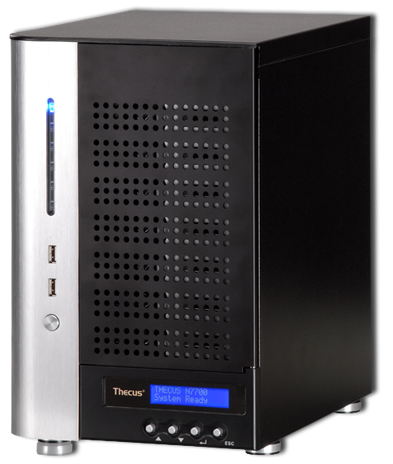
In 2009 TweakTown reviewed an average of one NAS product per month. Most of the products that we tested were from the two biggest names in the NAS server market, QNAP and Thecus. In 2010 TweakTown will continue to review NAS servers and the first two months have brought us a plethora of new products from Thecus, QNAP, Proware, Patriot, Advanced Industrial Computer (AIC) and a few others with products on the way. It is safe to say that our NAS server reviews have started to gain some attention with this market.
Testing NAS servers is a complicated and time consuming task. For the most part modern NAS products are computers in their own right with some using Intel Core2 Duo processors with 4GB of RAM. When writing a NAS review it is easy to focus on the hardware and capabilities, but often the software, applications and setup functionality take a back seat even though these functions are in many cases just as important as the hardware used.
To help ease the strain on both the reader and the writer, today we are going to cover the latest firmware / software release from Thecus. In a couple of days we will also publish a similar article covering the QNAP firmware / software since these are the two companies that send us a sample every other month and also have such extensive software. We plan to keep these available as living documents with updates published throughout the coming years.
Software Version 3.00.08b
The current software release from Thecus is the 3.00.08b and that is what we will be looking at today.
Getting Started and Menu System
Getting Started

The easiest way to log into your Thecus NAS server is to use Thecus' Setup Wizard Software. The Setup Wizard will allow you to access the main login screen of your NAS or run through the basic setup options in an easy to follow, logical order.
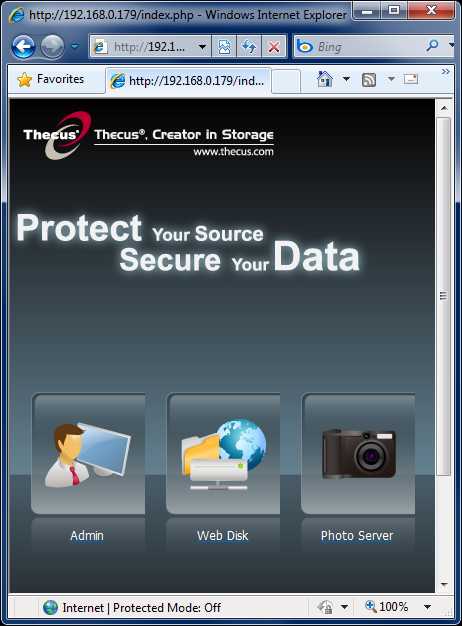
The main login screen on the NAS has three options to get you into the System, Admin, Web Disk and Photo Server. In this section we are going to take a look at the setup and menu system on a Thecus N7700 Pro, one of Thecus' latest, most advanced NAS servers.
Main Menu System

Once inside the system there are eight menus found in the tabs on the left side of the software. Those tabs are System Information, System Management, System Network, Storage, User and Group Authentication, Application Server, Module Management and finally Backup.
In our deep dive today we are going to look at each menu and the settings that are available as options inside the menu system.
System Information
The System Information area covers four areas that show the status of your system.

The first area in the System Information tab is a simple Info page that shows the product ID, Firmware version currently on the NAS and how long the system has been in operation.

The Status area shows if there is a problem with a system fan, processor load in real time and the system up time. There is also a Service Status area that shows which feature is currently running. Services on NAS servers are like the services in your Windows computer. They take up processor cycles and if you do not need a particular service then I would advise you turn that service off. We will cover enabling and disabling system services later in this document.

The Logs area allows you to see server activity and if there is an error with the system. This information can be downloaded to a host computer. If you are ever encountering an error this is the area you need to go to find out what is going on and that will lead you to a way to fix it.

The final area in the System Information tab is for the Online Register. Here you can register your new Thecus NAS and allow Thecus to collect data on a few options like the brand of hard drives your NAS is being used with.
System Management
Many key setup and maintenance features are found in the System Management tab.

The Time area is where you set the system clock or enable the NAS to connect to an outside server to set its own clock. The Time Zone area is a little different than what we are used to seeing. Instead of offering a date line number like -5 Eastern, we found cities listed.

In a work environment it is important to keep your system admins aware with the status of your network and storage systems. The Notification Configuration will allow the NAS to send emails to four unique email addresses. You can also enable an alarm notification that will make the NAS beep when an error has occurred.

Thecus has made updating their NAS server's firmware very easy. In the Firmware Update area you simply point the NAS to the update file (after downloading it from Thecus' website) and hit the apply button.

In order to further conserve power your NAS can be configured to shut down or turn on at specific times or days through the week. There are two action settings per day and each can be configured by time of day. Each day has its own settings. This is useful if you are not using the NAS for remote access and everyone leaves the office at a set time.

Nearly all Thecus' NAS servers are able to work hand-in-hand with smart UPS battery backup power systems. Modern UPS are able to talk to a NAS through either USB or a Serial interface.

Thecus includes a Wake on LAN (WOL) setting that can be either enabled or disabled in this area.

Most Thecus NAS servers allow for SNMP Support. This is the area in which you would configure this option.
Utility
The utility tools are found as a subset inside the System Management tab.

Like most NAS servers, users are able to change the system administrator password. The Thecus models that use a LCD screen for easy status and setup changes can have a separate password.

It is possible to save (download) or set (upload) Thecus NAS products configuration files. This is very useful when migrating products or bringing a new NAS into the system.

Sometimes things don't go as planned and you just want to start over with a fresh plate. In the Reset to Factory Default tab you can make a fresh start.

After making major configuration changes you may need to reboot the system. At other times you may want to turn the NAS off for cleaning or to move the NAS from one location to another. In the Shutdown/Reboot System area this is possible, quickly and easily.

As time passes you may need to run a File System Check to keep everything running smoothly. This is a one button process and is found in this area.
System Network
Thecus products have a couple of areas where I feel they lead the industry. The System Network setup options are one of those areas.

The WAN Configuration area has all of the setup options for the WAN port. It is possible to use your Thecus NAS as a router by connecting your internet connection to the WAN port and your network switch to the LAN port. Another option is to load balance the two connections or set them up in a fail over activate setting.
The gigabit Ethernet ports are able to be configured with Jumbo Frame support up to 9K bytes. If you transfer large files more than smaller files, this option will allow you to transfer data faster than using the standard 1500 byte setting.

The LAN Configure options allow you to also setup Jumbo Frames as well as use your NAS as a DHCP Server. Most users will already have a dedicated router and in that case you can set the LAN port up to accept settings from your routers own DHCP server.

Thecus NAS servers have Samba Service and you can setup the system up to use File Access Cache. A Recycle Bin can also be enabled as well as Anonymous Login Authentication.

Thecus NAS products also support AFP. This is the area where you configure this setting.

NFS Support, check. The NFS area is where you enable or disable this feature.

Thecus NAS servers allow for File Transfer Protocol (FTP) transfers. In the FTP area you can configure the settings. Later we will cover the user and group management.

One of the neatest features for home or even small office users is the Media Server. This will allow you to make folders for music, movies and other multimedia types. This area is where you can choose the folders that you would like to share. I know if I ran an office this area feature would go over well and everyone would be playing music and watching movies over the network. On second thought, maybe this is best left for home users.

Modern NAS servers are very powerful and setting up an intranet or web page is very easy on Thecus' hardware. Before you get started making your own website, you need to enable the feature and this is where that is possible.

If you are running a Playstation 3 or Xbox 360 then you are fully aware what UPnP is. This feature will allow you to stream music and movies to other media devices and play them without copying the files over.

Thecus NAS products are able to be used in both Nsync and Rsync configurations.

Bonjour is also supported as a service and can be enabled or disabled in this area.
Storage Settings
The primary reason why most people choose a NAS server is for data storage that is accessible over a network by multiple computers. The main part of that is data storage and if setting that up isn't user friendly then all is lost. In this section we will see the Storage Settings and below how to setup a RAID Array.

The Disk area in the Storage Settings tab allows you to see the status of each drive in the system and even run tests on the drives to verify they're working correctly.

The RAID area allows you to view your RAID arrays status as well as build or edit arrays. We will look at building a new array briefly.

The Space Allocation allows us to setup iSCSI and the iSCSI options.

The Shared Folder area is where you add or remove folders on the NAS.

When running multiple NAS servers you have the option to stack them for extra data integrity or more capacity.

The Thecus software will allow you to mount an ISO image.
RAID Setup
Starting off at the RAID area in the Storage Settings tab, we can start to build a RAID array.

Here we see the RAID Configuration screen. To start you need to select the disks you would like to use in your array.

Once you have your disks selected you have a couple of options. Here we see the stripe size options that are available. Thecus offers several stripe sizes.

Next is the file system. In our testing we found that the XFS file system is the fastest for nearly all usage scenarios by a large margin.

Be sure to select the array type and hit the Create button. Most Thecus NAS servers are able to run RAID 0, 1, 5, 6 and 10. RAID 1 and 10 needs to run on an even number of disks.

Once you are finished setting up your RAID array you can watch as the NAS formats the drives. This can take up to 24 hours on large drive groups in RAID 5 and 6.
User / Group Authentication and Application Server
User and Group Authentication
Office administrators and even some home users will appreciate the option to setup user groups and access policies for individual users.

To start down the path of managed access, you must first setup and enable ADS.

After enabling support for the function you can start by adding local users. If at some point you need to edit users access or remove them entirely, the User area is where those options are found.

It is also possible to make group policies and add users to a specific group.

One very nice feature is the ability to upload or download a backup file that holds the user policy data.
Application Server
Using your NAS as an application server is quite easy and the Application Server area is where you configure your applications. Later in this article we will discuss the Thecus User Communities and how they have managed to build custom applications that add to the functionality of Thecus NAS servers.

Out of the box Thecus includes two applications. The first is the print server. You can attach a USB printer to one of the many USB ports on a Thecus NAS.

The second application included with the NAS handles iTunes. I have to admit that I am not the biggest Apple fan so you will have to explore this one on your own.
Module Management and Backup
Module Management

There are two types of modules that are easily installed on Thecus' software system. The first is System Modules and the second is User Modules. Most of these come from Thecus' user community that are busy building everything from Python to Torrent and Usenet download managers.
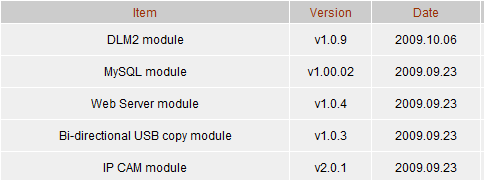
Thecus also has a small, but growing list of modules on their website that are available for download and easily install on their NAS servers.
Backup

The Backup tab has a reappearance of the Nsync option and here you can setup data backup tasks.

On the more advanced NAS servers from Thecus they have a fairly new option called Dual Dom. This is essentially your built in boot drive and the NAS servers ability to keep a second copy of your configuration just in case you somehow damaged your first one. The best option for most users will be to keep the settings at default so the feature is enabled and automatically saves a copy at predetermined intervals.
Forums and User Communities
NAS servers are very powerful tools and they can be used for a lot more tasks than what the original designers intended. As we said in the introduction, these are for the most part full bore computers that are essentially running a Linux operating system. There are many talented software writers out there that build additional functions into Thecus' NAS products. Most of these are installed through the module install feature and can be integrated into your system just like the factory modules. It is important to remember that most of these application packages are beta and testing is usually limited by the group of early adapters like yourself.
Below are a list of known forums and websites dedicated to NAS products and some Thecus specific groups.
- The Official Thecus Forum at Hexus
- The Thecus User Group
- The Thecus Forum Europe
- NAS-Central
If you own a Thecus NAS server and are looking to obtain more knowledge or gain additional functionality, these are all good places to start your research.
Final Thoughts
Thecus' firmware/software is one of the best in the business and when you start to break the software down into individual components you will find that Thecus leads the industry in several categories. The latest software, revision 3 is based on AJAX technology and is very fast unlike some of the other software packages I have tested in the past.
For the most part every task that you would need to complete in the software can be achieved easily and with little to no research into the settings. Making things even easier if you find yourself in unfamiliar territory are the user groups and forums that do a very good job explaining settings in detail. Thecus' own PDF manuals should always be the first place to start and they are written very well, but sometimes you just want that extra bit of confirmation when getting a new system up and running.
I hope you found this deep dive into Thecus' software educational. We are looking forward to reviewing several products from Thecus in 2010 and hope you join us for each one.
 United
States: Find other tech and computer products like this
over at
United
States: Find other tech and computer products like this
over at  United
Kingdom: Find other tech and computer products like this
over at
United
Kingdom: Find other tech and computer products like this
over at  Australia:
Find other tech and computer products like this over at
Australia:
Find other tech and computer products like this over at  Canada:
Find other tech and computer products like this over at
Canada:
Find other tech and computer products like this over at  Deutschland:
Finde andere Technik- und Computerprodukte wie dieses auf
Deutschland:
Finde andere Technik- und Computerprodukte wie dieses auf 


 TT Show Episode 31 - AI-Powered iPhone and PS5 Pro and an AI-Generated Romantic Comedy
 NASA is about to make Treasure Planet real with a solar sail mission
 AI discovers famous painting wasn't entirely painted by the credited artist
 Dubai government responds to claims cloud seeding caused historic flooding
 Elgato announces new Neo range that includes plug-and-play Wave, Facecam, Stream Deck, and more
 FlexiSpot C7B-Mesh Ergonomic Office Chair Review
 Samsung G8 34-inch QD-OLED Gaming Monitor Review - 175Hz for $900
 ASRock NUCBOX-155H Mini PC Review
 NuPhy Air96 V2 Wireless Mechanical Keyboard Review
 TEAM T-FORCE Siren DUO360 RGB Liquid CPU Cooler Review
 AVerMedia Live Streamer ULTRA HD Review
 AVerMedia Live Gamer 4K 2.1 Review
 XPG Invader X Mid-Tower Chassis Review
 Intel Core i9-14900KS CPU Review
 Arbiter Polar 65 Magnetic Gaming Keyboard Review
 Everything you need to know about the latest ASUS NUC Mini PCs - NUC 14 Pro and ROG NUC
 How to Overclock Your GPU and Boost Your PC Gaming with ASUS GPU Tweak III
 ASUS's AMD Radeon RX 7000 Series GPU lineup has something for every gamer
 ASUS OLED Premium Care defends the ROG Swift OLED PG32UCDM gaming monitor from burn-in
 Patriot Viper Xtreme 5 Engineering Prototype 48GB Dual-Channel Memory Kit Preview