

Introduction
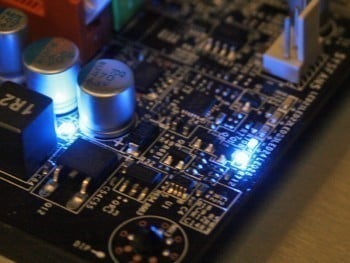
Over the last six months the idea of going green with each motherboard manufacturer has picked up. Ideas and thoughts of a cleaner and greener PC industry are now taking hold. GIGABYTE can be thanked for kicking this off. Not only have they been the first to introduce solid state components across the entire line of boards, but also the first to introduce a hardware based voltage switching system that allows the board to physically shut down un-used phases when the CPU is at idle and during lower states of activity; very impressive. GIGABYTE called this technology DES or Dynamic Energy Saver. GIGABYTE has since upgraded to DES Advanced.
Not to be outdone, ASUS followed suit, but by doing things their own way so as not to look like they have followed a rivals company idea. ASUS brought something similar, but in our opinion, far less sophisticated. Where the DES was able to shut down two phases at a time, ASUS has two states running four or eight phases, resulting in a bit of energy wasted. While the CPU needed more than four phases during our testing, it didn't need all eight; six could have done. ASUS call this technology EPU or Energy Processing Unit. Again, an upgrade has been done and ASUS now call this EPU 6.
Today we have added a new contender to the market, that being MSI. It has only been of late that MSI has decided to enter the green PC market and it's very good to see them do it. MSI has decided not to jump straight in, but to work on its energy saving system a bit more to get the bugs out (something we think ASUS and GIGABYTE could have done). With that in mind, MSI has brought to the market what they like to call DrMOS.
GIGABYTE DES Advanced

First off on the list is DES Advanced. DES isn't new to us as we have already taken a look at the features of it. So, only a basic run down of DES Advanced is needed here.
The same principal behind DES applies to the new Advanced version. The board works off a Hardware IC chip from Intersil Technology that controls the voltage phase states, dependant on CPU load. In the simplest terms, when the CPU is at low load or idle states, depending on what level of throttling has been selected by the end user, the board shuts down un-needed extra phases. With current CPUs this allows the system to shut down all but two phases. At the same time, the CPU clock speed is throttled down using EIST and the voltage is also dropped even further than Intels specs, allowing for further voltage savings.
If you are lucky enough to have a VRM11.1 CPU (such as the new E8400 Series) GIGABYTEs board is VRM11.1 compatible and is able to shut down to a single voltage phase at idle mode; that's just one phase working when the system has no load. This is extremely impressive as most systems spend 80% of their time in idle mode each day in office environments and even in an average home users PC.
DES Advanced changes a few things that were a problem on DES based systems, namely overclocking. Unless you used the C.I.A.2 overclocking feature with the original DES systems, as soon as you manually clocked up the FSB you would lose DES; it would simply shut off. DES Advanced continues to work when you manually overclock the system to keep the power levels down while still giving you a good overclock. However, during our tests we found that with DES Advanced enabled we couldn't get the CPU to run as high a clock speed as we could when we ran without DES enabled. For example, we managed to hit 571MHz FSB with DES Advanced disabled, but with it enabled FSB speeds were limited to 552MHz. While still good, that extra clock speed can mean the difference between buying and not buying this board. Thanks to GIGABYTE, though, if you're the extreme user who isn't focused on power saving, you can disable DES Advanced and clock your way to freedom.
The Test Board

Our test board for today is GIGABYTEs EP45 Extreme Motherboard. This is the newest board to come from GIGABYTE with the latest VRM 11.1 specs as well as featuring DES Advanced in its latest form. This makes it an ideal candidate for today's tests.
Not only will we be testing DES Advanced's ability to keep power down, we will also be performing some overclocking tests to determine how much of an influence there is by the DES Advanced system under overclocked conditions.
ASUS EPU 6

Now we move onto another upgrade of an existing technology, namely EPU 6. ASUS has named its EPU 6 as the all-round system power saver which is designed to reduce total system power and not just the CPU. How ASUS intends to do this is to not only control the voltage and phases of the CPU itself, but also the system memory, graphics card, HDD and fans; a total control centre design.
This is a far better upgrade from the original EPU design. However, while a good idea in theory, ASUS really didn't give the EPU enough control. Rather, it's just a simple on/off system. When the CPU was at idle, the board would shut down and use only four phases of energy. When the CPU would start to throttle up, the board would enable four extra phases, giving the boards eight phases of full power. While good in theory, compared to GIGABYTEs design it simply isn't technologically as advanced and this led to a lot of marketing campaigns from both ASUS and GIGABYTE. During our testing of the original setup, we found that EPU would even cause system crashes in prime95 when under hard load. It would simply not switch in quick enough to tackle the required loads.
As is possible with DES Advanced, EPU 6 also works when overclocking the system by the AI Overclocker or when doing it manually. And again, if you enable EPU 6 overclocking does take a hit. But thanks to the users interface, you can disable EPU 6 and go for broke for the highest CPU clock speed.
The Test Board

Moving to our test board, we have the ASUS P5Q Deluxe motherboard that we recently tested. Like the GIGABYTE board, we have selected a few tests mostly relating to power and overclocking, as we have already reviewed the board itself and know just how good it is.
MSI DrMOS

Now we come to our newest player in the Green PC market, that being MSI. We haven't seen any green offerings from MSI until now; this could be because they haven't mastered the technology, or simply they would rather get it right the first time. We hope it's the latter in this case.
MSI has gone for a different approach to its power saving technology by changing the way the board processes energy. Rather than using a traditional top and bottom Mosfet layout with a driver IC to control the voltage flow, MSI has chosen to go with Integrated Driver Mosfet technology on this board.
How this works is a Driver Mosfet which has built into it a single IC chip comprising a top, bottom and Driver IC chip. This chip is slightly bigger than a single Mosfet but takes up less real estate on the board thanks to being a single chip rather than three having to be used. Combining this along with Hi-C Cap capacitors and solid state chokes, we get a cooler running board along with the ability to run a much more stable system.
Powering the CPU is a total of six phases which are able to be shut down one at a time and powered up one at a time to help reduce overall system power consumption. When in idle, the board can lower itself to two phases and increases one phase at a time, depending on how much the system needs. MSI has gone some extra steps to add in two phase voltage stability on the memory to keep things as stable as possible.
MSI uses its Core Centre to control; what they refer to as GreenPower, the name for the energy saving part of it. In all, the total technology system is called DrMOS technology.
The Test Board

Our test board from MSI is the P45 Platinum which we reviewed a few months ago. The same set of tests have been run on the MSI board as with the ASUS and GIGABYTE boards to determine just how far each board can go in FSB and CPU clockspeeds with both DrMOS operating and disabled. Along with this, we did tests on the amount of power used at idle and load with DrMOS enabled and disabled as well as temperatures of the major components.
Overclocking
Overclocking is something we always enjoy here; not only does it show just how much time each motherboard manufacturer puts into their boards, but also shows if the effort pays off.
GIGABYTE Overclocking With DES Advanced Disabled
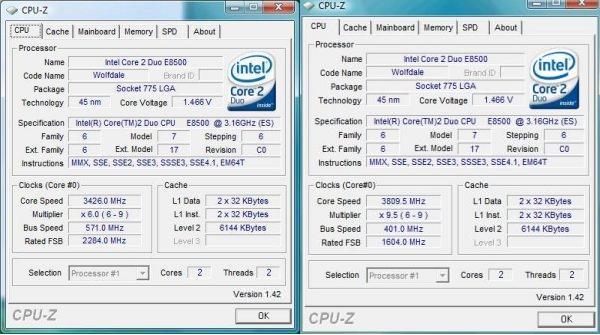
Here we see a very impressive FSB and CPU overclock; we managed 571MHz FSB and 3.85GHz on the CPU which was as stable as we could get it.
GIGABYTE Overclocking With DES Advanced Enabled
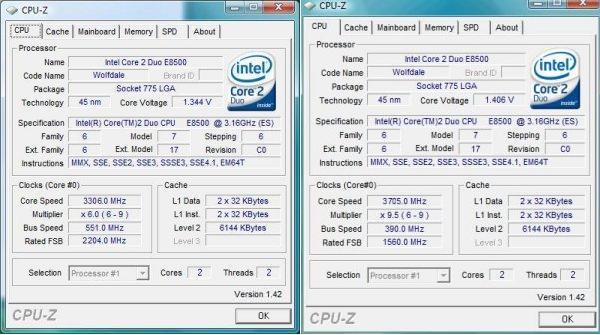
Now we see that the board takes a dive in overclocking. While DES Advanced does help power savings, it doesn't give the CPU enough power to really overclock to its limits. However, at 3.7GHz and a 551MHz FSB, we were still quite impressed.
ASUS Overclocking With EPU 6 Disabled
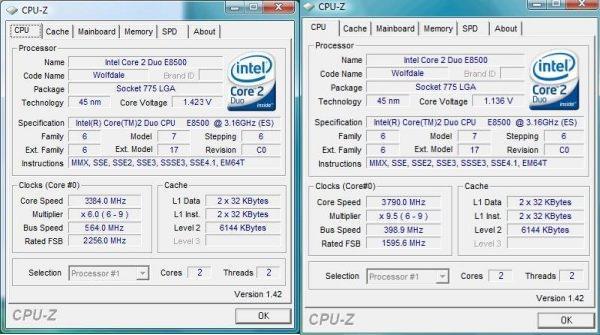
With EPU 6 disabled we managed to hit an impressive 564MHz FSB. Until the EP45 Extreme hit the market, this was the fastest DDR2 board we saw. Checking for max clock speeds, we managed to hit 3.79GHz which is just about on par with what our GIGABYTE board managed to give us.
ASUS Overclocking with EPU 6 Enabled
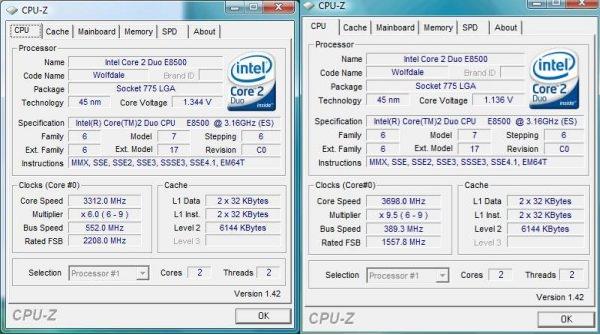
Enabling EPU 6 gives the board a hit, taking it down to a 552MHz FSB. We see that the energy savings from both competitors give around the same clock and FSB rates.
MSI Overclocking with DrMOS Disabled
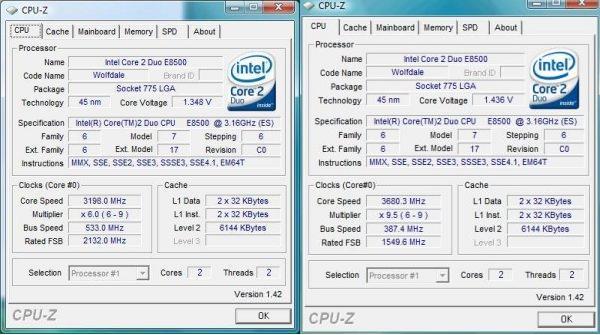
With DrMOS disabled we get quite a bit of an FSB change between the MSI board and the ASUS and GIGABYTE boards. However, the clock speeds are still pretty high. The ASUS board and GIGABYTE board are the top contenders, though.
MSI Overclocking with DrMOS Enabled
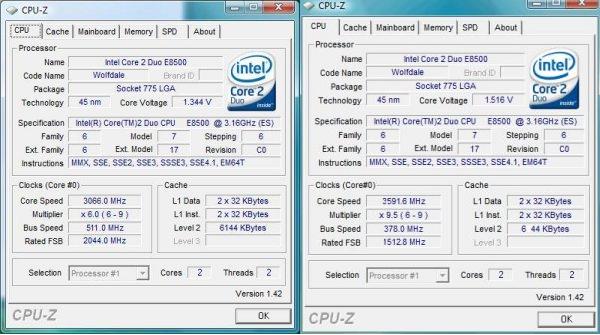
With DrMOS enabled the overclocking function takes a bit of a hit, but not as much as we expected.
Benchmarks - Test System Setup, Stock Clock Power and Heat
Test System
Processor: Intel Core 2 Duo E8500
Memory: 2x 1GB DDR2-1186 Geil (Supplied by Geil)
Hard Disk: 500GB Western Digital SE16 (Supplied by Western Digital)
Graphics Card: GIGABYTE 9800GX2 (Supplied by MSI)
Cooling: GIGABYTE 3D Galaxy II (Supplied by GIGABYTE)
Operating System: Microsoft Windows Vista SP1
Drivers: Intel INF 9.0.0.1008, Forceware 175.16
We used a common ground of components to determine the overall power drain of each system. While the software of each system does give a current power usage, this can't be fully trusted. To get a real power reading we use our wall power meter to determine the amount of power consumed.
Our stock clocked power consumption tests were done at idle in Windows Vista SP1 with no background systems running or any additional applications loaded. We used the stock 3.16GHz clock of 9.5x with a 333MHz FSB.
It should also be noted here that all three motherboards are based on the same Intel P45 chipset so as to stick with the most even playing field possible.
Stock Clockspeeds - Power Consumption
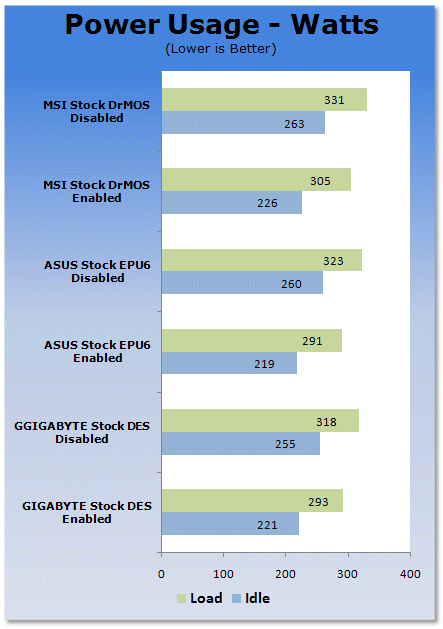
Here we see that at stock levels ASUS manages to get just a tiny bit ahead of the GIGABYTE board with the power management enabled. With it disabled GIGABYTE manages a slight win here. MSI brings up the rear, but not by a huge gap, that's for sure.
Stock Clockspeeds - Temperatures
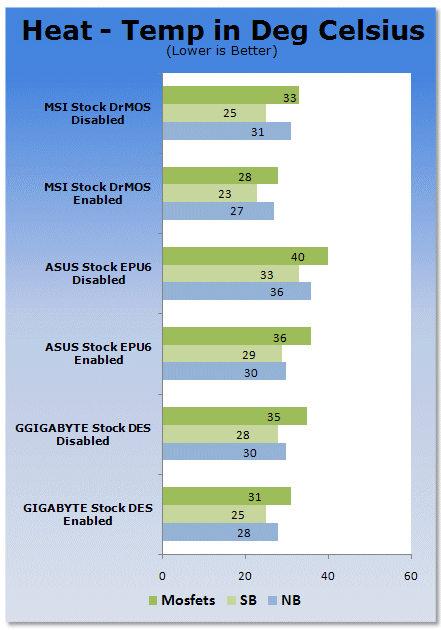
In terms of heat we see that MSIs Circu-pipe manages to keep things quite cool, and the DrMOS technology does help keep it cooler than the traditional components.
Benchmarks - Max FSB Overclock - Power and Heat
Maximum FSB Overclock - Power and Heat
Now we move into the FSB overclocking stages. These tests were done with the highest obtained FSB each board was able to achieve with their respective power management disabled and enabled.
Maximum FSB - Power Consumption
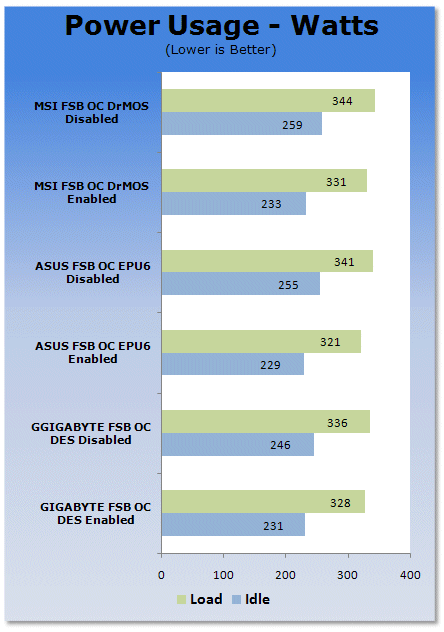
Power wise, we see ASUS again just in front when the power management is enabled. Despite GIGABYTEs higher clock speed the extra power required to get it stable isn't that that much more.
Maximum FSB - Temperatures
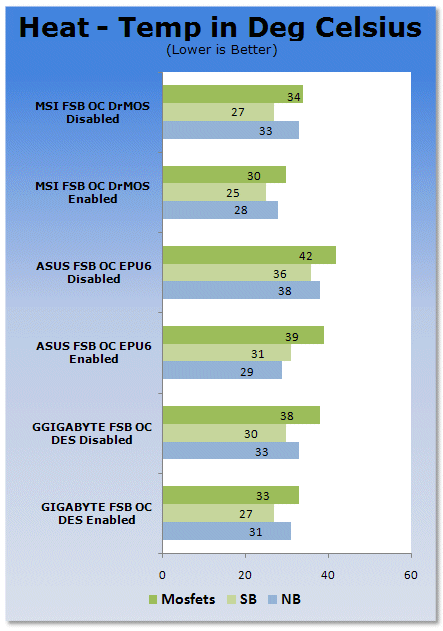
Again, on the temperature side of things MSIs new DrMOS Driver Mosfets manage to reduce heat quite a bit here.
Benchmarks - Max CPU Overclock - Power and Heat
Maximum CPU Overclock - Power and Heat
Lastly on our list of tests we have the maximum CPU core clock results. Again, power consumption tests were done with each boards' respective power management enabled and disabled.
Maximum CPU Overclock - Power Consumption
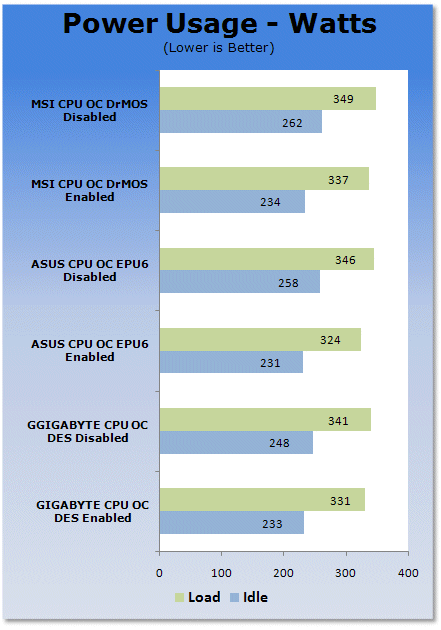
In our final power test we see ASUS still managing to just keep in front of GIGABYTE only when EPU 6 is enabled. With the energy saving systems disabled, GIGABYTE manages to just creep into the lead.
Maximum CPU Overclock - Temperatures
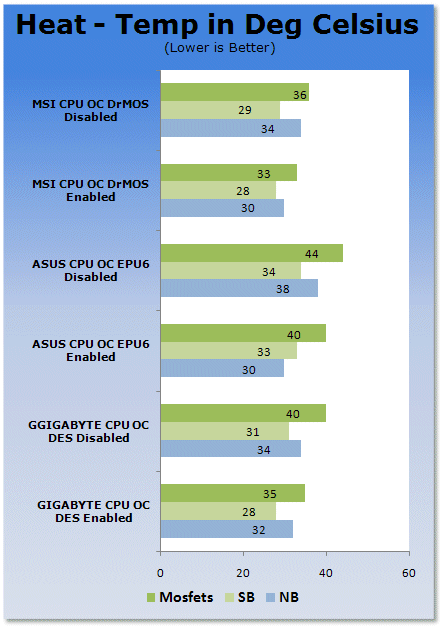
Finally, in our last test we still see MSIs Circu-pipe and DrMOS driver Mosfets managing to keep the heat right down.
Final Thoughts
Well, we hope today we have answered a few questions for you in terms of each of the current leaders in power saving technologies along with their potential for overclocking and power saving features. With the boards having also been reviewed individually in the past, we now have a clearer picture of their capabilities.
GIGABYTE DES Advanced
DES Advanced is a great improvement on the original DES series, simply because you can now overclock and keep DES Advanced working. Not only this, but you no longer need to have the DES Advanced applet running all the time; just set it to go and it's right. And if you're like me who likes to overclock to the limit, the ability to disable DES Advanced is a great feature as well.
ASUS EPU 6
ASUS managed to get the overall max power savings here thanks to its ability to tweak the voltages on the memory bus, HDD, GPU and CPU; it's an all round system designed to keep power as low as possible. The best option for this is a HTPC or office environment setup. EPU 6 like DES Advanced does give a performance hit to overclocking, but its upgrade on EPU is extremely impressive. Stability issues have been revised and there are no issues found on this new technology.
MSI DrMOS
MSIs first dive into the green PC market is extremely impressive. With time, tweaking and new technologies we will soon see DrMOS take off on just about all MSI boards. The new Driver Mosfets manage to help keep the boards' key components at cooler temperatures than any of the competitor's boards, showing just how well this new technology can work.
 United
States: Find other tech and computer products like this
over at
United
States: Find other tech and computer products like this
over at  United
Kingdom: Find other tech and computer products like this
over at
United
Kingdom: Find other tech and computer products like this
over at  Australia:
Find other tech and computer products like this over at
Australia:
Find other tech and computer products like this over at  Canada:
Find other tech and computer products like this over at
Canada:
Find other tech and computer products like this over at  Deutschland:
Finde andere Technik- und Computerprodukte wie dieses auf
Deutschland:
Finde andere Technik- und Computerprodukte wie dieses auf 

 Windows 10 users: Get ready to be bugged about creating a Microsoft Account
 TT Show Episode 31 - AI-Powered iPhone and PS5 Pro and an AI-Generated Romantic Comedy
 NASA is about to make Treasure Planet real with a solar sail mission
 AI discovers famous painting wasn't entirely painted by the credited artist
 Dubai government responds to claims cloud seeding caused historic flooding
 ASUS ROG Swift Pro PG248QP Gaming Monitor Review - Frames, frames, and more frames
 FlexiSpot C7B-Mesh Ergonomic Office Chair Review
 Samsung G8 34-inch QD-OLED Gaming Monitor Review - 175Hz for $900
 ASRock NUCBOX-155H Mini PC Review
 NuPhy Air96 V2 Wireless Mechanical Keyboard Review
 TEAM T-FORCE Siren DUO360 RGB Liquid CPU Cooler Review
 AVerMedia Live Streamer ULTRA HD Review
 AVerMedia Live Gamer 4K 2.1 Review
 XPG Invader X Mid-Tower Chassis Review
 Intel Core i9-14900KS CPU Review
 Everything you need to know about the latest ASUS NUC Mini PCs - NUC 14 Pro and ROG NUC
 How to Overclock Your GPU and Boost Your PC Gaming with ASUS GPU Tweak III
 ASUS's AMD Radeon RX 7000 Series GPU lineup has something for every gamer
 ASUS OLED Premium Care defends the ROG Swift OLED PG32UCDM gaming monitor from burn-in
 Patriot Viper Xtreme 5 Engineering Prototype 48GB Dual-Channel Memory Kit Preview