

Introduction
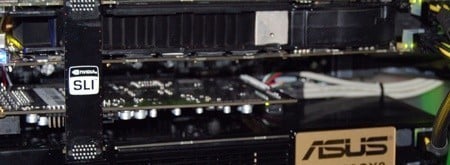
I've never before found myself in the position where I've been this rushed off my feet to get an article online. This afternoon I was e-mailed the Quad SLI Vista Driver! - At the same time, a second 9800 GX2 rocked up in my hot little hands. It was clear what I needed to do.
The problem is that we thought we would have a bit more time, so we haven't had the chance to organize our SLI motherboard and what not yet. We deal with a lot of overseas companies, but it's always nice to have some local Australian contacts handy. The boys over at iBuyPower in Australia has come to the rescue for us tonight.
We found ourselves in the IBP bunker sitting in front of a 4GHz Water-cooled system with an SLI capable motherboard and an 8GB Pen Drive in hand with the 174.53 Quad SLI Driver installed.
You want results? We've got 'em! Moving on...
Some 1337 Pictures

Come on driver......please install!

Looks like it's working!

Woohoo!

:shock: - We ended up seeing up to 270 FPS in this test, later in the night.

MMMmmm, that's how you kill a wallet!

The machine of choice.

The whole setup in all its glory.
Test System Setup and 3DMark06
Test System Setup
Processor(s): Intel Core 2 Quad QX9650 @ 4GHz (400MHz x 10)
Cooling: Swiftech Apogee GTX Block (CPU) 3x 120mm Radiator, MCP655-B Pump
Motherboard(s): EVGA 780i SLI
Memory: 2 X 2GB OCZ Reaper X PC6400 DDR-2 4-4-3-12
Hard Disk(s): Western Digital Raptor 150GB 10,00RPM SATA
Power Supply Zalman 1000W Modular
Operating System: Windows Vista Home Premium 64-Bit
Drivers: Forceware 174.53
All hardware components were provided by the guys at iBuyPower Australia.
Due to the quickness and the fact that we simply don't have our large array of benchmarks that you've become accustomed to seeing, we have had to limit our testing down to what we feel were the most important benchmarks. We tested three applications as mentioned below.
3DMark06 lets us gauge exactly where the cards sit, so that was a necessity.
Unreal Tournament 3 is also here, which is one of the latest fast-paced shooters on the market.
Finally we've got Crysis. How could we not include it? - Plus I know if we didn't, the local internet forums would have been coming at us with pitch forks and torches.
I'm not going to delude myself by thinking that you've even gotten this far in the reading of the text, so we're just going to get into it. We've done a few different setups and what not. Let's cross our fingers this SLI driver does what it's supposed to do!
3DMark06
Version and / or Patch Used: Build 110
Developer Homepage: http://www.futuremark.com
Product Homepage: http://www.futuremark.com/products/3dmark06/
Buy It Here

3DMark06 is the very latest version of the "Gamers Benchmark" from FutureMark. The newest version of 3DMark expands on the tests in 3DMark05 by adding graphical effects using Shader Model 3.0 and HDR (High Dynamic Range lighting) which will push even the best DX9 graphics cards to the extremes.
3DMark06 also focuses on not just the GPU but the CPU using the AGEIA PhysX software physics library to effectively test single and Dual Core processors.
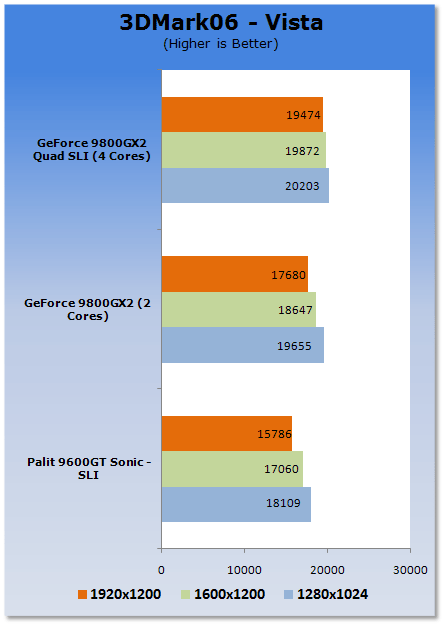
It doesn't look all that impressive, but when you really look into the graphs with details you can see just how powerful the GX2 is. For example, moving from 1280 x 1024 up to 1920 x 1200 on the Quad setup gives us a drop of only 729 3DMarks. You can see the single card gets a larger 1975 3DMark hit when you move from the lower to higher resolution.
The 9600GT in SLI cops a similar hit in performance when you move from 1280 to 1920, with a score difference of 2323 3DMarks.
Benchmarks - Crysis
Crysis
Version and / or Patch Used: 1.2
Timedemo or Level Used: Custom time demo
Developer Homepage: http://www.crytek.com/
Product Homepage: http://www.ea.com/crysis/
Buy It Here

From the makers of Far Cry, Crysis offers FPS fans the best-looking, most highly-evolving gameplay, requiring the player to use adaptive tactics and total customization of weapons and armor to survive in dynamic, hostile environments including Zero-G.
Real time editing, bump mapping, dynamic lights, network system, integrated physics system, shaders, shadows and a dynamic music system are just some of the state of-the-art features the CryENGINE™ 2 offers. The CryENGINE™ 2 comes complete with all of its internal tools and also includes the CryENGINE™ 2 Sandbox world editing system.
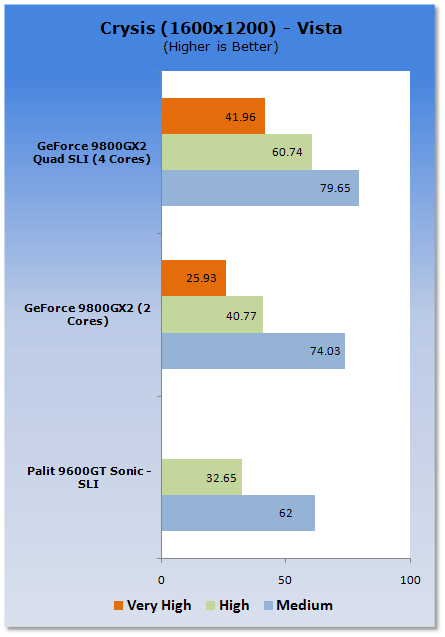
We updated Crysis to 1.2 before we started testing, and there seemed to be issues with it in conjunction with the new driver that we're using. The issue was present in both Quad SLI and the single card setup. The average FPS was 4FPS; to give you an idea of the problems we experienced. So for that reason, what we have chosen to do is include not only medium but also high detail runs, and for the GX2s? VERY HIGH.
You can see that the gains at the lower settings don't really exist, but when we climb, the setups scale extremely well. We manage to get some very nice numbers on High and even Very High on the Quad Core setup.
Benchmarks - Unreal Tournament 3
Unreal Tournament 3
Version and / or Patch Used: 1.1
Timedemo or Level Used:
Developer Homepage: http://www.epicgames.com/
Product Homepage: http://www.unrealtournament3.com/
Buy It Here

Following the formulae that made Unreal Tournament so great the third installment to the series has hit us recently with better than ever graphics. The games uses the latest Unreal Engine which like most modern day games when maxed out puts the pressure on our lineup of graphics cards.
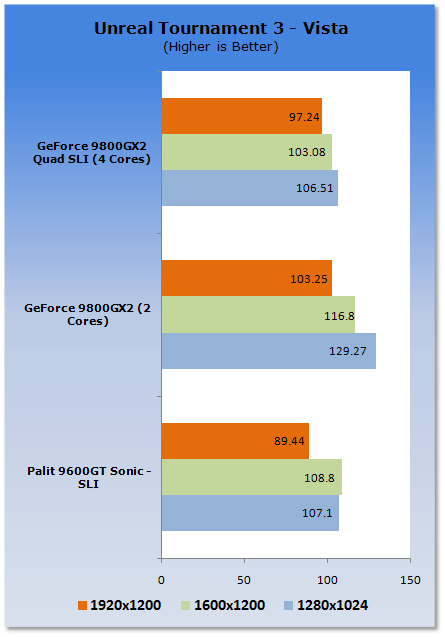
This isn't an uncommon picture where UT3 really spits out some weird results. If you're a UT3 player you will probably find yourself perfectly happy with a single 8800GT or 8800GTS, as while the game looks absolutely gorgeous, the engine behind it is fantastic and it runs like a dream on significantly cheaper setups.
Final Thoughts
Officially, Quad SLI isn't due out till the 25th, so there is still a high chance that NVIDIA have another driver up their sleeves. We can see that we just couldn't play Crysis at 1920 x 1200 which is a bit of a bummer due to the fact that at medium I think we could have pulled out some decent numbers.
Crysis numbers were just literally draw dropping at medium. At one point, myself and the owner of iBuyPower managed to see the counter in Crysis get to 120FPS. We also saw Test 5 of 3DMark06 get 270FPS when we started to mess around with the system a bit more.
Since we were so hopped up on Dickens Energy Cider we still found ourselves with a spring in our step at 1am, so we thought we would do a bit of overclocking!
We tried 4.6GHz, then 4.8GHz but the system didn't really want to have a bar of it. The sweet spot was 4.4GHz. Quite a nice overclock from the stock 3GHz. We managed not only to scream past 20,000 3DMarks, but climbed up over 22,000 3DMarks as you can see in the picture below.

It was a long night, and while I had hoped to have cranked this article out last night, due to getting home at 3am it just wasn't going to happen.

Again, we have to thank our major sponsors of the night; Doritos, McDonalds, IBuyPower Australia and Dickens Cider Australia. Without them it would have been a long and boring night filled with starvation.
 United
States: Find other tech and computer products like this
over at
United
States: Find other tech and computer products like this
over at  United
Kingdom: Find other tech and computer products like this
over at
United
Kingdom: Find other tech and computer products like this
over at  Australia:
Find other tech and computer products like this over at
Australia:
Find other tech and computer products like this over at  Canada:
Find other tech and computer products like this over at
Canada:
Find other tech and computer products like this over at  Deutschland:
Finde andere Technik- und Computerprodukte wie dieses auf
Deutschland:
Finde andere Technik- und Computerprodukte wie dieses auf  Dragon's Dogma 2 patch delivers some important fixes - but not the one everyone wants
 AMD's top Strix Point Halo APU could have 16 Zen 5 cores in 2 x CCDs, mirroring Ryzen 9000 CPUs
 FBI confirms Chinese hackers have infested US water and energy systems
 Microsoft's new Windows 11 'AI Explorer' feature set to anger AMD and Intel
 High-end PC maker gives advice that could fix Intel Core i9 CPUs crashing in games
 ASUS ROG Swift Pro PG248QP Gaming Monitor Review - Frames, frames, and more frames
 FlexiSpot C7B-Mesh Ergonomic Office Chair Review
 Samsung G8 34-inch QD-OLED Gaming Monitor Review - 175Hz for $900
 ASRock NUCBOX-155H Mini PC Review
 NuPhy Air96 V2 Wireless Mechanical Keyboard Review
 TEAM T-FORCE Siren DUO360 RGB Liquid CPU Cooler Review
 AVerMedia Live Streamer ULTRA HD Review
 AVerMedia Live Gamer 4K 2.1 Review
 XPG Invader X Mid-Tower Chassis Review
 Intel Core i9-14900KS CPU Review
 Everything you need to know about the latest ASUS NUC Mini PCs - NUC 14 Pro and ROG NUC
 How to Overclock Your GPU and Boost Your PC Gaming with ASUS GPU Tweak III
 ASUS's AMD Radeon RX 7000 Series GPU lineup has something for every gamer
 ASUS OLED Premium Care defends the ROG Swift OLED PG32UCDM gaming monitor from burn-in
 Patriot Viper Xtreme 5 Engineering Prototype 48GB Dual-Channel Memory Kit Preview