









Introduction
Intel has definitely come up with the trump card when it comes to their Core architecture. It has finally given away the "more GHz is better" crap they have been trying to push down our throats ever since the Pentium 4 came on the market. When Athlon 64 made its mark, Intel was in extreme damage control.
One of the biggest embarrassments for Intel (though they would never admit this) was the fact their mobile CPU (the Pentium-M) was able to kill in gaming benchmarks, whilst the highest clocked Pentium 4 processor was quite dismal in comparison, showing Intel just how flawed the Pentium 4 was for this task. While having some major downsides, the Pentium 4 was the best processor for multimedia applications such as movie and audio encoding tasks. Its raw power was unmatchable by the Pentium-M or the Athlon 64.
Learning from its technological mistakes, Core architecture came from the ashes of the Pentium 4 with a vengeance. Core architecture was based around the Pentium-M's extreme power saving features as well as its gaming performance, along with this came the extreme multimedia capabilities of the Pentium 4. The result is the Core 2 series of CPUs, the Duo being the best value and power for your money.
While having a good CPU is one thing, you need a solid platform to back it up. Until recently, Intel has relied on its 975X and P965 chipsets. 975X was designed primarily for the Pentium Extreme series of CPUs, and while compatible, the Core 2 series features didn't really come up to par. Without DDR2-800 memory support and an outdated Crossfire setup, its performance was behind the 8 ball. P965 really filled the gap, but that's about all, without a true Crossfire setup it has some performance issues when running two ATI graphics cards. This is where Intel has finally looked at future-proofing some of its CPUs and chipsets, hence the launch of the new Intel 3 series of chipsets, with the P35 being the first mainstream to gaming platform to emerge.
Now that P35 has been given the all clear and is designed to run with the new 1333MHz FSB CPUs, P35 based boards are hitting the shelves. Today we have five on offer, each from a different company. The purpose is of course to see what is on offer, what is worth your money and who has the best features. Gigabyte, ASUS, ABIT, Foxconn and ECS put their mid-range boards on the chopping block for us, so let's get stuck into this.
The Boards - Specifications

Normally we have our specs in a specific layout, but due to the amount of boards we have here today we have decided to go with a table setup, a much easier way to compare what each board has.
Both the Gigabyte DS4 and the ASUS P5K-E have the most features available out of all the boards.
The Boards - Foxconn P35A
Foxconn P35A

First off we have the Foxconn P35A motherboard. Normally we would have the board and package setups on different pages, but to save some space we have gone with a more compact setup this time and put everything on one page per board. Foxconn's package is pretty plain on the front, a few interesting graphics but nothing much.

The back of the box contains a lot of marketing info. However, one of the biggest things we like to see is missing here, that being a full colour photo of the board. So if you were to see this box on the shelf at your local computer retailer, you're not going to have a good idea on what the board looks like until it's out of the box.

Foxconn's manuals that are provided are split in two. There is a small pamphlet style manual used for quick install, this giving you the location on the motherboard's onboard headers as well as front panel access headers for the onboard LEDs and switches. The second and more hearty manual gives full details on the board's features.

The accessories that Foxconn provides are pretty sparse. You get two SATA data cables as well as two power converters for Molex-to-SATA HDD use. For the USB side of things, you get a 4-port rear PCI expansion slot cover and a single IDE cable. You also get a Rear I/O shield.

Now it's onto the board. Foxconn has come up with a full ATX motherboard using 6-layer design. The colour scheme is a dark blue base with yellow, blue and white slots along with green and blue headers.
The layout of the board is pretty clean for a mid-range board. The 24-pin ATX power, IDE and FDD ports are located on the right hand side of the board behind the four memory slots. The 4/8 pin power port is located on the top left of the board behind the PS/2 ports, just above the large heatsink which cools the mosfets.

Foxconn has given a good layout of the CPU area, if you want to use large aftermarket heatsinks or water cooling you're not going to have a problem here. The CPU is powered by a 4-phase voltage regulation system. The mosfets are cooled by a single large alloy heatsink on the voltage regulators.

The rear I/O panel contains quite a few ports. You get the legacy PS/2 ports, LPT and serial port. Six stereo audio ports and one RCA S/PDIF-out connector takes care of the audio thanks to the HD audio integrated on the Intel ICH9. External storage options are through the USB as well as a single e.SATA port on the back of the board. A high speed Gigabit Ethernet port is also resident here.

Lastly we get down to the expansion slots and additional controllers that are placed on the board. Being based on the P35 chipset you have the ability to run Crossfire graphics cards. The blue PCI-Express x16 slot runs at full speed on the board, and the black one runs at x4 speeds, this is a disadvantage of the P35 Crossfire setup unfortunately. A single PCI-Express x1 slot and three PCI slots are what gives you the expansion options on the board.
Since the ICH9 does not have any ATA channels the JMicron PCI Express x1 controller chip gives you the single IDE port on the board as well as controlling the e.SATA port on the back of the board. This port runs in AHCI mode and you are unable to change this.
The Boards - Gigabyte P35-DS4
Gigabyte P35-DS4

Gigabyte has put a lot into their motherboards as of late, and their P35 series is definitely no exception. We have already looked at their top line P35-QD6 board which has every bell and whistle you could want. The P35-DS4 is a slightly cut down version of that board. The box is actually the same size as the DQ6 board. The front of the box contains the model number and some artwork similar to the DQ6.

The back of the box contains the same info on the P35-DS4 as what the P35-QD6 contained. Gigabyte has gone with the colour photo of the board so you get a good idea on what you're getting for your money.

Gigabyte has put a good documentation and software bundle with the DS4. Not unlike the Foxconn we looked at previously, there are two manuals; one of them being a quick install hardware manual so that you don't need the full user manual to get the board installed into your case. The Driver CD provided with the board has driver support for both Windows XP and the Vista OS's, both 32 and 64bit.

The accessories included are pretty extensive. There are four SATA data cables, a single IDE cable and a FDD cable. Included is also a USB expansion bracket. For the board to get e.SATA support, Gigabyte gives you 2x 2 port e.SATA port expansion brackets which plug on to some of the eight SATA ports the board has. If you want e.SATA you can run them, if you don't require them you aren't losing any internal ports.

It's down to the board itself now. Gigabyte's boards use a light blue PCB on a 6-layer design. Gigabyte's layout on the DS4 is identical in design to the DQ6, apart from a few things missing. The 24-pin power connector is located behind the DDR2 memory slots. The Green IDE slot is located on the middle of the right hand side of the board, rotated 90 degrees. The 4/8 pin combo port is located between the mosfet cooler and the parallel port.

The CPU area is a little tight, mostly because of the large heatsinks that are used to cool the southbridge, northbridge and mosfets around this area. While the DQ6 gives you twelve phases of voltage regulation; the DS4 is cut down to six phases. While it's not as impressive as the DQ6, it's definitely still good enough for the overclocking.

The rear I/O of the board is identical to that of the DQ6. Gigabyte has elected not to change any of the port placements.

Expansion slots are also unchanged from the DQ6. The DS4 comes with two PCI-Express x16 slots. The blue one is the full x16 speed slot. The orange one is a x4 slot. Unlike the other boards, Gigabyte has come up with a way to allow you to have the extra three PCI-Express x1 slots which other boards don't.
Gigabyte also puts a PCI-Express switch in, this means that if the extra PCI-Express x1 slots aren't in use, the extra bandwidth is routed to the x4 slot. If one card is installed in any of the x1 slots, the x4 slot reduced in speed to x2 speed, and if two PCI-Express x1 cards are used, the x4 slot runs at x1 speeds. Lastly there are two PCI legacy slots.

As we finish off with the extra features, JMicron's PATA/SATA controller chip makes its way onto the Gigabyte board in order to give the board its IDE port. The two purple SATA ports are also controlled by this chip and can be run in RAID, IDE or AHCI mode.
The Boards - ASUS P5K-E
ASUS P5K-E

ASUS has been one of the biggest players in the motherboard realm, having boards to cover the low, mid-range and high-end market. The P5K-E comes in as part of the AI Lifestyle motherboard range. The board comes in the black casing seen with the ROG boards and most of ASUS's mid to high-end boards. The front has very little info.

The back has a lot of info on the board and its main features, and yes, there is a full colour photo of the board also shown. One of the biggest features we like to see on the packages is a full colour photo of the board, even better is to have a layout explaining the features as well.

ASUS's package is one of the best when it comes to software and documentation. There are two manuals that come with the board. The black one is for the board itself which explains all of the onboard features, BIOS and what not. The second manual is for the onboard USB wireless controller. Two CD's are also included, the black one comes with the drivers for Windows XP and Vista, and the second comes with a lot of extra goodies that ASUS now bundles with its boards.

The extra accessories aren't all that great with this board. You only get four SATA data cables, two power splitters, one IDE and one FDD cable. For the wireless unit an external antenna is included for reception of the wireless signal.

Now it's to ASUS's board. The PCB is a full ATX sized board on the black pearl design that has been used for their high-end boards. The layout is extremely clean, ASUS usually has one of the cleanest layouts available. The 24-pin power connector and FDD are located behind the memory slots, with the 4/8 pin power connector at the top left of the board behind the PS/2 ports. The IDE and SATA ports are located down near the southbridge.

The CPU layout is a lot clearer than that of the Gigabyte board, it has far less clutter around the CPU. Power to the CPU is given through an 8-phase voltage regulation system which is cooled by a heatsink and heat pipes that also play the role of cooling the northbridge at the same time.

The rear I/O on the ASUS board has changed a bit now. The audio system has two S/PDIF ports, one RCA and one Toslink. ASUS has given us two e.SATA ports on the back thanks to the JMicron chipset. The rest is pretty standard here.

To the slots on the board, ASUS has given a good layout. Two PCI-Express x16 slots are supplied in blue and black. The blue one runs off the northbridge at the full x16 speed, while the black one runs off the southbridge at x4 speed. Two PCI-Express x1 and three PCI slots make up the rest of the expansion slots.
To the additional controller you have a single JMicron chipset which runs the IDE port and the two e.SATA ports. For the Firewire capabilities, a Texas Instruments PCI based firewire chip is used. Lastly, there is a USB based Realtek wireless ontroller built onto the motherboard.
The Boards - ECS P35T-A
ECS P35T-A

ECS are more known for their OEM and budget boards on the PC market. The board we have been sent here is the more mid to value-end offering. The package that ECS ships the board in resembles its cheaper versions, the front doesn't have any info on the board's features.

The back of the box however contains a lot of info on the motherboard. Despite the cheaper board status that ECS has, the back also contains a full colour photo of the board along with info on each of the features.

The manuals and software bundle is pretty light. The two user manuals supplied include a full detail manual on the board (BIOS and software included) and a quick install manual. The Driver CD has all the necessary drivers to get both XP and Vista running.

Lastly with the package we look at the accessories. The ECS board has the lightest package here today, you get only one SATA data cable, one IDE cable and an I/O shield.

ECS's board uses the full ATX layout design; however its layout could stand with some improvements. The 24-pin power connector along with the FDD connector reside behind the memory slots. The six SATA ports and the IDE port are located at the bottom right of the board. The 4-pin power connector is located between the northbridge heatsink and the rear I/O shield, definitely not the best place.

Despite its budget design, the CPU area is extremely neat with plenty of room for large heatsinks. Power for the CPU is supplied by a 4-phase voltage regulation system with the mosfets being cooled by a large alloy passively cooled heatsink.

The rear I/O ports on ECS boards change from board to board. The back of this one comes without any parallel port, an onboard header supplies this if you need it. A single e.SATA port is also supplied.

The expansion slots setup comprises two PCI-Express x16 slots, a blue and an orange. The blue one runs off the northbridge at x16 full speed, the orange one runs at only x4 speeds off the southbridge. A single PCI-Express x1 slot and three PCI legacy slots make up the complement. For the additional controllers, a single JMicron PCI-Express chip runs the IDE port and the rear e.SATA port.
The Boards - ABIT IP32 Pro Off Limits
ABIT IP35 Pro Off Limits

On to our last board, the ABIT IP35 Pro Off Limits. ABIT's designs are always fun. The box that ABIT ships its new board in is quite decorative. On the front you get the model number and some art work.

The back of the ABIT board contains the most info out of any board we were given along with a colour photo of the board itself, so no surprises on what you're getting.

ABIT's documents and software is also the best of all the boards. There are a total of three manuals, a case sticker and the CD. The case sticker has info on the board layout and header configurations. The rest of the documentation consists of a uGURU info manual and the board user manual. The software CD comes with all drivers for XP and Vista.

Lastly is the accessories bundle. ABIT has a modest package. Four of the six SATA ports get data cables as well as a single IDE and FDD cable. A USB/Firewire combo PCI cover bracket and I/O shield finish it off.

ABIT's PCB design is extremely full. The full 6-layer ATX board in a blue shade is used for the IP35 Pro Off limits. The layout is clean with the 24-pin power connector behind the DDR2 memory slots. The IDE and FDD ports are on the right hand side of the board with the SATA ports. Both the IDE and SATA ports are 90 degree aligned to the board.

Around the CPU, all is clean. ABIT's power regulator system is four phases and the mosfets are cooled by a heatsink and heat pipe that also keeps the northbridge cool.

The back of the board is pretty unique and special. Here you get two e.SATA ports along with 2 S/PDIF toslink ports. Two ethernet ports and a CMOS reset switch are found here as well.

Last but not least are the expansion slots and the additional controllers. ABIT uses two PCI-Express x16 slots, a blue and black one. The blue one runs at x16 speed off the northbridge's express lanes, and the black one runs at x4 off the southbridge's PCI-Express lanes.There is also one PCI-Express x1 slot and three PCI slots. The last of the additional controllers are a JMicron PCI-Express controller which runs the IDE port and the two e.SATA ports. For the firewire, you get it off the PCI based Texas Instruments controller chip.
BIOS Settings and Overclocking the Boards
Rather than putting up screenshots of every board's BIOS and overclocking options we have gone with a table describing the overclocking features as well as their ranges, allowing you to get a better idea of what each board can do.

From the list, the ABIT, ASUS and Gigabyte boards have the best BIOS tweaking options, with the Foxconn and ECS falling behind.
With all of this we managed to get some reasonable scores. Our Gigabyte board managed 568MHz, ASUS just behind with 560MHz, ABIT at 557MHz, Foxconn at 438MHz and the ECS only managing 422MHz.
Test System Setup and Memory Performance
Test System
Processor: Intel Core 2 Extreme X6800 (Supplied by Intel)
Memory: 2x 1GB DDR2-1100 Geil (Supplied by Geil)
Hard Disk: 500GB Seagate 7200.9 (Supplied by Seagate Australia)
Graphics Card: MSI 8800GTS 640MB (Supplied by MSI)
Cooling: Gigabyte Neon775 (Supplied by Gigabyte)
Operating System: Microsoft Windows XP SP2
Drivers: Intel INF 8.3.0.1013, nVidia Forceware 158.22
Today we are pitting all five of our boards against each other using our usual test suite. We did stock speeds using a DDR2-800 memory divider and then we ran the boards at their overclocked level using a 1:1 memory divider.
Our overclocked settings were as follows:
Gigabyte:568MHz x6 for 3408MHz
ASUS: 560MHz x 6 for 3360MHz
ABIT: 557Mhz x 6 for 3342MHz
Foxconn: 438MHz x 7 3066MHz
ECS: 422MHz x8 for 3376MHz
EVEREST Ultimate Edition
Version and / or Patch Used: 2006
Developer Homepage: http://www.lavalys.com
Product Homepage: http://www.lavalys.com
Buy It Here
EVEREST Ultimate Edition is an industry leading system diagnostics and benchmarking solution for enthusiasts PC users, based on the award-winning EVEREST Technology. During system optimizations and tweaking it provides essential system and overclock information, advanced hardware monitoring and diagnostics capabilities to check the effects of the applied settings. CPU, FPU and memory benchmarks are available to measure the actual system performance and compare it to previous states or other systems.


Stock speeds see very little in performance differences between the boards. When we go to overclocked speeds we start to see some performance gaps. ASUS and Gigabyte tie it up at the top with ABIT right on their heals.
Benchmarks - PCMark05
PCMark
Version and / or Patch Used: 1.2.0
Developer Homepage: http://www.futuremark.com
Product Homepage: http://www.futuremark.com/products/pcmark04/
Buy It Here
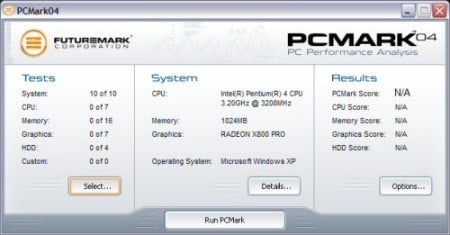
PCMark is a multipurpose benchmark, suited for benchmarking all kinds of PCs, from laptops to workstations, as well as across multiple Windows operating systems. This easy-to-use benchmark makes professional strength benchmarking software available even to novice users. PCMark consists of a series of tests that represent common tasks in home and office programs. PCMark also covers many additional areas outside the scope of other MadOnion.com benchmarks.


Again we see the results at stock almost identical. It's not until we overclock that we see the ASUS and Gigabyte boards tie it up at the top.
Benchmarks - Worldbench
WorldBench 5.0
Version and / or Patch Used: Retail, version 5.0
Developer Homepage: http://www.pcworld.com
Product Homepage: http://www.pcworld.com
Buy It Here

WorldBench 5.0 is the fifth generation of PC World's industry-standard benchmarking application. Designed to measure the performance of today's wide range of personal computers, WorldBench has been in continuous use at PC World for nine years.
WorldBench 5.0 uses the following applications to gauge system performance: ACD Systems ACDSee PowerPack 5.0, Adobe Photoshop 7.0.1, Adobe Premiere 6.5, Ahead Software Nero Express 6.0.0.3, Discreet 3ds max 5.1 (DirectX), Discreet 3ds max 5.1 (OpenGL), Microsoft Office XP with SP-2, Microsoft Windows Media Encoder 9.0, Mozilla 1.4, Musicmatch Jukebox 7.10, Roxio VideoWave Movie Creator 1.5 and WinZip Computing WinZip 8.1.

Worldbench keeps the boards identical at stock, when we go to higher clock speeds we see the ASUS and Gigabyte boards at the top. The rest of the boards tie pretty close due to the CPU speed, as CPU speed plays pretty well in this program.
Benchmarks - Adobe Premiere Elements 2.0
Adobe Premiere Elements 2.0
Version and / or Patch Used: 2.0
Developer Homepage: http://www.adobe.com
Product Homepage: http://www.adobe.com/products/premiereel/
Buy It Here
Our test with Adobe Premiere Elements 2.0 is performed with a raw two hour AVI file. It is then compressed into DivX format using the latest version codec. We measure the time it takes to encode and then record CPU usage.
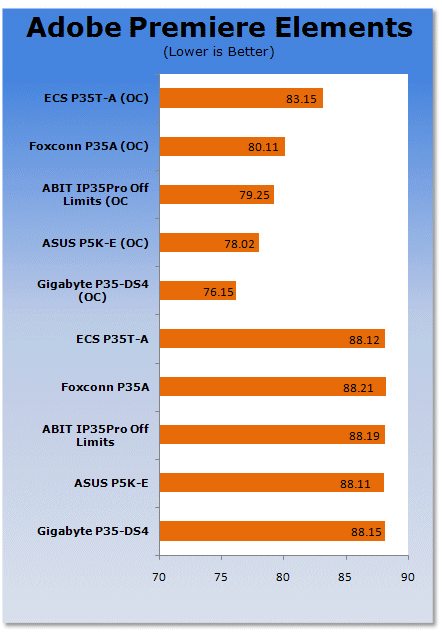
Adobe Premiere Elements 2.0 is a bandwidth hungry application, the more memory speed the better. While CPU speed helps, it's not as helpful as the memory bandwidth. This is where Gigabyte pulls ahead, with ASUS close behind.
Benchmarks - HDD Performance
HD Tach
Version and / or Patch Used: 3.0.1.0
Developer Homepage: http://www.simplisoftware.com
Product Homepage: http://www.simplisoftware.com/Public/index.php?request=HdTach
Buy It Here
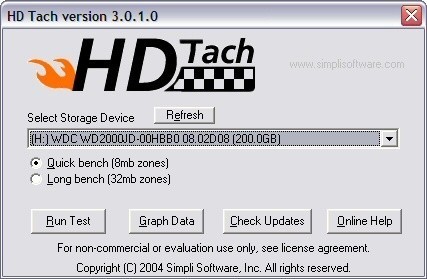
HD Tach has been around for a long time and is excellent when it comes to testing hard drive performance. It is also a very handy program when it comes to testing the controller used on particular motherboards. Tests such as Read, CPU Utilization and Burst are available at a click of the button and give you a good idea of how the hard drive can perform from system to system.
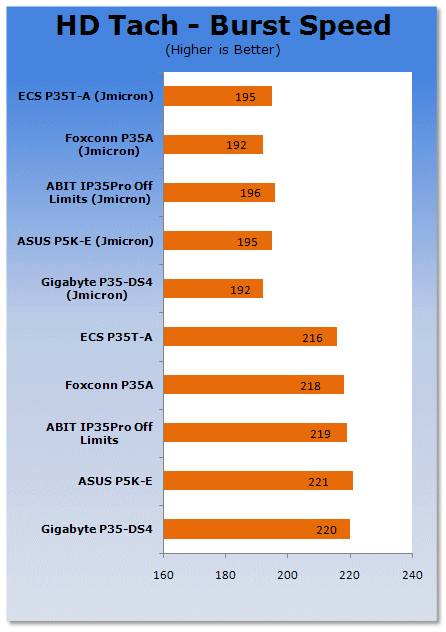

Due to the identical ICH9 southbridges and JMicron controllers, they all score identical in each test.
Benchmarks - 3DMark06
3DMark06
Version and / or Patch Used: 1.1.0
Developer Homepage: http://www.futuremark.com
Product Homepage: http://www.futuremark.com/products/3dmark06/
Buy It Here

3DMark06 is the very latest version of the "Gamers Benchmark" from FutureMark. The newest version of 3DMark expands on the tests in 3DMark05 by adding graphical effects using Shader Model 3.0 and HDR (High Dynamic Range lighting) which will push even the best DX9 graphics cards to the extremes.
3DMark06 also focuses on not just the GPU but the CPU using the AGEIA PhysX software physics library to effectively test single and Dual Core processors.

3DMark06 gives Gigabyte the win when we start to overclock the boards, with ASUS not very far behind.
Benchmarks - Prey
Prey
Version and / or Patch Used: 1.2
Timedemo or Level Used: Hardware OC Demo
Developer Homepage: http://www.humanhead.com
Product Homepage: http://www.prey.com
Buy It Here

Prey is one of the newest games to be added to our benchmark line-up. It is based off the Doom 3 engine and offers stunning graphics passing what we've seen in Quake 4 and does put quite a lot of strain on our test systems.

Prey is our real world gaming benchmark and we see that it only just gives Gigabyte a small lead of around 1-2 FPS.
Benchmarks - Far Cry
Far Cry
Version and / or Patch Used: 1.3
Timedemo or Level Used: Benchemall Default Demo
Developer Homepage: http://www.crytek.com
Product Homepage: http://www.farcrygame.com
Buy It Here

While Far Cry is now one of our older benchmarking games, it is still able to put pressure on most computers systems as it is able to utilize all parts of the system. Utilizing PS2.0 technology with the latest versions supporting Shader Model 3.0 with DX9c and offering an exceptional visual experience, there is no denying that even some of the faster graphics cards get a bit of a workout.

Lastly, with Far Cry we can see that Gigabyte manages to pull ahead of the competition.
Final Thoughts
P35 and DDR2, what a combination! Companies are starting to realise the full potential of the P35 as a bridge chip; DDR2 or DDR3, the choice is yours. Intel has done a magnificent job.
Gigabyte P35-DS4
As mentioned earlier, Gigabyte's mid-range DS4 board is based on the DQ6, slightly cut down but still retaining the excellent features of this series. The onboard features are fantastic and its price while a bit on the high side is pretty competitive.
We give this board 9.5 out of 10 and TweakTown's Editors Choice Must Have award.

ASUS P5K-E
The ASUS P5K-E board is a feature packed board with a slighty high price tag, but definitely worth the extra cash, especially if you're going to want wireless as the ASUS board can run as a wireless NIC or a wireless AP, depending on your needs. Its performance is just about on the heals of the Gigabyte board, if you want the wireless this board is for you.
As with the Gigabyte, we give this board a 9.5 out of 10 and TweakTown's Best Features Must Have award.

ABIT IP35 Pro Off Limits
Unfortunately ABIT's board while quite nice didn't stand out to us, its overclocking was good but the price tag for an ABIT board is just too high. Without any additional features like the ASUS board, it's not really worth the money unless you just want the ABIT name.
We give this board an 8 out of 10.
Foxconn P35A
Foxconn's board resembled more of the higher end boards, but its BIOS and overclocking really let it down as the lack of some voltage features and bus tweaks really put this board in our bad books. Sorry Foxconn but better luck next time, its only saving grade is a lower price tag.
We give this board 7 out of 10
ECS P35T-A
Lastly ECS, this didn't surprise us as the board from the start looked like a budget to mid-range board, and it didn't have any great features to bring to the table. Being cheaper in price means it's a good platform to start with for a cheap crossfire setup.
We give this board 7 out of 10.

 ASRock Z890 Taichi Aqua Motherboard Review - Flagship features without the flagship price
 GIGABYTE Z890I AORUS Ultra Motherboard Review - Mini-ITX with surprisingly good thermals
 GIGABYTE Z890 AORUS Elite WiFi7 Plus Motherboard Review - Right in the sweet spot
 ASUS ROG Strix X870E-E Gaming WiFi7 NEO - A Crosshair by any other name
 MSI MAG B850 Tomahawk Max WiFi II Motherboard Review - Leveling up
 'Radically different' business models coming to Xbox, CEO Asha Sharma says
 GEEKOM's new GeekBook M16 brings a Core Ultra 9 and a 99.9Wh battery to the business laptop market for $899
 AMD warns DDR5 prices won't recover until 2028 as AI demand continues pulling supply away from consumers
 SEGA under fire for using gen AI in new Crazy Taxi game
 Halo Studios quietly establishes innovative new business model for legacy game remakes
 Zelda Ocarina of Time remake confirmed for 2026 launch on Switch 2
 ID Cooling shows off wooden PC cases and matching AIO coolers at Computex 2026
 Formula V Line's Ice Nova Pro 3 air cooler could be perfect for brass-themed PC builds
 SAMA's Computex 2026 lineup includes a curved-glass case and AIO coolers with swappable screens
 Master Chief crashes the Covenant's vacation in new Halo remake prequel missions
 Navman MiVue Smart True 4K Surround Dashcam Review - Seeing In All Directions At Once
 IQUNIX Magi96 Pro Aluminum Low Profile Mechanical Keyboard Review - Premium Build, Satisfying Sound
 Asetek Forte S-Series Racing Simulator Bundle Review
 Razer Pro Type Ergo Wireless Split Ergonomic Keyboard Review - Built for Comfort and Support
 ASUS ROG Strix Morph 96 Wireless Gaming Keyboard Review - Great Performance, More Affordable
 SAPPHIRE Radeon RX 9070 GRE PULSE OC Review - A New 1440p Challenger Has Arrived
 NZXT H6 RGB+ Compact Dual-Chamber Chassis Review
 ASRock Radeon RX 9070 GRE Steel Legend Review - The RDNA 4 Mid-Range Reshuffle
 The PowerToys utilities I keep enabled on every Windows 11 PC, and the ones I turned off within a week
 TweakTown's Best of Computex 2026 Awards - The Best Hardware, Gaming Gear, and AI
 Phison E37T SSD Controller Exclusive Preview - The Fastest DRAMless SSD Platform Yet
 USB Ports Not Working in Windows 11? Try These Fixes
 ASUS WiFi Routers and Networking Solutions Deliver Long-term Security and Reliability with No Additional Cost
 Second Monitor Not Detected in Windows 11? Try These Fixes
 Turn Your Old Smartphone Into a Dedicated Webcam for Your Windows PC
 The Send To menu is the right-click feature on Windows 11 that nobody bothers to customize
 Windows 11 will not let you pin a folder to the taskbar, but a 30-second workaround does
 ASUS ProArt Displays Unlock Creativity with Professional Monitors for Everyone