

Introduction
Today's PCs are getting faster and faster. PC processors are now getting closer to 4GHz, but more importantly, we are moving into the world of symmetric multi-processing and multi-threading. Applications are now starting to come out that take full advantage of dual- and quad-core processors. For example Adobe Premiere Elements 2.0 that we use in our benchmarks is fully multi-threaded and multi-core compliant, it has been since version 1.0 when dual-CPU, rather than dual-core, was the only way to boost power.
Windows Vista has also been on retail shelves for a couple of months, and with its performance prospects needing at least 1GHz of CPU power and 1GB of RAM, the need to increase memory beyond the 2GB barrier is now starting to make sense, however there are a few snags in doing this, namely registrable memory in the 32-bit era.
Back when 32-bit CPUs were first released, the first being the 386-series for the x86 architecture, registrable and accessible memory size increased up to 4GB. While you can plug 4GB into any 32-bit CPU system it will not all be addressable. Why this is, we will elaborate on later.
Today we are going to give you the low-down on the whys of 4GB memory setups and how you can get beyond the 4GB limit, which is not hard with today's technology.
4GB of RAM and the OS - 64-bit all the way
4GB of RAM - how do we use it?
32-bit processors have been available since the 386 (80386) CPU, but it was not really until Windows NT 4.0 came out that we saw true 32-bit operating systems. Windows 95 and 98 were still 16-bit OSes with support for 32-bit applications, and consequently this was why Windows 95 and 98 were so unstable, trying to get the two separate codebases to work together was a true nightmare. If you wanted to go true 32-bit you had no choice but to run Windows NT Workstation 4.0. Which was well behind 98 in terms of hardware support. USB support was out, and gaming was also a big bust on NT, nothing worked.
Windows 2000 was the big breakthrough on this side, with support for 16-bit applications, so you could run your older games, but as it was based on the NT 32-bit core, stability increased 10 fold over 95, 98 and the dismal Windows Millennium, which had more problems than 98 and 95 put together. Windows 2000, however, did not last too long as the OS of choice for simplicity and hardware support, as Windows XP quickly came out with a more user friendly setup and interface. XP was also 32-bit compliant, with new 16-bit emulation allowing a 16-bit application to crash if it wanted to without taking down Windows completely as was common under 98.
As the OSes grew, so did the need for more memory. Windows 95 could be run on as little as 8MB of memory but performed better with 16MB, or 32MB at best. Windows 98 wanted 16MB for minimum setups, but 64MB was really the best option, 128MB did help but did not give the gains you would expect. Windows 2000 wanted 64MB minimum for its setup, while 256MB was the sweet spot. XP was a memory hungry beast needing 128MB bare minimum, and 256MB with XP SP2. If you had 512MB for XP SP1 you were fine, but SP2 raised the bar, and today 512MB just gets you by, while 1GB is needed for basic operations, and for gaming at least 1.5GB or 2GB is recommended. Windows Vista recommends a bare minimum of 1GB for install, but do not expect the OS to run along at full-speed with this amount of RAM. To get anywhere you need 2GB or 4GB for the smoothest results, but here, as we said earlier, a 32-bit OS cannot fully access 4GB, only 3.5GB is supported. So how do we combat this? This is where we come into the realm of 64-bit computing!
Since AMD brought out the first Athlon 64 CPU on the original 754 platform, we have seen the ability to physically access memory beyond 4GB. In fact 64-bit computing allows for over 128GB of memory access, however, we are nowhere near able to populate a PC with this amount of RAM yet, so 64-bit does give us some head room. Intel quickly followed suit on its Pentium 4 600-series CPU with the EM64T instruction set, which is pretty much just a renaming of the x86-64 instruction set that AMD released. Intel was initially hoping to push the market towards its Itanium architecture (IA-64), but that went down the drain real quick. Thanks go to Microsoft for that one.
Though 64-bit processors are here, in order to still run 4GB and beyond you need more than just a 64-bit CPU, you need an OS that supports 64-bit instructions. Windows has recently gone 64-bit, though Microsoft has not pushed it as hard as it has for its 32-bit versions. In fact there is no advertising for 64-bit operating systems, if you did not know what you needed, or that it existed, you would probably not know about it.
In order to get full access to all 4GB of memory you need the following:
- Motherboard with ACPI compliant BIOS (standard now as you need ACPI for dual-core)
- 64-bit compatible CPU, all CPUs coming from Intel and AMD now are x86-64 driven, even Celeron D and Sempron
- 64-bit OS, Windows XP x64 and Windows Vista64 are Microsoft's versions, plus must flavours of Linux now have 64-bit versions available, so no shortage for 64-bit users
For our setup we used Windows XP x64 as we could not get our hands on a copy of Vista64 in time for our article. However, we are quite happy to deal with Windows XP x64 as is based around the same Windows XP we know, just with a 64-bit kernel rather than 32-bit.
There are a few limitations you must also deal with when running 64-bit Windows over 32-bit. Some applications are not quite happy to run on XP x64, we had troubles getting some of our benchmarks to run in the past, and while there are patches for our benchmarks, there are a few programs that will not support x86-64 OSes. The free version of AVG Anti-Virus, our trusted virus protection program we use for testing out software we download will not run on XP x64 since it is designed for a 32-bit OS, and there are no plans to release any free 64-bit versions.
Drivers are also a problem, if you are running some older printers or scanners that were great for XP or even 2000, they may not work under XP x64 as there are still limited drivers out, 64-bit OSes are not updated in their drivers as much as the 32-bit versions, and even if they are, sometimes they are buggy or performance is not as good. Let us hope this picks up in the near future, if 4GB and beyond is to be the way, 64-bit is the only OS that will handle this.
Mushkin XPS2-8500 4GB kit Test Memory
Test Memory

Our test memory was supplied to us by Mushkin - an American company who produces rock solid performance memory. Those who do not know about Mushkin memory modules, well you must have been under a rock for the past six years. Mushkin has been one of the biggest pushers of DRAM products in the retail market.
In fact, Mushkin was the first memory manufacturer to bring out 133MHz SDRAM for overclocking 440BX chipsets. Mushkin's high speed SDRAM at 133MHz was the talk of the town when Pentium 3 and the Intel 440BX chipset were making big headlines - it was stable, fast, with great low-latency timings; its only drawback was its price.
Mushkin has moved further on now and is producing DDR-2 modules for AMD and Intel based systems, with speeds now topping out over 1GHz, it is good to see this company continue with their high-quality memory products which always seem to perform pretty well.

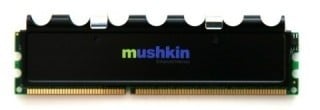
We were sent for our evaluation a XPS2-8500 memory kit with two 2GB DDR-2 memory modules rated at 5-4-4-12-2T at 1066MHz DDR. These modules are slightly faster than the XMS2 PC2-8500 modules we use in our test systems that run 5-5-5-12-2T. Does this allow for some extra performance at stock? Let us hope so.
Our testing was only short with this memory, unfortunately we did not get a chance to do lowest latency timings, we only managed to get stock results and overclocked. We managed to push the memory to a max speed of 1077MHz using the default 5-4-4-12-2T latency setup on our eVGA nForce 680i SLI motherboard. We kept the FSB at the stock speed of 266MHz and overclocked the memory independently, allowing us to eliminate the CPU as a bottleneck. This just beat our XMS2-8500Mhz modules which peaked at 1069MHz, the modules slowed down to 5-5-5-18-2T in order to run this high on the board.
Benchmarks - Test System Setup and Everest
Test System Setup
Processor: Intel Core 2 Extreme X6800 (Supplied by Intel)
Motherboard: eVGA nForce 680i SLI
Hard Disk: Seagate 500GB 7200.9 SATA (Supplied by Seagate)
Graphics Card: MSI Radeon X1950 Pro (Supplied by MSI)
Cooling: Gigabyte Neon775 (Supplied by Gigabyte)
Operating System: Microsoft Windows XP Professional SP2
Drivers: Nvidia nForce platform driver 9.53, ATI Catalyst 7.1 and DX9c
As mentioned in our earlier pages, we ran the modules at both stock and overclocked speeds, we tested the Mushkin to as far as we could in the time we were allotted to do the review, if we had more time we quite possibly would have gotten higher speeds, however we were simply constrained by time.
We did our testing under Windows XP x64 in both 2GB configurations (using 2 x1GB Corsair XMS2-8500 modules) and 4GB mode (using the 2 x 2GB Mushkin modules).
We ran a few benchmarks to see if there are any major differences between having 4GB and 2GB of memory. Let's take a closer look at performance now.
Everest Ultimate Edition
Version and / or Patch Used: 2006
Developer Homepage: http://www.lavalys.com
Product Homepage: http://www.lavalys.com
Buy It Here
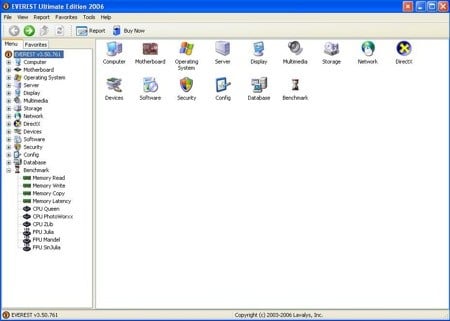
Everest Ultimate Edition is an industry leading system diagnostics and benchmarking solution for enthusiasts PC users, based on the award-winning Everest Technology. During system optimizations and tweaking it provides essential system and overclock information, advanced hardware monitoring and diagnostics capabilities to check the effects of the applied settings. CPU, FPU and memory benchmarks are available to measure the actual system performance and compare it to previous states or other systems.
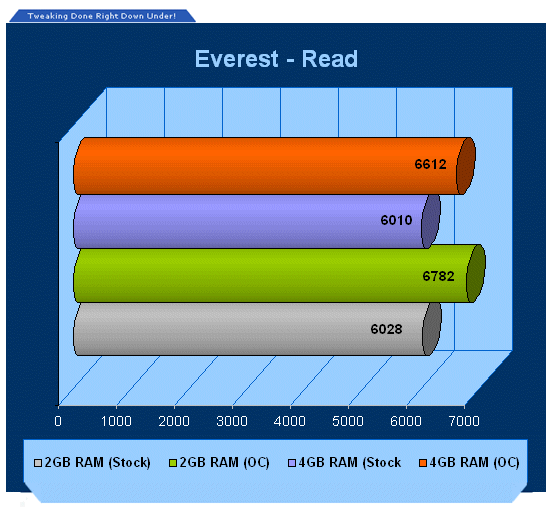
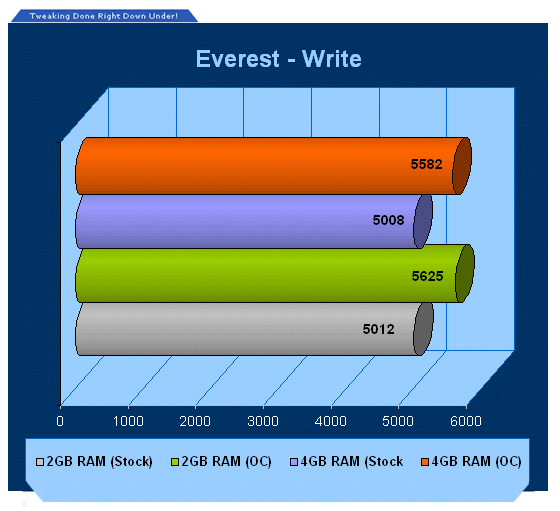
Mushkin's 4GB memory setup has slightly higher bandwidth at stock and OC speeds due to its lower latency, so we can see that adding extra size does not reduce or increase latency, which is a good sign.
As you increase memory capacity, memory performance is sometimes reduced and Mushkin have managed to keep performance up, which is great.
Benchmarks - PCMark
PCMark
Version and / or Patch Used: 1.2.0
Developer Homepage: http://www.futuremark.com
Product Homepage: http://www.futuremark.com/products/pcmark04/
Buy It Here
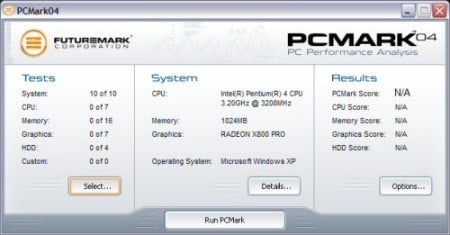
PCMark is a multipurpose benchmark, suited for benchmarking all kinds of PCs, from laptops to workstations, as well as across multiple Windows operating systems. This easy-to-use benchmark makes professional strength benchmarking software available even to novice users. PCMark consists of a series of tests that represent common tasks in home and office programs. PCMark also covers many additional areas outside the scope of other MadOnion.com benchmarks.
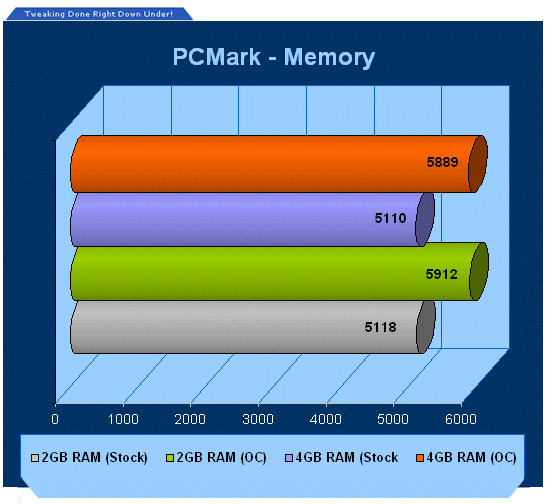
PCMark with 4GB memory does show an improvement, however only slightly and most likely due to the lower latency timings rather than the extra memory.
Benchmarks - ScienceMark
ScienceMark
ScienceMark 2.0 is a mathematical program designed to stress the memory subsystems of both desktop/workstation and server environments to determine the read/write latency as well as the overall memory bandwidth available between the CPU and the memory controller.
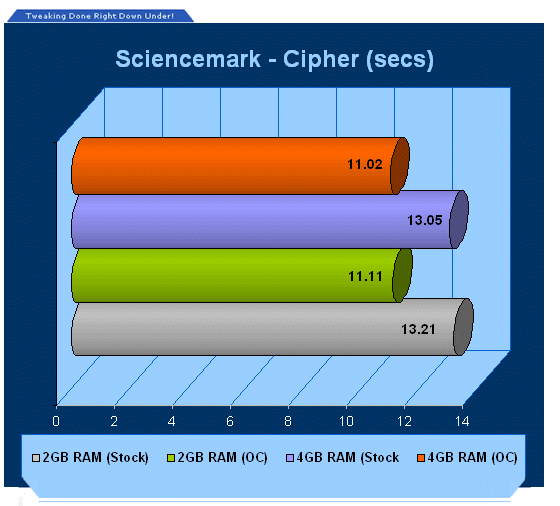
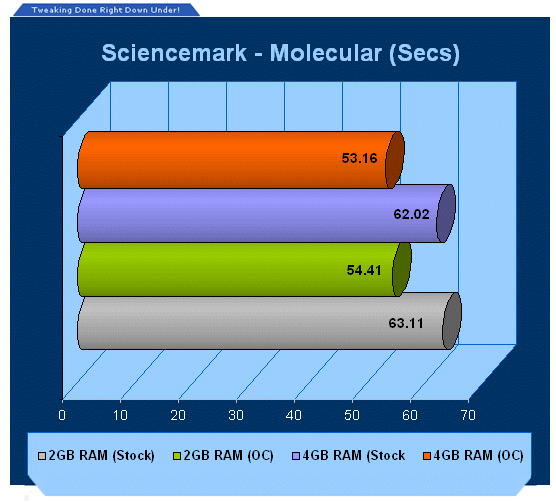
ScienceMark depends more on latency than size, however the Mushkin comes out in front again, quite a good score in fact - it may well be the larger size helps here a little bit.
Benchmarks - Adobe Premiere Elements
Adobe Premiere Elements
Version and / or Patch Used: 2.0
Developer Homepage: http://www.adobe.com
Product Homepage: http://www.adobe.com/products/premiereel/
Buy It Here
Our test with Adobe Premiere Elements 2.0 is performed with a raw two hour AVI file. It is then compressed into DivX format using the latest version codec. We measure the time it takes to encode and then record CPU usage.
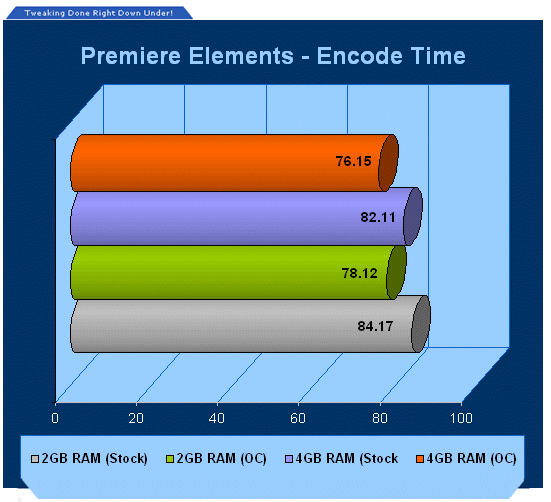
Adobe Premiere Elements likes the extra memory added to the system and reduces overall encode times. When the buffer gets full with 2GB the HDD is trashed to the limits, with 2GB extra, it takes longer to fill the buffer up.
Benchmarks - WorldBench
WorldBench
Version and / or Patch Used: 5.0
Developer Homepage: http://www.pcworld.com
Product Homepage: http://www.pcworld.com
Buy It Here

WorldBench 5.0 is the fifth generation of PC World's industry-standard benchmarking application. Designed to measure the performance of today's wide range of personal computers, WorldBench has been in continuous use at PC World for nine years.
WorldBench 5.0 uses the following applications to gauge system performance: ACD Systems ACDSee PowerPack 5.0, Adobe Photoshop 7.0.1, Adobe Premiere 6.5, Ahead Software Nero Express 6.0.0.3, Discreet 3ds max 5.1 (DirectX), Discreet 3ds max 5.1 (OpenGL), Microsoft Office XP with SP-2, Microsoft Windows Media Encoder 9.0, Mozilla 1.4, Musicmatch Jukebox 7.10, Roxio VideoWave Movie Creator 1.5 and WinZip Computing WinZip 8.1.
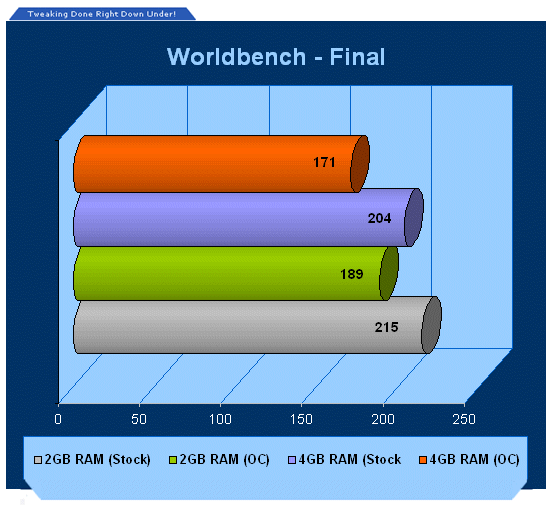
Like Adobe Premiere Elements, this is where 4GB helps, in office and rendering applications. Remember lower scores are better!
Benchmarks - Prey
Prey
Version and / or Patch Used: 1.2
Timedemo or Level Used: HardwareOC Custom Timedemo
Developer Homepage: http://www.humanhead.com
Product Homepage: http://www.prey.com
Buy It Here

Prey is one of the newest games to be added to our benchmark lineup. It is based off the Doom 3 engine and offers stunning graphics passing what we have seen in Quake 4 and does put quite a lot of strain on our test systems.
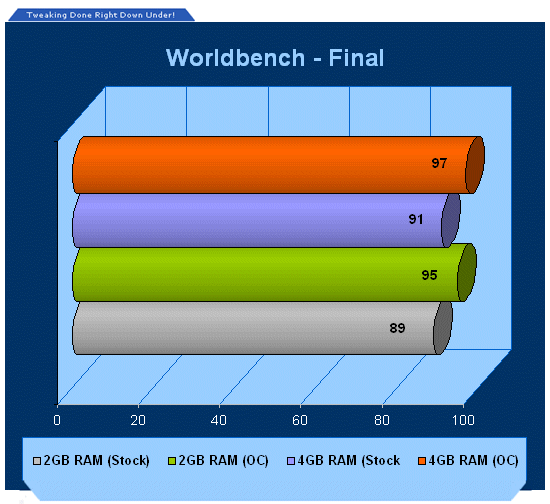
Our real-world gaming shows there is very little to gain with 4GB of memory installed in the system, as it barely has enough oomph to use up 2GB of system memory for gaming.
Final Thoughts
Our benchmarks did not show a great deal of what we experienced with 4GB of memory. Benchmarks are designed to test the system overall based on productivity and performance. While FPS rates in games we tested did not go up, the load times of applications and even the OS were greatly reduced as the system had more resources to play with. This is one big thing you will need to keep in mind; our benchmarks do not show you how well the systems performed.
As for the transition to 4GB, it is definitely coming. Windows Vista is a memory and processor hungry beast, 2GB is the absolute minimum you are going to want to use with this OS. Forget Microsoft's recommended 1GB; that is just to get it installed so you do not get those pesky error messages saying you do not have enough memory, 2GB is needed to get anything done, and 4GB is going to be the real sweet spot. 32-bit OS users have two options, live with only having 3.5GB of memory accessible or upgrade to 64-bit.
Microsoft's strategy on this really leaves us in the dark. Vista needs 2GB for good performance and 4GB for optimal performance, yet its 32-bit version cannot access it all. Only the 64-bit version can do that, yet you cannot get this at a retail outlet, only the 32-bit version is available, which includes an application for 64-bit discs. Only the Ultimate Editions of Vista come with the 64-bit in the box. Also there are no advertisements for 64-bit by campaign or by website, so why is Microsoft delaying the adoption of 64-bit if its own OS needs it? Sure, right now there are not a lot of fully optimised 64-bit programs or games out there but there is some and until Microsoft really start pushing it, it will take longer for other companies to really start supporting 64-bit computing also with more finely tuned 64-bit version drivers and applications and so on.
Should you buy a 4GB memory kit like what Mushkin are offering? If you are going to run Vista, look at holding off till you get a 64-bit version - it is not worth installing the RAM and not having access to the full amount under the 32-bit and then having to upgrade or format later - do it all in one hit.
Mushkin on the other hand has gone and done a good job with its 4GB kit, it is definitely what you are going to want for Vista. They managed to not only offer increases module capacity but also keep the memory timings very respectable.
 United
States: Find other tech and computer products like this
over at
United
States: Find other tech and computer products like this
over at  United
Kingdom: Find other tech and computer products like this
over at
United
Kingdom: Find other tech and computer products like this
over at  Australia:
Find other tech and computer products like this over at
Australia:
Find other tech and computer products like this over at  Canada:
Find other tech and computer products like this over at
Canada:
Find other tech and computer products like this over at  Deutschland:
Finde andere Technik- und Computerprodukte wie dieses auf
Deutschland:
Finde andere Technik- und Computerprodukte wie dieses auf  Meta launches early versions of Llama 3 to fight with OpenAI and Google in the AI battle
 AI startup: AMD Instinct MI300X is 'far superior' option to NVIDIA Hopper H100 AI GPU
 Samsung unveils world's fastest LPDDR5X memory: 10.7Gbps speeds, 32GB capacities per package
 SK hynix and TSMC to work together with HBM4 and next-gen semiconductor packaging technology
 Intel finishes assembly of ASML's first High-NA EUV tool, ready for Intel 14A process in 2025
 FlexiSpot C7B-Mesh Ergonomic Office Chair Review
 Samsung G8 34-inch QD-OLED Gaming Monitor Review - 175Hz for $900
 ASRock NUCBOX-155H Mini PC Review
 NuPhy Air96 V2 Wireless Mechanical Keyboard Review
 TEAM T-FORCE Siren DUO360 RGB Liquid CPU Cooler Review
 AVerMedia Live Streamer ULTRA HD Review
 AVerMedia Live Gamer 4K 2.1 Review
 XPG Invader X Mid-Tower Chassis Review
 Intel Core i9-14900KS CPU Review
 Arbiter Polar 65 Magnetic Gaming Keyboard Review
 Everything you need to know about the latest ASUS NUC Mini PCs - NUC 14 Pro and ROG NUC
 How to Overclock Your GPU and Boost Your PC Gaming with ASUS GPU Tweak III
 ASUS's AMD Radeon RX 7000 Series GPU lineup has something for every gamer
 ASUS OLED Premium Care defends the ROG Swift OLED PG32UCDM gaming monitor from burn-in
 Patriot Viper Xtreme 5 Engineering Prototype 48GB Dual-Channel Memory Kit Preview